
Block Notifications
Block/Unblock Chrome Notifications
As of May 2026, Block Notifications has 264 users and a 5.00/5 rating from 3 reviews in the Accessibility category.
Usersup 3.9 percent+3.9%
264
264
Ratingno change0%
5.00
3 reviews
Reviewsno change0%
3
Version
1.0
Manifest V3
History
2 snapshotsTracking since Apr 25, 2026.
View as table
| Date | Users | Rating | Reviews | Version |
|---|---|---|---|---|
| Apr 25, 2026 | 254 | 5.00 | 3 | 1.0 |
| May 22, 2026 | 258 | 5.00 | 3 | 1.0 |
| Now | 264 | 5.00 | 3 | 1.0 |
Permissions & access
- Permissions
- contentSettingsstorage
- Host access
- None declared
Screenshots
About
Introduction:

Welcome to "Notification Blocker," the ultimate Chrome extension designed to simplify notification management for users who may not be familiar with Chrome settings. With a focus on ease-of-use, this extension empowers common users to effortlessly turn off notifications with just one click.

Overview:

"Notification Blocker" is your solution if you're seeking a user-friendly approach to managing notifications without navigating the complexities of Chrome settings. We understand that not everyone is tech-savvy, and our extension makes the process seamless with a straightforward one-click solution.

Key Features:

One-Click Notification Management:

"Notification Blocker" streamlines the process, allowing users to disable notifications with a single click. No more digging through Chrome settings—simplicity is just a click away.
User-Friendly Interface:

Enjoy an intuitive interface that caters to users who find traditional Chrome settings overwhelming. "Notification Blocker" ensures that even the least tech-savvy individuals can effortlessly manage their notification preferences.
Accessible to Everyone:

Whether you're a new Chrome user or simply prefer simplicity, "Notification Blocker" ensures accessibility for all. Say goodbye to confusing menus and complicated settings—our extension is designed for users of all backgrounds.
Guided Setup:

"Notification Blocker" includes a guided setup process with clear instructions and tooltips. Users are guided through the features, minimizing any learning curve for a smooth experience.
How It Works:

Installation:

Start by installing "Notification Blocker" from the Chrome Web Store. The installation process is straightforward, enabling users to get started quickly.
Activation:

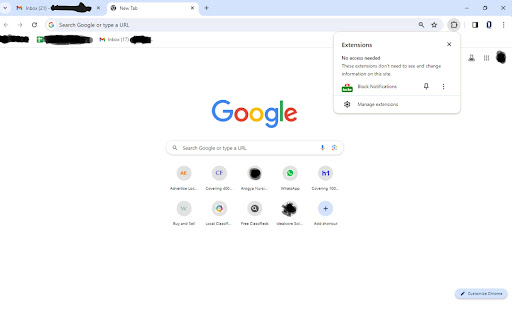
Once installed, activate the extension with a simple click. A discrete icon appears in your Chrome toolbar, ready to assist you whenever needed.
Notification Management:

Clicking on the extension icon opens a user-friendly menu that consolidates all notification management options. Toggle notifications on or off, customize preferences, and manage settings effortlessly.
Onboarding Assistance:

For users unfamiliar with the extension, an onboarding tutorial guides them through the features, ensuring a smooth first-time experience.
Frequently Asked Questions (FAQs):

Is "Notification Blocker" free to use?

Yes, "Notification Blocker" is completely free to use.
Is my data secure when using the extension?

"Notification Blocker" prioritizes user privacy and data security. We do not collect any personal information, ensuring a secure and private experience.
Can I customize notification preferences with "Notification Blocker"?

Absolutely! "Notification Blocker" provides users with the flexibility to customize their notification preferences according to their needs.
Is the extension compatible with other Chrome extensions?

"Notification Blocker" is designed to be compatible with most Chrome extensions, ensuring seamless integration with your existing setup.
Conclusion:

In conclusion, "Notification Blocker" is your go-to solution for a simple, one-click approach to managing Chrome notifications. Our commitment to user-friendliness and accessibility ensures that everyone, regardless of technical expertise, can enjoy a hassle-free experience with their Chrome notifications.

Download "Notification Blocker" today and take control of your Chrome notifications with ease!
Technical
- Version
- 1.0
- Manifest
- V3
- Size
- 8.63KiB
- Min Chrome
- 88
- Languages
- 1
- Featured
- No
Metadata
- ID
- pgmeelhofbopinikofgkhkonmihfflia
- Developer ID
- u3f88b927156bc410d931e4cd3fa822fe
- Developer Email
- [email protected]
- Created
- Jan 16, 2024
- Last Updated (Store)
- Jan 16, 2024
- Last Scraped
- May 22, 2026
- Website
- sarvanubanerjee.blogspot.com
- Support URL
- —
- Privacy Policy
- —
Similar extensions
Alternatives to Block Notifications, ranked by description similarity.

Block Cookie
Blocks cookie pop-up notifications on websites with the ability to add sites to a whitelist
36

Evaporate - Universal Redirect Blocker
Blocks annoying popup ads on all websites
24

Website Blocker
Block distracting websites to boost your productivity. Features scheduling, whitelist mode, quick-add, and blocked attempt tracking.
—
Urban AdBlocker
Block ad, pop-up & pre-roll video with AdBlocker for web browsers
20.0K
★ 4.3

Ad block & Adblocker - No Ads extension
Block ads and popunders on social websites. Removing ads makes websites work faster. Youtube Adblocker for pre-roll, banners
700.0K
★ 4.0

Live Preview Opener
Enter your workspace url and click on any button to open Frontend Preview OR Backend Data
78
★ 5.0

Stealth Ad & Popup Suppressor
Suppresses ads and popups with minimal detectability
2
★ 5.0

Downloads
Quick access button to the download page
13
★ 5.0
Data sourced from the Chrome Web Store · last verified May 22, 2026.