
Map My Places
Simple tool to mark multiple places, compare original vs optimized round‑trip routes, and open directions in Google Maps
As of June 2026, Map My Places has 66 users and a 5.00/5 rating from 1 reviews in the Travel category.
Usersno change0%
66
66
Ratingno change0%
5.00
1 reviews
Reviewsno change0%
1
Version
1.1
Manifest V3
History
3 snapshotsTracking since Apr 19, 2026.
View as table
| Date | Users | Rating | Reviews | Version |
|---|---|---|---|---|
| Apr 19, 2026 | 66 | 5.00 | 1 | 1.1 |
| May 11, 2026 | 60 | 5.00 | 1 | 1.1 |
| Jun 6, 2026 | 61 | 5.00 | 1 | 1.1 |
| Now | 66 | 5.00 | 1 | 1.1 |
Permissions & access
- Permissions
- tabs
- Host access
- None declared
Screenshots
About
Map My Places is a free, intuitive Chrome extension that transforms your browser into a powerful mapping and trip planning tool. Whether you’re planning a road trip, tracking your favorite destinations, or simply exploring new routes, Map My Places makes it effortless to visualize your journey, create custom maps, and optimize your travel routes—all directly within your browser.

Key Features:

Instant Mapping:
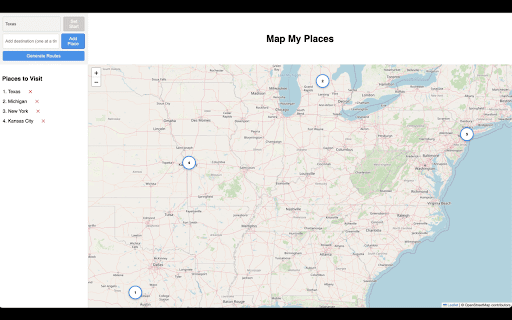
Generate a full-screen interactive map instantly by entering a semicolon-separated list of your desired locations.

Interactive Markers:
Your input locations are dynamically plotted as numbered markers on the map, making it easy to see the order in which they were entered.

Dual Route Planning:
Compare two route options at a glance—view the original order of your locations alongside an optimized route that minimizes travel time using advanced algorithms.

Seamless Google Maps Integration:
Navigate directly to Google Maps with a single click. Both the original and optimized routes use your original place names to display Google’s top suggested locations, ensuring accurate and familiar directions.

Real-Time Progress Feedback:
A built-in progress bar provides visual feedback as your map and routes are generated, ensuring you always know the status of your request.

Responsive & Immersive Experience:
Designed for an immersive experience, the extension opens in a full browser tab, offering a dynamic layout that adapts to your screen.

Discover a smarter way to plan your trips and explore the world—effortlessly and efficiently—with Map My Places.
Technical
- Version
- 1.1
- Manifest
- V3
- Size
- 696KiB
- Min Chrome
- 88
- Languages
- 1
- Featured
- No
Metadata
- ID
- pgkfghpajnonboimipmmgnojcjaelfmk
- Developer ID
- uc0a6b259b870ee527a5d84c0473cf9f4
- Developer Email
- [email protected]
- Created
- Mar 15, 2025
- Last Updated (Store)
- Mar 27, 2025
- Last Scraped
- Jun 6, 2026
- Website
- datetimeai.com
- Support URL
- —
- Privacy Policy
- —
Similar extensions
Alternatives to Map My Places, ranked by description similarity.

QuickMaps
Time • Distance • Directions with Trips & History.
50
★ 5.0

MapSnap.ai - Travel Itineraries to Google Maps™ Lists
Google Maps™ Lists Made Easy!
425
★ 3.7

Getaway
Add places directly from Google Maps to your Getaway trips.
9

Open in Google Maps
Quickly open your current Google Search query directly in Google Maps.
341
★ 1.0

Google Maps Place Ranker
Collects and ranks places from Google Maps search results by rating and review count.
9

Map Your Travel
Extracts travel places from a webpage and map onto Google Maps with one-click
56
★ 5.0

Route Optimizer
Facilitate the optimization of routes (focusing on time rather than distance) that include multiple destinations.
32

TravelPins – Save Places You Want to Visit
Save Google Maps locations with notes. Weekly automatic cookie sync for cross-device access.
1
Data sourced from the Chrome Web Store · last verified Jun 6, 2026.