
LiveJimaku
Subtitles generator for YouTube Live
As of May 2026, LiveJimaku has 829 users and a 4.71/5 rating from 7 reviews in the Functionality & UI category.
Usersdown 2.4 percent−2.4%
829
829
Ratingno change0%
4.71
7 reviews
Reviewsno change0%
7
Version
1.3.1
Manifest V3
History
2 snapshotsTracking since Apr 25, 2026.
View as table
| Date | Users | Rating | Reviews | Version |
|---|---|---|---|---|
| Apr 25, 2026 | 849 | 4.71 | 7 | 1.3.1 |
| May 22, 2026 | 834 | 4.71 | 7 | 1.3.1 |
| Now | 829 | 4.71 | 7 | 1.3.1 |
Permissions & access
- Permissions
- storage
- Host access
- https://www.youtube.com/*
Screenshots
About
◆features
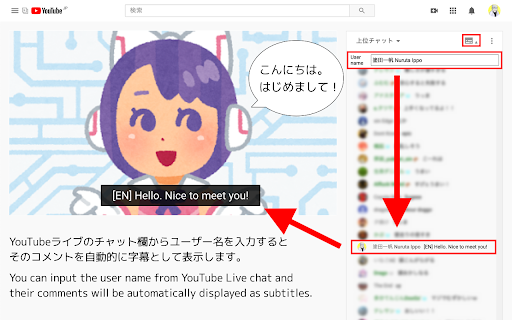
You can input the user name from YouTube Live chat and
their comments will be automatically displayed as subtitles.
If you specify the username of a volunteer who translate and comment what the streamer is saying as a real time , you can enjoy the live streams in any language.

◆Usage
(1) Click the icon in the chat field.
(2) Copy and paste the user name you want to specify
(3) Click the icon again to close it.

◆If you find a problem
Please contact me on Twitter (@nulltypo).
I can't respond to reviews.

◆Disclaimer
I'm not responsible for any loss or damage caused by this extension.
Technical
- Version
- 1.3.1
- Manifest
- V3
- Size
- 48.28KiB
- Min Chrome
- 88
- Languages
- 2
- Featured
- No
Metadata
- ID
- pggagcnknjflkejaiimenbpdoebfegkm
- Developer ID
- u0fbc4768113dcf4fd0c8645de41f578b
- Developer Email
- [email protected]
- Created
- Oct 25, 2020
- Last Updated (Store)
- Aug 27, 2023
- Last Scraped
- May 22, 2026
- Website
- —
- Support URL
- —
- Privacy Policy
- —
Similar extensions
Alternatives to LiveJimaku, ranked by description similarity.

MaxChat
Wide chat area for YouTube Live
5.0K
★ 4.9

TwitchNoNameChat
Twitchのコメント欄の名前を非表示にする.Hide the usernames in the Twitch chat.
54
★ 5.0

FloatFrame
YouTubeの動画を固定するやつ
4.0K
★ 4.4

DevilEar
Pan and volume controller for each tab
10.0K
★ 4.5

SepaList
YouTubeの新着動画一覧をフィルタリングするやつ
4.0K
★ 4.9

YouTube Subtitles +
Dual-language subtitles for YouTube — auto-translate captions in real-time
25

YouTube Heart Chat Remover
Removes the heart icon from the bottom right of the chat section during YouTube live streams for a clearer view.
1.0K
★ 4.5

SukoStamp
YouTubeのタイムスタンプがサクサク作れるやつ
10.0K
★ 4.7
Data sourced from the Chrome Web Store · last verified May 22, 2026.