
TaskMaster
Your personal task and note manager.
As of June 2026, TaskMaster has 5 users and a 5.00/5 rating from 1 reviews in the Workflow & Planning category.
Usersno change0%
5
5
Ratingno change0%
5.00
1 reviews
Reviewsno change0%
1
Version
1.3.0
Manifest V3
90-day change · In the last 90 days this extension 2 version updates.
History
7 snapshotsTracking since Apr 21, 2026.
View as table
| Date | Users | Rating | Reviews | Version |
|---|---|---|---|---|
| Apr 21, 2026 | — | — | — | 1.0.0 |
| Apr 26, 2026 | — | — | — | 1.0.0 |
| May 9, 2026 | 3 | 5.00 | 1 | 1.0.0 |
| May 14, 2026 | 2 | 5.00 | 1 | 1.0.0 |
| May 26, 2026 | — | 5.00 | 1 | 1.0.0 |
| Jun 3, 2026 | 2 | 5.00 | 1 | 1.0.0 |
| Jun 8, 2026 | 4 | 5.00 | 1 | 1.1.0 |
| Now | 5 | 5.00 | 1 | 1.3.0 |
Changelog
- Jun 8, 2026description
TaskMaster is your ultimate personal productivity companion, designed to live right inside your browser. Whether you are managing daily chores, tracking long-term projects  or just jotting down quick thoughts, TaskMaster keeps you organized without breaking your workflow.
With a focus on beautiful aesthetics, privacy  and ease of use, TaskMaster offers a powerful suite of tools accessible with a single click.

✨ KEY FEATURES
📅 Smart Calendar & Task Tracking
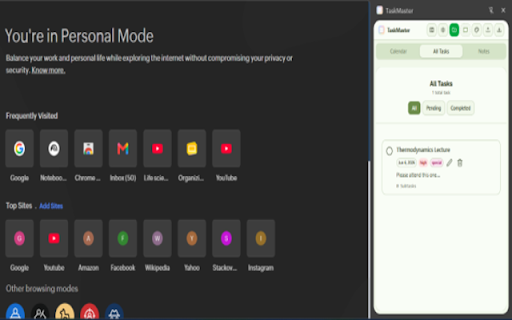
• View your tasks on a built-in calendar.
• Set tasks as Daily, Weekly, Monthly or Special Events.
• Filter your view to see exactly what needs to be done today or view all pending and completed tasks at a glance.

✅ Advanced Task Management
• Break complex projects down with unlimited Subtasks.
• Assign priorities (Low, Medium, High) with color-coded badges.
• Attach important web links directly to your tasks for quick access.
• Edit, update, and manage your tasks on the fly.

📝 Quick Notes
• A dedicated space for your sudden ideas and important text.
• Customize your notes with different fonts and background colors to keep things visually organized.

🎨 Beautiful Aesthetic Themes
Make your workspace your own! TaskMaster comes with 8 stunning, carefully crafted themes:
• Light & Dark modes
• Dracula (Deep purple/midnight blue)
• Nord (Frosty arctic blues)
• Sunset (Warm, vibrant orange)
• Mocha (Earthy, coffee-inspired beige and brown)
• Peach (Soft morning light and salmon)
• Sage (Calming forest green and soft white)

💾 Secure & Private Auto-Backups
Your data belongs to you. TaskMaster requires no account, no login, and no cloud syncing.
• All data is stored locally on your machine.
• Auto-Backup: Connect a local folder on your computer  and TaskMaster will automatically save a backup of your data every time you make a change, or every hour!
• Manually export and import your data as a JSON file anytime.

🚀 Fast & Lightweight
Opens instantly as a popup over any webpage you are currently browsing. No need to switch tabs or lose your train of thought.

Take control of your day, beautifully. Install TaskMaster today!
What's new in this version Version 1.3
🔄 Real-Time Cross-Window Synchronization
Unified Local Storage Sync: Tasks, project categories, and markdown notes now synchronize instantly in the background across browser popups, chrome side panels, and full-screen tabs. Editing data in one view immediately updates all other active views without requiring a manual page refresh.
🛠️ Seamless Backup & Tab Management
Eliminated Multi-Tab Redirection Loops: Fixed a crucial issue where attempting to connect a local folder would repeatedly trigger background redirects and spin up multiple blank tabs. The flow is now entirely clean, predictable, and single-instance.
Streamlined Connection Workflows: Standardized the File System Access API triggers. When Chrome suspends your directory handle permission (a standard browser security policy upon extension popup closure), TaskMaster now offers a clear, elegant pause state and non-intrusive re-authorization guidelines rather than auto-handling loops.
📊 Version Synchronization
Unified Build Identifiers: Fully bumped version signatures to v1.3.0 across the application manifest configuration, background system descriptors, and the user feedback hub for consistent telemetry tracking.
Enhanced Linter Compliance: Polished React hooks, state initializers, and IndexedDB handle retrievals to preserve performance memory footprints inside ultra-light Chrome Extension wrappers.

About TaskMaster
TaskMaster is your ultimate personal productivity companion, designed to live right inside your browser. Whether you are managing daily chores, tracking long-term projects  or just jotting down quick thoughts, TaskMaster keeps you organized without breaking your workflow.
With a focus on beautiful aesthetics, privacy  and ease of use, TaskMaster offers a powerful suite of tools accessible with a single click.

✨ KEY FEATURES
📅 Smart Calendar & Task Tracking
• View your tasks on a built-in calendar.
• Set tasks as Daily, Weekly, Monthly or Special Events.
• Filter your view to see exactly what needs to be done today or view all pending and completed tasks at a glance.

✅ Advanced Task Management
• Break complex projects down with unlimited Subtasks.
• Assign priorities (Low, Medium, High) with color-coded badges.
• Attach important web links directly to your tasks for quick access.
• Edit, update, and manage your tasks on the fly.

📝 Quick Notes
• A dedicated space for your sudden ideas and important text.
• Customize your notes with different fonts and background colors to keep things visually organized.

🎨 Beautiful Aesthetic Themes
Make your workspace your own! TaskMaster comes with 8 stunning, carefully crafted themes:
• Light & Dark modes
• Dracula (Deep purple/midnight blue)
• Nord (Frosty arctic blues)
• Sunset (Warm, vibrant orange)
• Mocha (Earthy, coffee-inspired beige and brown)
• Peach (Soft morning light and salmon)
• Sage (Calming forest green and soft white)

💾 Secure & Private Auto-Backups
Your data belongs to you. TaskMaster requires no account, no login, and no cloud syncing.
• All data is stored locally on your machine.
• Auto-Backup: Connect a local folder on your computer  and TaskMaster will automatically save a backup of your data every time you make a change, or every hour!
• Manually export and import your data as a JSON file anytime.

🚀 Fast & Lightweight
Opens instantly as a popup over any webpage you are currently browsing. No need to switch tabs or lose your train of thought.

Take control of your day, beautifully. Install TaskMaster today!
Permissions & access
- Permissions
- storagesidePanel
- Host access
- None declared
Screenshots



About
What's new in this version Version 1.3
🔄 Real-Time Cross-Window Synchronization
Unified Local Storage Sync: Tasks, project categories, and markdown notes now synchronize instantly in the background across browser popups, chrome side panels, and full-screen tabs. Editing data in one view immediately updates all other active views without requiring a manual page refresh.
🛠️ Seamless Backup & Tab Management
Eliminated Multi-Tab Redirection Loops: Fixed a crucial issue where attempting to connect a local folder would repeatedly trigger background redirects and spin up multiple blank tabs. The flow is now entirely clean, predictable, and single-instance.
Streamlined Connection Workflows: Standardized the File System Access API triggers. When Chrome suspends your directory handle permission (a standard browser security policy upon extension popup closure), TaskMaster now offers a clear, elegant pause state and non-intrusive re-authorization guidelines rather than auto-handling loops.
📊 Version Synchronization
Unified Build Identifiers: Fully bumped version signatures to v1.3.0 across the application manifest configuration, background system descriptors, and the user feedback hub for consistent telemetry tracking.
Enhanced Linter Compliance: Polished React hooks, state initializers, and IndexedDB handle retrievals to preserve performance memory footprints inside ultra-light Chrome Extension wrappers.

About TaskMaster
TaskMaster is your ultimate personal productivity companion, designed to live right inside your browser. Whether you are managing daily chores, tracking long-term projects  or just jotting down quick thoughts, TaskMaster keeps you organized without breaking your workflow.
With a focus on beautiful aesthetics, privacy  and ease of use, TaskMaster offers a powerful suite of tools accessible with a single click.

✨ KEY FEATURES
📅 Smart Calendar & Task Tracking
• View your tasks on a built-in calendar.
• Set tasks as Daily, Weekly, Monthly or Special Events.
• Filter your view to see exactly what needs to be done today or view all pending and completed tasks at a glance.

✅ Advanced Task Management
• Break complex projects down with unlimited Subtasks.
• Assign priorities (Low, Medium, High) with color-coded badges.
• Attach important web links directly to your tasks for quick access.
• Edit, update, and manage your tasks on the fly.

📝 Quick Notes
• A dedicated space for your sudden ideas and important text.
• Customize your notes with different fonts and background colors to keep things visually organized.

🎨 Beautiful Aesthetic Themes
Make your workspace your own! TaskMaster comes with 8 stunning, carefully crafted themes:
• Light & Dark modes
• Dracula (Deep purple/midnight blue)
• Nord (Frosty arctic blues)
• Sunset (Warm, vibrant orange)
• Mocha (Earthy, coffee-inspired beige and brown)
• Peach (Soft morning light and salmon)
• Sage (Calming forest green and soft white)

💾 Secure & Private Auto-Backups
Your data belongs to you. TaskMaster requires no account, no login, and no cloud syncing.
• All data is stored locally on your machine.
• Auto-Backup: Connect a local folder on your computer  and TaskMaster will automatically save a backup of your data every time you make a change, or every hour!
• Manually export and import your data as a JSON file anytime.

🚀 Fast & Lightweight
Opens instantly as a popup over any webpage you are currently browsing. No need to switch tabs or lose your train of thought.

Take control of your day, beautifully. Install TaskMaster today!
Technical
- Version
- 1.3.0
- Manifest
- V3
- Size
- 494KiB
- Min Chrome
- 88
- Languages
- 1
- Featured
- No
Metadata
- ID
- pgfafacfiocaihefcpnfhlpmopdhidel
- Developer ID
- u19beb131f5c454073f2debaad0c78706
- Developer Email
- [email protected]
- Created
- Apr 20, 2026
- Last Updated (Store)
- Jun 6, 2026
- Last Scraped
- Jun 8, 2026
- Website
- —
- Support URL
- —
Data sourced from the Chrome Web Store · last verified Jun 8, 2026.