
QR Code Generator for Gmail
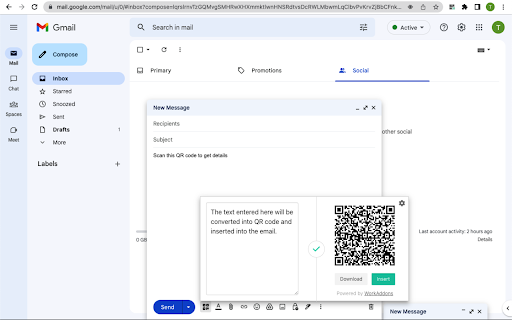
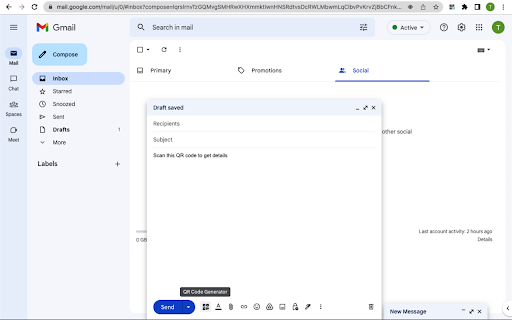
Generate a QR code and insert it into the email when composing or replying
As of May 2026, QR Code Generator for Gmail has 2,000 users and a 5.00/5 rating from 4 reviews in the Productivity category.
Usersno change0%
2.0K
2,000
Ratingno change0%
5.00
4 reviews
Reviewsno change0%
4
Version
1.0.4
Manifest V3
Permissions & access
- Permissions
- storagescripting
- Host access
- https://mail.google.com/*
Screenshots


About
Generate a QR code and insert it into the email when composing or replying.

When sending emails to your target, you can attach QR codes to direct them to your marketing campaign. These QR codes can be links, videos, sign-up forms, audio, or a series of images.

Why insert QR codes in the emails?

Adding QR codes to your emails can significantly increase the strong user experience of your marketing strategy.

With QR codes in your emails, your customers can seamlessly access a lot of useful information and provide more help to your customers without consuming more manpower.

- Easy to contact customer support: Nowadays, cell phones support scanning QR codes, so customers can easily access the content you provide.
- Increase App download rate: You can generate QR codes for your App download addresses, or even merge Apps for multiple platforms into one QR code that automatically redirects to the appropriate download market depending on whether the user's Android or iOS device.
- QR code as business card: Nowadays, more and more businesses are using QR codes on their business cards, which can display richer content after scanning. You can also add QR codes to the signatures of your business emails to let your customers know more about you.
- Support social marketing: Create QR codes for your business's social media, such as Snapchat, LinkedIn, Facebook, Twitter, etc. to direct customers to your social media profile pages.
- Entry pass for events:  You can send customers a unique entry pass for an event,  they just need to show the email on their phone and verify the QR code.
- Use as coupons:  Email QR code coupons to your customers, the code can easily be scanned and verified at checkout. this can attract more customers to your store.

These are just a few examples, you can use QR codes in your emails to market using a variety of strategies.


Data Privacy
Your data stays on your device and is not stored or transmitted to our servers. We prioritize keeping your information secure and confidential.
Technical
- Version
- 1.0.4
- Manifest
- V3
- Size
- 2.78MiB
- Min Chrome
- 88
- Languages
- 1
- Featured
- No
Metadata
- ID
- pgenicongmjoccdhkdclfoimdnecpikb
- Developer ID
- u1878107d758e415853850c0b9dd0f360
- Developer Email
- [email protected]
- Created
- Nov 28, 2022
- Last Updated (Store)
- Oct 29, 2024
- Last Scraped
- May 22, 2026
- Website
- bulkqrcodegenerator.com
- Support URL
- https://bulkqrcodegenerator.com/
- Privacy Policy
- https://bulkqrcodegenerator.com/privacy
Similar extensions
Alternatives to QR Code Generator for Gmail, ranked by description similarity.

Dynamic QR Code
Create a dynamic QR code in seconds. This QR code generator lets you edit the URL, track scans, and customize QR.
145
★ 5.0

QR Code Generator
Generate QR codes from URLs.
51
★ 5.0

Create a QR code for a URL
Make QR code easily by using our app. We provide the best tool to Create a QR code for a URL.
89
★ 5.0

Qr Code Generator & Scanner
QR Code Generator & Scanner is a very simple and useful application which helps you to create your own custom Bar-code image.
19

QR Code Generator
QR Code Creator to Generate a QR code for the current page. Save QR Code or Copy.
3

QR-Pro: Custom QR-Codes
Create, download, and store highly customizable QR-codes.
28

QR Code Generator
Generate QR codes from selected text with various size options
1.0K
★ 4.7

QR Code Generator for Chrome
Use this extension to instantly generate QR codes from any webpage with no permissions required.
—
Data sourced from the Chrome Web Store · last verified May 22, 2026.