
Screen Privacy Blur
Blur parts of your screen to hide private information during screen sharing
As of June 2026, Screen Privacy Blur has 61 users and a 4.80/5 rating from 5 reviews in the Productivity category.
Usersup 48.8 percent+48.8%
61
61
Ratingup 1.1 percent+1.1%
4.80
5 reviews
Reviewsup 25.0 percent+25.0%
5
Version
2.1.0
Manifest V3
90-day change · In the last 90 days this extension 2 version updates, changed permissions.
History
8 snapshotsTracking since Apr 7, 2026.
View as table
| Date | Users | Rating | Reviews | Version |
|---|---|---|---|---|
| Apr 7, 2026 | 41 | 4.75 | 4 | 1.2.2 |
| Apr 19, 2026 | 40 | 4.75 | 4 | 1.2.2 |
| Apr 29, 2026 | 48 | 4.75 | 4 | 1.2.2 |
| May 9, 2026 | 63 | 4.75 | 4 | 1.2.2 |
| May 16, 2026 | 60 | 4.75 | 4 | 1.2.2 |
| May 25, 2026 | 64 | 4.75 | 4 | 1.2.2 |
| Jun 4, 2026 | 59 | 4.75 | 4 | 1.2.2 |
| Jun 10, 2026 | 65 | 4.80 | 5 | 2.0.0 |
| Now | 61 | 4.80 | 5 | 2.1.0 |
Changelog
- Jun 4, 2026description
Screen Privacy Blur - Protect Your Privacy During Screen Sharing

Hide sensitive information during video calls, screen sharing, and recordings with customizable blur overlays. Create instant privacy protection with adjustable blur intensity, color, and opacity. Perfect for remote work, video conferencing, and live streaming.

Key Features:
• One-click blur overlay creation
• Drag & resize blur areas
• Color and opacity controls
• Real-time settings updates
• Works on all websites

No data collection. Local processing only. Your privacy is our priority.
Screen Privacy Blur helps you protect sensitive information during screen sharing, video calls, demos, live streams, and recordings.

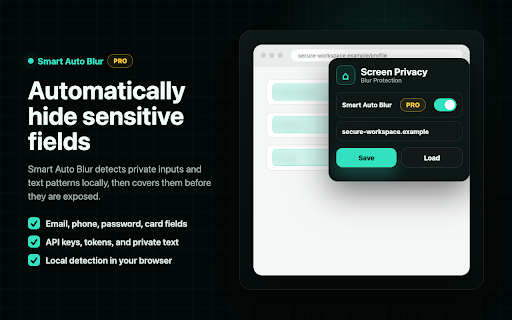
Create manual blur overlays anywhere on a webpage, resize and move them freely, save layouts per site, or use Smart Auto Blur Pro to automatically detect and blur sensitive fields such as emails, passwords, phone numbers, card fields, API keys, tokens, and private text patterns.

Perfect for remote work, client demos, product walkthroughs, support calls, online teaching, streaming, and any situation where you need to share your screen without exposing private data.

Key Features:
• One-click manual blur overlays
• Drag, resize, and position blur areas
• Save and load blur layouts per website
• Per-overlay pin controls
• Adjustable blur intensity, opacity, color, and glass blur
• Smart Auto Blur Pro for automatic sensitive field detection
• Presentation Mode for instant full-screen privacy
• Works across websites and web apps
• Local blur detection and overlay rendering

Privacy-first by design. Manual overlays and Smart Auto Blur detection run locally in your browser. No screenshots, page content, form values, or browsing history are collected.
- Jun 4, 2026permissions
activeTab, storage, scripting
activeTab, tabs, storage, scripting
- Jun 4, 2026host_permissions
(empty)
https://*.supabase.co/*
Permissions & access
- Permissions
- activeTabtabsstoragescripting
- Host access
- https://*.supabase.co/*
Screenshots



About
Screen Privacy Blur helps you protect sensitive information during screen sharing, video calls, demos, live streams, and recordings.

Create manual blur overlays anywhere on a webpage, resize and move them freely, save layouts per site, or use Smart Auto Blur Pro to automatically detect and blur sensitive fields such as emails, passwords, phone numbers, card fields, API keys, tokens, and private text patterns.

Perfect for remote work, client demos, product walkthroughs, support calls, online teaching, streaming, and any situation where you need to share your screen without exposing private data.

Key Features:
• One-click manual blur overlays
• Drag, resize, and position blur areas
• Save and load blur layouts per website
• Per-overlay pin controls
• Adjustable blur intensity, opacity, color, and glass blur
• Smart Auto Blur Pro for automatic sensitive field detection
• Presentation Mode for instant full-screen privacy
• Works across websites and web apps
• Local blur detection and overlay rendering

Privacy-first by design. Manual overlays and Smart Auto Blur detection run locally in your browser. No screenshots, page content, form values, or browsing history are collected.
Technical
- Version
- 2.1.0
- Manifest
- V3
- Size
- 63.0KiB
- Min Chrome
- 88
- Languages
- 1
- Featured
- No
Metadata
- ID
- pfngjkakgncabcfjdknjacpnbidjlldm
- Developer ID
- ude3315c8ce53fbe18ddee74d42a63a31
- Developer Email
- [email protected]
- Created
- Sep 4, 2025
- Last Updated (Store)
- Jun 8, 2026
- Last Scraped
- Jun 10, 2026
- Privacy Policy
- https://mikhailborodin.github.io/screen-guard-pro/
Similar extensions
Alternatives to Screen Privacy Blur, ranked by description similarity.

Blurly: One-Click Element Blurring for Screen Sharing
The easiest way to blur web content. Protect your sensitive data for screen recordings and calls
8

MyBlurWeb
Blur sensitive content on any website. Blur specific text, draw blur zones, auto-detect emails/numbers, and more.
4

Blurby
Privacy-focused extension that automatically blurs sensitive information for secure screen recording and sharing
2

BlurShield - Hide Sensitive Info
Blur sensitive information on any webpage during screen sharing, presentations, or recordings. One click to protect your privacy.
2

BlindBug
Blur sensitive data instantly during screen recording or sharing. No editing required.
—

Blur App - Privacy Blur Tool for Screen Shares & Recordings
Privacy screen recording tool to blur sensitive information.
3

Microblur
Blur highlighted area of the browser. Share your screen securely
5

SafeBlur
Blur sensitive info (emails, phones, dates, keywords) on webpages during screen recording or sharing.
2
Data sourced from the Chrome Web Store · last verified Jun 10, 2026.