
WordsMine! Your one-stop solution for vocabulary
WordsMine! Tools that help you gather words fast
As of June 2026, WordsMine! Your one-stop solution for vocabulary has 6,000 users and a 4.66/5 rating from 67 reviews in the Education category.
Usersno change0%
6.0K
6,000
Ratingno change0%
4.66
67 reviews
Reviewsno change0%
67
Version
10.1.3
Manifest V3
90-day change · In the last 90 days this extension 3 version updates, changed permissions.
History
4 snapshotsTracking since Apr 6, 2026.
View as table
| Date | Users | Rating | Reviews | Version |
|---|---|---|---|---|
| Apr 6, 2026 | 6.0K | 4.66 | 67 | 10.0.9 |
| Apr 17, 2026 | 6.0K | 4.66 | 67 | 10.1.0 |
| Apr 23, 2026 | 6.0K | 4.66 | 67 | 10.1.0 |
| May 7, 2026 | 6.0K | 4.66 | 67 | 10.1.1 |
| Now | 6.0K | 4.66 | 67 | 10.1.3 |
Changelog
- May 7, 2026description
Translate, save, and boost your vocabulary while you browse.

WordsMine lets you translate with a double-click, save words to your personal word bank, and review with flashcards using spaced repetition. It works across websites, YouTube subtitles, and PDFs/eBooks, so learning fits your browsing, not the other way around.

Never look up twice.
It’s easy to forget a word you looked up a few days ago—when it appears again, you search again, and the cycle repeats. WordsMine breaks the loop: saved vocabulary is auto-highlighted whenever you meet it across the web, with quick meanings in context so you keep reading and keep learning.

What you can do
	•	Translate instantly: Double-click, select text, or hover over a word while holding the Ctrl key (Windows or MacOS) to get inline translations for words and phrases easily.
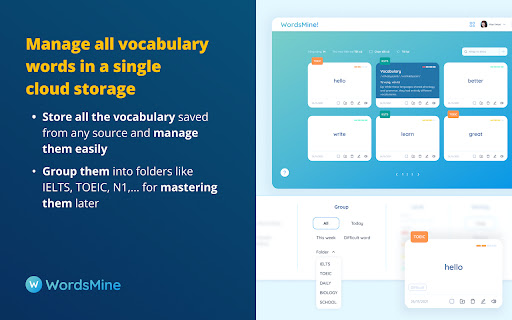
	•	Save anything: Add words/phrases from webpages, YouTube captions, and PDF/eBooks to your word bank.
	•	Review smarter: Turn saves into flashcards with spaced repetition to retain faster, longer.
	•	Learn in context: See examples, highlight previously saved words on pages, and mark “hard” words.
	•	Works everywhere: Web, PDF reader, YouTube; syncs across devices.
	•	Multilingual support: Bi-directional lookup across 120+ languages.

Languages
Languages (bidirectional): English, Vietnamese, Japanese, Korean, Chinese (Simplified/Traditional), Spanish, French, German, Thai, Indonesian, Hindi, Arabic, Portuguese, Russian, Turkish — 120+ in total.

Perfect for
Students, test prep (IELTS/TOEIC/SAT), professionals upskilling on technical terms, and lifelong learners.

Privacy & control
Toggle translation popups, manage saved words, and customize review—your learning, your pace.

Recognition
50+ recognitions and awards from local and global organizations, including Google for Startups, Microsoft for Startups, Qualcomm, and UNDP.

What’s new
Sep-Dec 2025
	•	New features for Youtube translation, stability fixes and performance improvements.

Support
Need WordsMine work on your favorite sites? Visit the Support section on this page.
Translate, save, and boost your vocabulary while you browse.

WordsMine lets you translate with a double-click, save words to your personal word bank, and review with flashcards using spaced repetition. It works across websites, YouTube subtitles, and PDFs/eBooks, so learning fits your browsing, not the other way around.

Never look up twice.
It’s easy to forget a word you looked up a few days ago—when it appears again, you search again, and the cycle repeats. WordsMine breaks the loop: saved vocabulary is auto-highlighted whenever you meet it across the web, with quick meanings in context so you keep reading and keep learning.

What you can do
	•	Translate instantly: Double-click, select text, or hover over a word while holding the Ctrl key (Windows or MacOS) to get inline translations for words and phrases easily.
	•	Save anything: Add words/phrases from webpages, YouTube captions, and PDF/eBooks to your word bank.
	•	Review smarter: Turn saves into flashcards with spaced repetition to retain faster, longer.
	•	Learn in context: See examples, highlight previously saved words on pages, and mark “hard” words.
	•	Works everywhere: Web, PDF reader, YouTube; syncs across devices.
	•	Multilingual support: Bi-directional lookup across 120+ languages.

Languages
Languages (bidirectional): English, Vietnamese, Japanese, Korean, Chinese (Simplified/Traditional), Spanish, French, German, Thai, Indonesian, Hindi, Arabic, Portuguese, Russian, Turkish — 120+ in total.

Perfect for
Students, test prep (IELTS/TOEIC/SAT), professionals upskilling on technical terms, and lifelong learners.

Privacy & control
Toggle translation popups, manage saved words, and customize review—your learning, your pace.

Recognition
50+ recognitions and awards from local and global organizations, including Google for Startups, Microsoft for Startups, Qualcomm, and UNDP.

What’s new
	•	Quick translation by pressing Ctrl + Hovering over a word to get inline translations easily
	•	New features for Youtube translation, stability fixes and performance improvements.

Support
Need WordsMine work on your favorite sites? Visit the Support section on this page.
- Apr 6, 2026description
Translate, save, and boost your vocabulary while you browse.

WordsMine lets you translate with a double-click, save words to your personal word bank, and review with flashcards using spaced repetition. It works across websites, YouTube subtitles, and PDFs/eBooks, so learning fits your browsing, not the other way around.

Never look up twice.
It’s easy to forget a word you looked up a few days ago—when it appears again, you search again, and the cycle repeats. WordsMine breaks the loop: saved vocabulary is auto-highlighted whenever you meet it across the web, with quick meanings in context so you keep reading and keep learning.

What you can do
	•	Translate instantly: Double-click, select text, or hover over a word while holding the Ctrl/Command key to get inline translations for words and phrases easily.
	•	Save anything: Add words/phrases from webpages, YouTube captions, and PDF/eBooks to your word bank.
	•	Review smarter: Turn saves into flashcards with spaced repetition to retain faster, longer.
	•	Learn in context: See examples, highlight previously saved words on pages, and mark “hard” words.
	•	Works everywhere: Web, PDF reader, YouTube; syncs across devices.
	•	Multilingual support: Bi-directional lookup across 120+ languages.

Languages
Languages (bidirectional): English, Vietnamese, Japanese, Korean, Chinese (Simplified/Traditional), Spanish, French, German, Thai, Indonesian, Hindi, Arabic, Portuguese, Russian, Turkish — 120+ in total.

Perfect for
Students, test prep (IELTS/TOEIC/SAT), professionals upskilling on technical terms, and lifelong learners.

Privacy & control
Toggle translation popups, manage saved words, and customize review—your learning, your pace.

Recognition
50+ recognitions and awards from local and global organizations, including Google for Startups, Microsoft for Startups, Qualcomm, and UNDP.

What’s new
Sep-Dec 2025
	•	New features for Youtube translation, stability fixes and performance improvements.

Support
Need WordsMine work on your favorite sites? Visit the Support section on this page.
Translate, save, and boost your vocabulary while you browse.

WordsMine lets you translate with a double-click, save words to your personal word bank, and review with flashcards using spaced repetition. It works across websites, YouTube subtitles, and PDFs/eBooks, so learning fits your browsing, not the other way around.

Never look up twice.
It’s easy to forget a word you looked up a few days ago—when it appears again, you search again, and the cycle repeats. WordsMine breaks the loop: saved vocabulary is auto-highlighted whenever you meet it across the web, with quick meanings in context so you keep reading and keep learning.

What you can do
	•	Translate instantly: Double-click, select text, or hover over a word while holding the Ctrl key (Windows or MacOS) to get inline translations for words and phrases easily.
	•	Save anything: Add words/phrases from webpages, YouTube captions, and PDF/eBooks to your word bank.
	•	Review smarter: Turn saves into flashcards with spaced repetition to retain faster, longer.
	•	Learn in context: See examples, highlight previously saved words on pages, and mark “hard” words.
	•	Works everywhere: Web, PDF reader, YouTube; syncs across devices.
	•	Multilingual support: Bi-directional lookup across 120+ languages.

Languages
Languages (bidirectional): English, Vietnamese, Japanese, Korean, Chinese (Simplified/Traditional), Spanish, French, German, Thai, Indonesian, Hindi, Arabic, Portuguese, Russian, Turkish — 120+ in total.

Perfect for
Students, test prep (IELTS/TOEIC/SAT), professionals upskilling on technical terms, and lifelong learners.

Privacy & control
Toggle translation popups, manage saved words, and customize review—your learning, your pace.

Recognition
50+ recognitions and awards from local and global organizations, including Google for Startups, Microsoft for Startups, Qualcomm, and UNDP.

What’s new
Sep-Dec 2025
	•	New features for Youtube translation, stability fixes and performance improvements.

Support
Need WordsMine work on your favorite sites? Visit the Support section on this page.
- Apr 6, 2026permissions
storage, activeTab, contextMenus
storage, activeTab, contextMenus, alarms
Permissions & access
- Permissions
- storageactiveTabcontextMenusalarms
- Host access
- http://*/*, https://*/*
Screenshots



About
Translate, save, and boost your vocabulary while you browse.

WordsMine lets you translate with a double-click, save words to your personal word bank, and review with flashcards using spaced repetition. It works across websites, YouTube subtitles, and PDFs/eBooks, so learning fits your browsing, not the other way around.

Never look up twice.
It’s easy to forget a word you looked up a few days ago—when it appears again, you search again, and the cycle repeats. WordsMine breaks the loop: saved vocabulary is auto-highlighted whenever you meet it across the web, with quick meanings in context so you keep reading and keep learning.

What you can do
	•	Translate instantly: Double-click, select text, or hover over a word while holding the Ctrl key (Windows or MacOS) to get inline translations for words and phrases easily.
	•	Save anything: Add words/phrases from webpages, YouTube captions, and PDF/eBooks to your word bank.
	•	Review smarter: Turn saves into flashcards with spaced repetition to retain faster, longer.
	•	Learn in context: See examples, highlight previously saved words on pages, and mark “hard” words.
	•	Works everywhere: Web, PDF reader, YouTube; syncs across devices.
	•	Multilingual support: Bi-directional lookup across 120+ languages.

Languages
Languages (bidirectional): English, Vietnamese, Japanese, Korean, Chinese (Simplified/Traditional), Spanish, French, German, Thai, Indonesian, Hindi, Arabic, Portuguese, Russian, Turkish — 120+ in total.

Perfect for
Students, test prep (IELTS/TOEIC/SAT), professionals upskilling on technical terms, and lifelong learners.

Privacy & control
Toggle translation popups, manage saved words, and customize review—your learning, your pace.

Recognition
50+ recognitions and awards from local and global organizations, including Google for Startups, Microsoft for Startups, Qualcomm, and UNDP.

What’s new
	•	Quick translation by pressing Ctrl + Hovering over a word to get inline translations easily
	•	New features for Youtube translation, stability fixes and performance improvements.

Support
Need WordsMine work on your favorite sites? Visit the Support section on this page.
Technical
- Version
- 10.1.3
- Manifest
- V3
- Size
- 841KiB
- Min Chrome
- 88.0.0.0
- Languages
- 1
- Featured
- Yes
Metadata
- ID
- pfjninionlecmhganagpckidcmhgjlhd
- Developer ID
- ubf1c03b88da62186080c2a6b3cb87d82
- Developer Email
- [email protected]
- Created
- Jul 12, 2020
- Last Updated (Store)
- May 3, 2026
- Last Scraped
- Jun 25, 2026
- Website
- wordsmine.com
- Support URL
- https://wordsmine.com
- Privacy Policy
- http://wordsmine.com/policy
Similar extensions
Alternatives to WordsMine! Your one-stop solution for vocabulary, ranked by description similarity.

Vocably: Translate and Learn with Flashcards
AI dictionary. Translate on any website or YouTube. Learn your translations on mobile. Expand your vocabulary.
2.0K
★ 5.0

Osama's Word Saver
Language Learning Tool. Instantly translate any word to English. Supports 100+ languages.
9

AnkiMine
Turn sentence mining into an easy experience with our AnkiMine extension.
455
★ 5.0

Smart Translate
AI translator for 7 languages: English, Vietnamese, Chinese, Japanese, ... Save vocabulary and practice with spaced repetition.
4
★ 5.0

Sentence Mine
Break down sentences for analysis. For learners who want to sentence mine their favorite content.
13
★ 5.0

Vocabulary Builder
Learn vocabulary with flashcards, spaced repetition, and context menu lookup
10
★ 5.0

Highlight Translator
Highlight any text to translate instantly and save for flashcards.
72
★ 5.0

Quick Translate - AI Language Translator
Translate text while browsing. Auto-translate, audio, favorites, spaced repetition. PDF support. Language learning tool.
3.0K
★ 4.7
Data sourced from the Chrome Web Store · last verified Jun 25, 2026.