
DelPhish - Phishing Detector
Free URL check from the popup. Pro plan unlocks right-click analysis and Gmail/Outlook inline scanning.
As of June 2026, DelPhish - Phishing Detector has 2 users in the Workflow & Planning category.
Usersno change0%
2
2
Ratingno change0%
—
— reviews
Reviewsno change0%
—
Version
1.1.3
Manifest V3
History
2 snapshotsTracking since May 9, 2026.
Not enough history yet for this metric — the chart fills in as we collect more snapshots.
View as table
| Date | Users | Rating | Reviews | Version |
|---|---|---|---|---|
| May 9, 2026 | — | — | — | 1.1.3 |
| May 13, 2026 | — | — | — | 1.1.3 |
| Now | 2 | — | — | 1.1.3 |
Changelog
- May 13, 2026description
DelPhish is a free, privacy-focused phishing detector that runs a 4-layer AI
pipeline on emails, SMS messages and URLs. It works in Gmail, Outlook Web and
on any webpage via the right-click menu.

Free: Quick URL safety checks from the extension popup.

Pro (with DelPhish account):

Right-click any link or selection on any website → "Analyze with DelPhish"
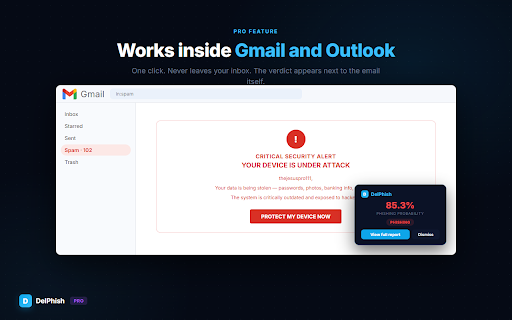
Inline "Scan with DelPhish" button in Gmail and Outlook Web
Higher rate limits and synced analysis history
The extension is functional out of the box without an account. An API key from a free/Pro/Business DelPhish account unlocks the advanced features listed above.

━━━  What it does  ━━━
• Scans the subject, body, headers and every link of an open email in Gmail
  or Outlook — right from your inbox.
• Right-click any suspicious link or highlighted text on any webpage to get
  an instant risk verdict.
• Returns a 0–100 risk score, a classification (phishing / spam / legitimate
  / suspicious) and a detailed breakdown of the signals that triggered it.

━━━  How it detects threats  ━━━
1. Heuristic engine — 45+ rules across URLs, keywords, sender, content,
   headers and URL intelligence.
2. Machine Learning — calibrated Random Forest trained on 10,000+ real
   phishing / legitimate emails, 1,052 features (52 numeric + 1,000 TF-IDF).
3. BERT — transformer fine-tuned for phishing, catches semantic meaning the
   other layers miss.
4. LLM reasoning — a large language model analyses the email like a human
   expert and explains its verdict.

Scores from all layers are combined with asymmetric dampening so a single
fooled layer cannot hide a real threat.

━━━  Why DelPhish  ━━━
• Privacy first. Email content is only transmitted when you explicitly click
  "Analyze". No background scraping, no ads, no tracking, no data selling.
• Free tier — no credit card needed.
• Works where you already read email: Gmail and Outlook Web.
• Full-text analysis, not just URL reputation lookups.
• Supports English, Spanish and autodetects other languages (translated
  before ML / BERT processing; LLM reasons in the original language).
• SMS / smishing detection for pasted text.
• Open REST API for integrations. Full docs at https://delphish.app/api-docs.

━━━  What happens to your data  ━━━
• Emails and URLs you send for analysis are processed in real time and are
  NOT stored permanently. Registered users can opt-in to save analyses to
  their own history.
• Your API key (if you set one) is stored locally via chrome.storage.sync.
• We never sell, share or use your data for advertising.
• Full privacy policy: https://delphish.app/privacy

━━━  Getting started  ━━━
1. Install the extension and pin it to the toolbar.
2. (Optional) Create a free account at https://delphish.app for history +
   higher limits.
3. Open an email in Gmail or Outlook and click "Scan with DelPhish", OR
   right-click any link and choose "Analyze with DelPhish".

Questions? Feedback? Reach out at https://delphish.app/contact.
Most phishing emails get past the spam filter because the spam filter
checks who sent it, not what it says. DelPhish reads the message itself
with four layers of AI — heuristic rules, machine learning, BERT, and
an LLM — and tells you in five seconds whether to trust it.

━━━━━━━━━━━━━━━━━━━━━━━━━━━━━━━━━━━
WHAT YOU GET
━━━━━━━━━━━━━━━━━━━━━━━━━━━━━━━━━━━

✓ Free URL check from the popup
   Paste any link, get a verdict + the suspicious indicators behind it.

✓ Right-click "Analyze with DelPhish" on any link (Pro)
   Hover before you click. The extension calls out homoglyphs,
   open redirects, fresh domains and URLs already in known phishing
   feeds (OpenPhish, URLhaus, Google Safe Browsing).

✓ Inline analysis inside Gmail and Outlook web (Pro)
   A small DelPhish button appears next to each email. One click → full
   analysis without leaving your inbox.

✓ Real-time URL intelligence
   DNS, SSL certificate, WHOIS, content fingerprinting — all the
   technical signals an attacker can't easily fake.

━━━━━━━━━━━━━━━━━━━━━━━━━━━━━━━━━━━
WHY DELPHISH IS DIFFERENT
━━━━━━━━━━━━━━━━━━━━━━━━━━━━━━━━━━━

• Four detection engines, not one. Most phishing tools use a single
  model; DelPhish runs four in parallel and combines the verdicts.
  When attackers learn to bypass one, the others still catch them.

• Privacy by default. Your emails are never used to train models or
  sold. Servers in the EU. Open about what we collect — see the
  Privacy Policy linked from the popup.

• Built for real users, not just security teams. The extension is
  one click. The web app accepts pasted text, .eml uploads, screenshots
  with QR codes and forwarded SMS. No setup, no rules to write.

━━━━━━━━━━━━━━━━━━━━━━━━━━━━━━━━━━━
HOW IT WORKS
━━━━━━━━━━━━━━━━━━━━━━━━━━━━━━━━━━━

1. Install. The DelPhish icon lives next to your address bar.
2. Got a suspicious URL or text? Click the icon and paste it in.
3. In ~5 seconds you'll see a verdict (Phishing / Suspicious / Safe),
   a 0-100 risk score, and the exact indicators that triggered it.
4. Going Pro unlocks right-click analysis on any link, plus inline
   buttons inside Gmail and Outlook.

━━━━━━━━━━━━━━━━━━━━━━━━━━━━━━━━━━━
PERMISSIONS, EXPLAINED
━━━━━━━━━━━━━━━━━━━━━━━━━━━━━━━━━━━

• "Read and change your data on mail.google.com / outlook.com" —
  ONLY used to add the inline DelPhish button next to emails so you
  can analyze them. The extension does not read message bodies on
  its own; the analysis happens only when you click. Pro feature.
• "activeTab" — needed for the right-click "Analyze this URL" item.
• "storage" — saves your DelPhish login token and language preference
  on your machine. Not synced.

━━━━━━━━━━━━━━━━━━━━━━━━━━━━━━━━━━━
PRICING
━━━━━━━━━━━━━━━━━━━━━━━━━━━━━━━━━━━

Free forever for popup URL checks (5 / month, no signup).
Free with a DelPhish account: more analyses, history, .eml uploads.
Pro: unlimited inline analysis, PDF reports, VirusTotal + Safe Browsing
enrichment, priority queue. See delphish.app/pricing.

━━━━━━━━━━━━━━━━━━━━━━━━━━━━━━━━━━━
HELP / FEEDBACK
━━━━━━━━━━━━━━━━━━━━━━━━━━━━━━━━━━━

Found a phishing pattern we missed? Mail us at [email protected].
We respond within 24h and ship updates weekly.

Source data: OpenPhish, URLhaus, Google Safe Browsing, our own ML +
LLM models, and reports from the DelPhish community.
Permissions & access
- Permissions
- contextMenusactiveTabstoragescripting
- Host access
- https://delphish.app/*, https://mail.google.com/*, https://outlook.live.com/*, https://outlook.office.com/*, https://outlook.office365.com/*
Screenshots




About
Most phishing emails get past the spam filter because the spam filter
checks who sent it, not what it says. DelPhish reads the message itself
with four layers of AI — heuristic rules, machine learning, BERT, and
an LLM — and tells you in five seconds whether to trust it.

━━━━━━━━━━━━━━━━━━━━━━━━━━━━━━━━━━━
WHAT YOU GET
━━━━━━━━━━━━━━━━━━━━━━━━━━━━━━━━━━━

✓ Free URL check from the popup
   Paste any link, get a verdict + the suspicious indicators behind it.

✓ Right-click "Analyze with DelPhish" on any link (Pro)
   Hover before you click. The extension calls out homoglyphs,
   open redirects, fresh domains and URLs already in known phishing
   feeds (OpenPhish, URLhaus, Google Safe Browsing).

✓ Inline analysis inside Gmail and Outlook web (Pro)
   A small DelPhish button appears next to each email. One click → full
   analysis without leaving your inbox.

✓ Real-time URL intelligence
   DNS, SSL certificate, WHOIS, content fingerprinting — all the
   technical signals an attacker can't easily fake.

━━━━━━━━━━━━━━━━━━━━━━━━━━━━━━━━━━━
WHY DELPHISH IS DIFFERENT
━━━━━━━━━━━━━━━━━━━━━━━━━━━━━━━━━━━

• Four detection engines, not one. Most phishing tools use a single
  model; DelPhish runs four in parallel and combines the verdicts.
  When attackers learn to bypass one, the others still catch them.

• Privacy by default. Your emails are never used to train models or
  sold. Servers in the EU. Open about what we collect — see the
  Privacy Policy linked from the popup.

• Built for real users, not just security teams. The extension is
  one click. The web app accepts pasted text, .eml uploads, screenshots
  with QR codes and forwarded SMS. No setup, no rules to write.

━━━━━━━━━━━━━━━━━━━━━━━━━━━━━━━━━━━
HOW IT WORKS
━━━━━━━━━━━━━━━━━━━━━━━━━━━━━━━━━━━

1. Install. The DelPhish icon lives next to your address bar.
2. Got a suspicious URL or text? Click the icon and paste it in.
3. In ~5 seconds you'll see a verdict (Phishing / Suspicious / Safe),
   a 0-100 risk score, and the exact indicators that triggered it.
4. Going Pro unlocks right-click analysis on any link, plus inline
   buttons inside Gmail and Outlook.

━━━━━━━━━━━━━━━━━━━━━━━━━━━━━━━━━━━
PERMISSIONS, EXPLAINED
━━━━━━━━━━━━━━━━━━━━━━━━━━━━━━━━━━━

• "Read and change your data on mail.google.com / outlook.com" —
  ONLY used to add the inline DelPhish button next to emails so you
  can analyze them. The extension does not read message bodies on
  its own; the analysis happens only when you click. Pro feature.
• "activeTab" — needed for the right-click "Analyze this URL" item.
• "storage" — saves your DelPhish login token and language preference
  on your machine. Not synced.

━━━━━━━━━━━━━━━━━━━━━━━━━━━━━━━━━━━
PRICING
━━━━━━━━━━━━━━━━━━━━━━━━━━━━━━━━━━━

Free forever for popup URL checks (5 / month, no signup).
Free with a DelPhish account: more analyses, history, .eml uploads.
Pro: unlimited inline analysis, PDF reports, VirusTotal + Safe Browsing
enrichment, priority queue. See delphish.app/pricing.

━━━━━━━━━━━━━━━━━━━━━━━━━━━━━━━━━━━
HELP / FEEDBACK
━━━━━━━━━━━━━━━━━━━━━━━━━━━━━━━━━━━

Found a phishing pattern we missed? Mail us at [email protected].
We respond within 24h and ship updates weekly.

Source data: OpenPhish, URLhaus, Google Safe Browsing, our own ML +
LLM models, and reports from the DelPhish community.
Technical
- Version
- 1.1.3
- Manifest
- V3
- Size
- 51.27KiB
- Min Chrome
- 88
- Languages
- 1
- Featured
- No
Metadata
- ID
- pepegipngjmfpmhagkdkbojgldiohoko
- Developer ID
- u83370f3d4c5dca1502dd3b7f9e92602f
- Developer Email
- [email protected]
- Created
- May 8, 2026
- Last Updated (Store)
- May 11, 2026
- Last Scraped
- Jun 7, 2026
- Website
- delphish.app
- Support URL
- https://delphish.app/contact
- Privacy Policy
- https://delphish.app/privacy
Data sourced from the Chrome Web Store · last verified Jun 7, 2026.