
Blackboard Grader
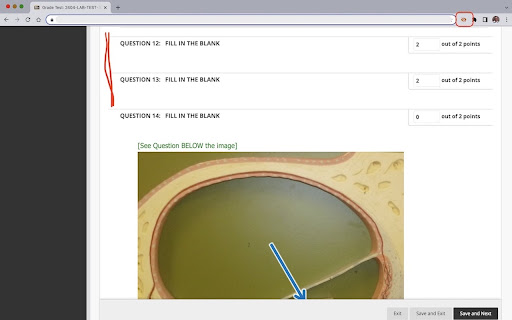
Hide questions marked as correct and show only questions with incorrect answers.
As of May 2026, Blackboard Grader has 58 users and a 5.00/5 rating from 1 reviews in the Workflow & Planning category.
Usersdown 7.9 percent−7.9%
58
58
Ratingno change0%
5.00
1 reviews
Reviewsno change0%
1
Version
0.0.1.0
Manifest V3
History
2 snapshotsTracking since Apr 25, 2026.
View as table
| Date | Users | Rating | Reviews | Version |
|---|---|---|---|---|
| Apr 25, 2026 | 63 | 5.00 | 1 | 0.0.1.0 |
| May 22, 2026 | 60 | 5.00 | 1 | 0.0.1.0 |
| Now | 58 | 5.00 | 1 | 0.0.1.0 |
Permissions & access
- Permissions
- activeTabscripting
- Host access
- None declared
Screenshots
About
This extension is intended for faculty at Austin Community College, who administer online tests on Blackboard. The extension does not alter the content nor interact with content on the LMS server. Faculty can use this to hide all questions marked as correct and to show only those that are either partially correct or incorrect.

Once added as an extension, the user may pin the extension to the extensions bar for easy access. The extension is designed to work on pages that contain test items with correct or incorrect markings. Once the page is displayed, click the extension's icon (it will appear in color if the page you are on is on www.austincc.edu) to hide the questions marked as correct. User may then change the grades for any question just they would do while grading.

Hitting the  icon again or clicking the 'refresh' button or moving to the next page will unhide the hidden questions and you may choose to hide the correct questions on the next page by clicking the extension icon again.

No logins are required and no data about the user or the test item on display will be collected or stored by the extension.

USE SCENARIO 1:
During Grading: Manual review and grading becomes faster as you need to focus only on questions that are incorrect. Hiding the questions marked as correct eliminates unnecessary page scrolling and fatigue.

USE SCENARIO 2:
During Test Reviews: When you are discussing a test with a student during a review, hiding the questions marked correct helps you focus on the areas the student failed to do well.

If you are not a faculty member at Austin Community College and would like to use this on your Blackboard site, contact us by email.
Technical
- Version
- 0.0.1.0
- Manifest
- V3
- Size
- 18.54KiB
- Min Chrome
- 88
- Languages
- 1
- Featured
- No
Metadata
- ID
- pemdnnioakfiffdfhglndfhdgbhjglfd
- Developer ID
- uaacc7a0e8b2111df815e6090a7a3b348
- Developer Email
- [email protected]
- Created
- Apr 10, 2023
- Last Updated (Store)
- Apr 12, 2023
- Last Scraped
- May 22, 2026
- Website
- —
- Support URL
- —
Similar extensions
Alternatives to Blackboard Grader, ranked by description similarity.

LearnPlatform for Students
LearnPlatform for Students provides school administrators an easy way to measure student engagement with EdTech products.
1.0M
★ 1.3

LearnPlatform for Educators
LearnPlatform provides product evaluations for educational websites you visit.
500.0K
★ 3.0

Codejudge Proctoring
Extension to proctor candidate
40.0K
★ 2.3

Progressbook Grade Tester
Allows the user to see what their grade would be depending on their score.
37
★ 5.0

Aeries Grades+
An improved grade viewer for Aeries.
1.0K
★ 5.0

uCertify Proctoring
uCertify Chrome Extension for Remote Proctoring
—
★ 3.7

Student Stars
A student management and reward system designed to motivate and engage learners through a browser extension.
227
★ 5.0

UT Registration Plus
UT Registration Plus is a Chrome extension that allows students to easily register for classes.
50.0K
★ 5.0
Data sourced from the Chrome Web Store · last verified May 22, 2026.