
DocBreaker
Turn complex documentation pages into reusable Markdown. Preserves navigation structure and supports multi-page merged export.
As of June 2026, DocBreaker has 3 users in the Productivity category.
Usersno change0%
3
3
Ratingno change0%
—
— reviews
Reviewsno change0%
—
Version
0.2.0
Manifest V3
90-day change · In the last 90 days this extension 3 version updates, changed permissions.
History
7 snapshotsTracking since Apr 2, 2026.
View as table
| Date | Users | Rating | Reviews | Version |
|---|---|---|---|---|
| Apr 2, 2026 | — | — | — | 0.1.0 |
| Apr 17, 2026 | — | — | — | 0.1.0 |
| Apr 22, 2026 | 1 | — | — | 0.1.0 |
| Apr 27, 2026 | 1 | — | — | 0.1.1 |
| May 10, 2026 | — | — | — | 0.1.2 |
| May 22, 2026 | 1 | — | — | 0.2.0 |
| Jun 4, 2026 | 2 | — | — | 0.2.0 |
| Now | 3 | — | — | 0.2.0 |
Changelog
- May 10, 2026description
DocBreaker 用来把供应商文档、帮助中心和产品手册整理成更适合团队复用的 Markdown 文档。

当前版本重点解决三个问题:

复杂文档只复制正文不够,目录结构也需要保留
多个页面来回复制粘贴成本高
非技术团队阅读原始文档的成本太高

你可以用 DocBreaker:

提取当前页面正文
保留左侧目录和本页导读
将解析结果保存到本地
勾选多个已解析页面并合并导出
导出为便于分享、留档和继续加工的 Markdown

适用场景:

产品经理整理云厂商文档
售前快速打包方案附件
运营沉淀产品知识库
团队内部做对比研究和交接留档

当前版本说明:

主要针对中文文档场景优化
当前版本面向以下站点的文档场景:
阿里云文档
腾讯云文档
华为云文档
百度智能云文档
uni-app 官网文档
已对阿里云文档做专项解析适配
当前解析结果默认保存在浏览器本地
当前版本不要求用户登录
当前版本不将页面内容上传到远程服务

后续规划:

更强的站点规则管理
批量目录抓取
团队协作与订阅能力
推荐卖点短句
保留目录,不只抓正文
多页合并导出,一次整理成文
更适合产品、售前、运营团队
把复杂文档变成可交付材料
DocBreaker helps product, pre-sales, and operations teams turn vendor documentation, help centers, and product manuals into clean, reusable Markdown files.

Three problems it solves:

Copying body text alone loses the document structure — you need the navigation too
Copying across multiple pages one by one is slow and error-prone
Raw documentation is hard to share with non-technical teammates
What you can do with DocBreaker:

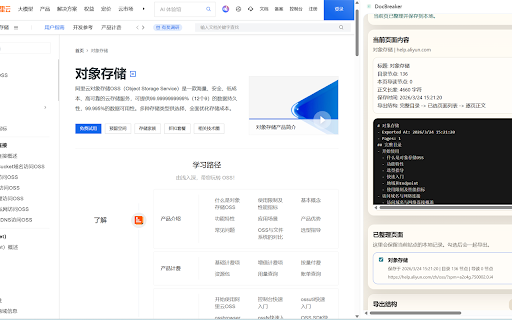
Extract the main content of the current page, with left-side navigation and page outline preserved
Save parsed results locally for later reference
Select multiple parsed pages and merge-export them as a single Markdown file
Sign in to use AI chat — ask questions directly against the current page content
Use cases:

Product managers organizing cloud vendor docs
Pre-sales teams packaging solution attachments quickly
Operations teams building internal product knowledge bases
Teams doing cross-reference research or handover documentation
Version notes:

Optimized for Chinese documentation; currently supports: Alibaba Cloud, Tencent Cloud, Huawei Cloud, Baidu AI Cloud, uni-app official docs
Parsed results are stored locally in your browser; page content is never uploaded to remote servers
Sign-in is optional — document extraction and export work without an account
AI chat is available after signing in, subject to a daily request quota
Key highlights: Keeps navigation, not just body text · Merge multiple pages into one file · AI Q&A on page content · Built for product, pre-sales & ops teams
- May 10, 2026host_permissions
https://help.aliyun.com/*, https://cloud.tencent.com/*, https://support.huaweicloud.com/*, https://cloud.baidu.com/*, https://uniapp.dcloud.net.cn/*, https://c4.yonyoucloud.com/*, https://api-docs.deepseek.com/*, https://mybatis-flex.com/*, https://baomidou.com/*, https://solon.noear.org/*
https://ai.zhoudw.vip/*, https://help.aliyun.com/*, https://cloud.tencent.com/*, https://support.huaweicloud.com/*, https://cloud.baidu.com/*, https://uniapp.dcloud.net.cn/*, https://c4.yonyoucloud.com/*, https://api-docs.deepseek.com/*, https://mybatis-flex.com/*, https://baomidou.com/*, https://solon.noear.org/*
- May 10, 2026permissions
activeTab, downloads, scripting, sidePanel, storage, tabs
activeTab, downloads, identity, scripting, sidePanel, storage, tabs
- Apr 27, 2026short_description
将复杂网页文档整理成可复用的 Markdown,支持目录保留与多页合并导出。
Turn complex documentation pages into reusable Markdown. Preserves navigation structure and supports multi-page merged export.
- Apr 27, 2026host_permissions
https://help.aliyun.com/*, https://cloud.tencent.com/*, https://support.huaweicloud.com/*, https://cloud.baidu.com/*, https://uniapp.dcloud.net.cn/*, https://c4.yonyoucloud.com/*
https://help.aliyun.com/*, https://cloud.tencent.com/*, https://support.huaweicloud.com/*, https://cloud.baidu.com/*, https://uniapp.dcloud.net.cn/*, https://c4.yonyoucloud.com/*, https://api-docs.deepseek.com/*, https://mybatis-flex.com/*, https://baomidou.com/*, https://solon.noear.org/*
- Apr 22, 2026host_permissions
https://help.aliyun.com/*, https://cloud.tencent.com/*, https://support.huaweicloud.com/*, https://cloud.baidu.com/*, https://uniapp.dcloud.net.cn/*
https://help.aliyun.com/*, https://cloud.tencent.com/*, https://support.huaweicloud.com/*, https://cloud.baidu.com/*, https://uniapp.dcloud.net.cn/*, https://c4.yonyoucloud.com/*
Permissions & access
- Permissions
- activeTabdownloadsidentityscriptingsidePanelstoragetabs
- Host access
- https://ai.zhoudw.vip/*, https://help.aliyun.com/*, https://cloud.tencent.com/*, https://support.huaweicloud.com/*, https://cloud.baidu.com/*, https://uniapp.dcloud.net.cn/*, https://c4.yonyoucloud.com/*, https://api-docs.deepseek.com/*, https://mybatis-flex.com/*, https://baomidou.com/*, https://solon.noear.org/*
Screenshots


About
DocBreaker helps product, pre-sales, and operations teams turn vendor documentation, help centers, and product manuals into clean, reusable Markdown files.

Three problems it solves:

Copying body text alone loses the document structure — you need the navigation too
Copying across multiple pages one by one is slow and error-prone
Raw documentation is hard to share with non-technical teammates
What you can do with DocBreaker:

Extract the main content of the current page, with left-side navigation and page outline preserved
Save parsed results locally for later reference
Select multiple parsed pages and merge-export them as a single Markdown file
Sign in to use AI chat — ask questions directly against the current page content
Use cases:

Product managers organizing cloud vendor docs
Pre-sales teams packaging solution attachments quickly
Operations teams building internal product knowledge bases
Teams doing cross-reference research or handover documentation
Version notes:

Optimized for Chinese documentation; currently supports: Alibaba Cloud, Tencent Cloud, Huawei Cloud, Baidu AI Cloud, uni-app official docs
Parsed results are stored locally in your browser; page content is never uploaded to remote servers
Sign-in is optional — document extraction and export work without an account
AI chat is available after signing in, subject to a daily request quota
Key highlights: Keeps navigation, not just body text · Merge multiple pages into one file · AI Q&A on page content · Built for product, pre-sales & ops teams
Technical
- Version
- 0.2.0
- Manifest
- V3
- Size
- 72.95KiB
- Min Chrome
- 88
- Languages
- 2
- Featured
- No
Metadata
- ID
- pegiifdckaahemcmjfjajinckhjcliaf
- Developer ID
- u2bc0ecca39738aeb6a0b828ea9733fd2
- Developer Email
- [email protected]
- Created
- Apr 1, 2026
- Last Updated (Store)
- May 10, 2026
- Last Scraped
- Jun 10, 2026
- Website
- https://blog.zhoudw.vip/
- Support URL
- https://blog.zhoudw.vip/docbreaker-support
- Privacy Policy
- https://blog.zhoudw.vip/docbreaker-privacy
Data sourced from the Chrome Web Store · last verified Jun 10, 2026.