
YouTube Bias Hider
Hide YouTube views, likes/dislikes, comments, and/or subscribers according to your preferences. Reduce potential biases from the…
As of May 2026, YouTube Bias Hider has 28 users and a 3.67/5 rating from 6 reviews in the Workflow & Planning category.
Usersno change0%
28
28
Ratingno change0%
3.67
6 reviews
Reviewsno change0%
6
Version
0.1.0
Manifest V3
History
2 snapshotsTracking since Apr 25, 2026.
View as table
| Date | Users | Rating | Reviews | Version |
|---|---|---|---|---|
| Apr 25, 2026 | 28 | 3.67 | 6 | 0.1.0 |
| May 22, 2026 | 25 | 3.67 | 6 | 0.1.0 |
| Now | 28 | 3.67 | 6 | 0.1.0 |
Permissions & access
- Permissions
- scriptingstorage
- Host access
- https://www.youtube.com/
Screenshots
About
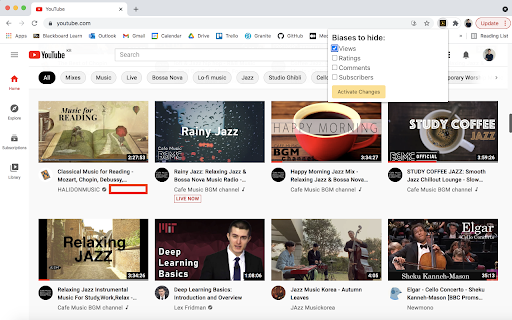
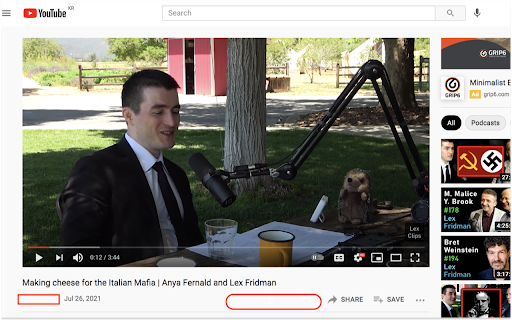
Hide YouTube views, likes/dislikes, comments, and/or subscribers according to your preferences.

Reduce potential biases from the YouTube metrics and consume information with minimal preconceptions.

How to use:
1. Click "YouTube Bias Hider" under the extensions tab on your browser.
2. Select the biases to hide, and click "Activate Changes".
3. To change your selection settings, repeat steps 1 and 2.
** None of the biases will be hidden by default at initial use. Once the selections are made by the user, they will be saved on the extension until any further changes are made.

--------------------
This product was built by BK from https://madebybk.github.io
Technical
- Version
- 0.1.0
- Manifest
- V3
- Size
- 10.31KiB
- Min Chrome
- 88
- Languages
- 1
- Featured
- No
Metadata
- ID
- pegcbaooofkcegdapahppmkiknngjill
- Developer ID
- ud9ad5a24fb6505a3a7643f735252c457
- Developer Email
- [email protected]
- Created
- Jul 27, 2021
- Last Updated (Store)
- Aug 11, 2021
- Last Scraped
- May 22, 2026
- Website
- —
- Support URL
- —
- Privacy Policy
- —
Similar extensions
Alternatives to YouTube Bias Hider, ranked by description similarity.

YouTube Enhancer
Hide YouTube distractions and take control of your viewing experience with powerful toggle-based controls.
7
RYS — Remove YouTube Suggestions
Spend less time on YouTube. Customize YouTube's user interface to be less engaging.
10.0K
★ 4.2

Focused for YouTube: Remove Distractions
A minimalist, productive UI for the YouTube website
8

Remove YouTube Shorts and Recommended
Hide YouTube shorts, trending, related videos, homepage recommendations, related videos and other distractions.
1.0K
★ 4.1

Clean YouTube: Block Shorts, Hide Comments & Feeds
YouTube Distraction-free. Remove Shorts, Recommended Videos, Thumbnails, Comments and other Distractions.
40.0K
★ 4.8

Less Youtube Mess
Customize YouTube: Hide Shorts, Sidebar, Comments, Recommendations, and More!
30
★ 5.0

Better Youtube: Reduce Distraction
Reduce YouTube distractions with page-based toggles, multilingual popup controls, and watch-time tools.
4

PurifyYT – Hide Shorts, Block Distractions, Stay Focused
Remove YouTube shorts, comments, and recommendations — for a cleaner, distraction-free experience.
14
★ 5.0
Data sourced from the Chrome Web Store · last verified May 22, 2026.