
Popup Blocker
This extension automatically closes tabs and windows opened by ad-requiring sites
As of May 2026, Popup Blocker has 7,000 users and a 4.41/5 rating from 34 reviews in the Workflow & Planning category.
Usersup 16.7 percent+16.7%
7.0K
7,000
Ratingup 0.7 percent+0.7%
4.41
34 reviews
Reviewsup 6.3 percent+6.3%
34
Version
3.1.0
Manifest V3
90-day change · In the last 90 days this extension gained 1.0K users.
History
2 snapshotsTracking since Apr 25, 2026.
View as table
| Date | Users | Rating | Reviews | Version |
|---|---|---|---|---|
| Apr 25, 2026 | 6.0K | 4.38 | 32 | 3.1.0 |
| May 22, 2026 | 7.0K | 4.39 | 33 | 3.1.0 |
| Now | 7.0K | 4.41 | 34 | 3.1.0 |
Permissions & access
- Permissions
- activeTabstoragetabscontextMenus
- Host access
- None declared
Screenshots

About
Ads can be annoying.

You may be browsing normally and then you click somewhere on the page and then a new tab opens, suddenly, pointing to an ad, without you initiating it. This extension automatically closes those tabs/windows. It's not an Adblocker; it's a tab/window-containing-ad closer. ;)

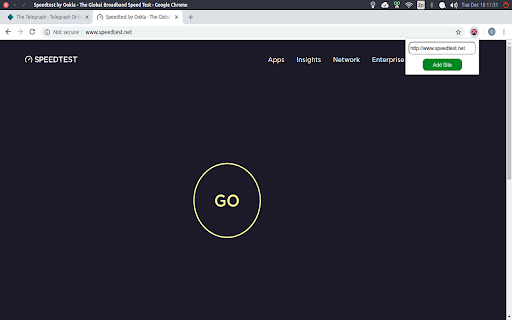
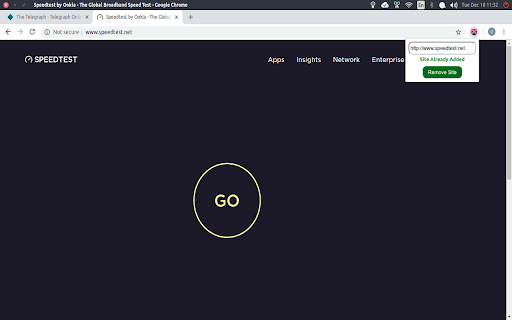
Once a site has that behaviour (where it opens random popups/tabs annoyingly), simply click on the extension and click "Add Site". Once that is done, the extension manages all tabs and windows opened from that particular site, automatically closing them if needed. To remove a site from the "monitored list", you can always click the extension again and click "Remove Site".

Note that I intentionally created the extension to be lightweight, doing nothing but its intended task.

Note that after adding a site, all new tabs opened that start with the protocol+hostname of that site will be allowed; all others won't. This means that if https://www.adopeningsite.com is added, then all sites starting with https://www.adopeningsite.com like https://www.adopeningsite.com/clickads or https://www.adopeningsite.com/hoverads will be allowed to open in a new tab. The others will be automatically closed.

To purposely open a new tab that has its protocol+hostname different from that of the site, right click the link and choose "Purposely open in a new tab".
Technical
- Version
- 3.1.0
- Manifest
- V3
- Size
- 30.37KiB
- Min Chrome
- 88
- Languages
- 1
- Featured
- Yes
Metadata
- ID
- pecjjeljffnplfcclbbbklkpcbbkchdk
- Developer ID
- u37b608beb0843c75ab668cdbd84f9d2b
- Developer Email
- [email protected]
- Created
- Dec 23, 2018
- Last Updated (Store)
- Sep 15, 2022
- Last Scraped
- May 22, 2026
- Website
- —
- Support URL
- —
- Privacy Policy
- —
Similar extensions
Alternatives to Popup Blocker, ranked by description similarity.

TabBlock
Prevents from opening new tabs.
40.0K
★ 4.1

Adblock Advanced - AdBlocker for Chrome & YouTube Ads Blocker
Adblocker for Chrome, block YouTube ads, pop-ups, trackers, faster browsing, secure ad filtering
200.0K
★ 4.9

Web Adblock - Ad Blocker
AdBlock blocks ads, pop-ups & trackers for faster, safer, ad-free browsing experience.
1.0K
★ 4.1

Free Adblocker for Chrome by Open Adblocker
Free Adblocker for Chrome by Open Adblocker
100.0K
★ 4.8

Popup Blocker for Google Chrome™
Strictly block all popup requests from any website
20.0K
★ 4.0

Ad Free Web
Simple extension to stop annoying ads without slowing down your browser.
44
★ 5.0

AdBlock — Auto-close AdBlock's popups
Tired of AdBlock's pop-up notifications? This extension automatically closes them. You must first have AdBlock installed.
561
★ 5.0

Ad blocker
Removes the ads
4.0K
★ 3.3
Data sourced from the Chrome Web Store · last verified May 22, 2026.