
Dark Mode — Night Reader & Blue Light Filter
Automatic dark mode for all websites + blue-light filter. Customize themes, reduce eye strain — fast, private Chrome extension.
As of May 2026, Dark Mode — Night Reader & Blue Light Filter has 30,000 users and a 4.20/5 rating from 536 reviews in the Accessibility category.
Usersno change0%
30.0K
30,000
Ratingdown 0.2 percent−0.2%
4.20
536 reviews
Reviewsup 0.2 percent+0.2%
536
Version
1.3.27
Manifest V3
History
5 snapshotsTracking since Apr 1, 2026.
View as table
| Date | Users | Rating | Reviews | Version |
|---|---|---|---|---|
| Apr 1, 2026 | 30.0K | 4.21 | 535 | 1.3.27 |
| Apr 21, 2026 | 40.0K | 4.21 | 535 | 1.3.27 |
| May 6, 2026 | 30.0K | 4.21 | 534 | 1.3.27 |
| May 17, 2026 | 30.0K | 4.20 | 535 | 1.3.27 |
| May 31, 2026 | 30.0K | 4.20 | 533 | 1.3.27 |
| Now | 30.0K | 4.20 | 536 | 1.3.27 |
Permissions & access
- Permissions
- activeTabstorageunlimitedStoragescripting
- Host access
- <all_urls>
Screenshots

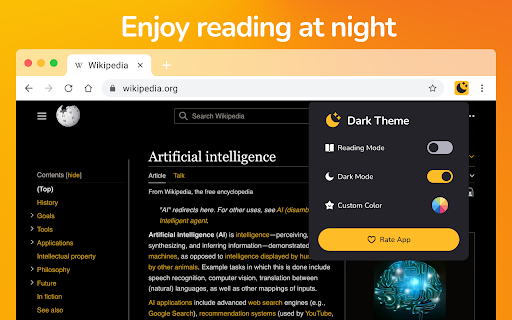

About
Dark Mode — Night Reader & Blue Light Filter
Enjoy automatic dark mode for all websites and protect your eyes with an advanced blue light filter. Fast, lightweight and privacy-friendly — built for comfortable night reading in Chrome.

✨ Key features:
➖Automatic dark theme: Instantly applies a dark theme to every website — no manual toggles.
➖Blue light filter: Reduce blue light to ease eye strain during night reading and long browsing sessions.
➖Full color customization: Pick or create your own dark palette with a simple color picker and presets.
➖Reading mode: Cleaner layout and adjustable brightness for distraction-free reading.
➖Privacy first: No ads, no tracking, no data collection — 100% local settings.
➖Lightweight & fast: Optimized to use minimal CPU and memory.

✅ Why choose Dark Mode — Night Reader:
➖Reduce eye strain and improve night-time reading comfort.
➖Make any website easier on the eyes with customizable dark themes.
➖Keep your browsing private — all settings are stored locally.

📌 How to use:
1.Install the extension and open the popup.
2.Toggle Dark Mode or Reading mode to enable.
3.Adjust the Blue Light Filter slider and choose custom colors.
4.Use per-site exceptions to disable dark mode if needed.

📎 Tips:
➖Use the color presets for quick theme changes.
➖Turn on Reading mode for articles to remove clutter and focus on text.

🛡️ Privacy & performance:
We do not collect personal data. All processing is done locally in your browser for speed and security.

❓FAQ
➖Does it work on all sites? — Yes, it automatically applies to most websites; some complex web apps may need per-site tweaks.
➖Can I exclude a site? — Yes — add exceptions from the popup.
➖Is it resource heavy? — No — optimized for minimal CPU and memory usage.

➡️ Install Dark Mode — Night Reader now and make browsing at night comfortable and safe. If you like it, please leave a 5-star review — it helps us improve.
Technical
- Version
- 1.3.27
- Manifest
- V3
- Size
- 50.57KiB
- Min Chrome
- 88
- Languages
- 24
- Featured
- Yes
Metadata
- ID
- pdpfhanekfkeijhemmfbnnjffiblgefi
- Developer ID
- uff1225c98b43f9cd42f5133ff286a21d
- Developer Email
- [email protected]
- Created
- Nov 7, 2021
- Last Updated (Store)
- Oct 1, 2025
- Last Scraped
- May 31, 2026
- Website
- —
- Support URL
- —
- Privacy Policy
- —
Similar extensions
Alternatives to Dark Mode — Night Reader & Blue Light Filter, ranked by description similarity.
Dark Mode - Dark Reader for Сhrome
Dark Mode a classic dark theme for every website. Switch website to dark reader and for night and daily browsing.
200.0K
★ 4.4

Night Eye Pro - Dark Mode & Night Theme
Dark mode for every website. Reduce eye strain with night theme. Custom colors, scheduling & site rules.
58
★ 5.0

Auto Dark Mode - Smart Theme Switcher
Enable automatic dark mode on any website. Reduce eye strain with smooth transitions and custom site controls.
47
★ 4.0

DARK VISOR — darkmode for the web
Dark mode for the web. Protect your eyes with Dark Visor. Customize brightness, contrast, and night shift for comfortable browsing.
8.0K
★ 4.9

Dark Mode Pro - Night Mode for Websites
Dark mode & night mode for any website. 12 themes, scheduled mode, per-site settings, system sync. Reduce eye strain & save battery.
67
★ 3.0

Blackfy
Dark Reader for Chrome. Apply dark theme & night mode on all websites with Blackfy.
740
★ 4.9

Dark Mode
Dark Mode, read at night. Bluelight filter for every website. Relax your eyes at night and day.
20.0K
★ 4.4

StudyRabbit: DarkMode+
A universal dark mode extension with custom color schemes
25
★ 5.0
Data sourced from the Chrome Web Store · last verified May 31, 2026.