
Gmail Free Online Polls & Surveys by cloudHQ
Easy and free online polls and surveys directly from your Gmail
As of June 2026, Gmail Free Online Polls & Surveys by cloudHQ has 20,000 users and a 4.71/5 rating from 17 reviews in the Communication category.
Usersno change0%
20.0K
20,000
Ratingno change0%
4.71
17 reviews
Reviewsno change0%
17
Version
1.0.1.5
Manifest V3
History
1 snapshotsTracking since Apr 19, 2026.
View as table
| Date | Users | Rating | Reviews | Version |
|---|---|---|---|---|
| Apr 19, 2026 | 20.0K | 4.71 | 17 | 1.0.1.5 |
| Now | 20.0K | 4.71 | 17 | 1.0.1.5 |
Permissions & access
- Permissions
- scriptingstoragebackground
- Host access
- https://mail.google.com/, https://www.cloudhq.net/
Screenshots


About
❗Polls and surveys can increase email response rates by 20-25%❗
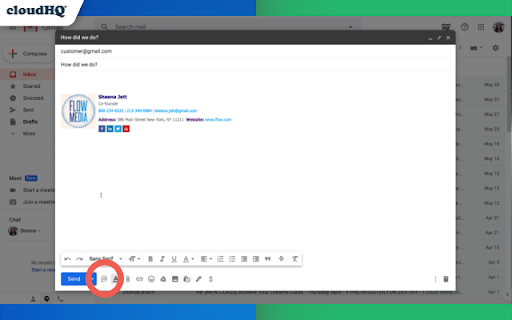
Use this Chrome extension to embed a poll or a survey right into your email.

Top Features:
- Polls and surveys have open-ended feedback
- Save polls or surveys as your personal template to use again in 1 click
- Receive multiple answers to your question
- Export all your responses into an organized Google Sheet™, where you can easily share it with others and delegate responsibilities.
- Customize the design of your polls and surveys (colors, button borders, etc.)
- Embed your poll or survey into your email signature to make sure that you adequately answered someone's inquiry.

Online polls are great for your business. Let's break down the top 7 ways you'll want to start using free online polls and surveys in your business emails:

1) Upgrade customer experience:
Brand follow-up is a major part of a customer's experience, but it's often forgotten. Fortunately, when you round out your customer experience by explicitly allowing for customer feedback, you complete the sales cycle, which leaves your customers feeling complete, too. Consequently, you'll increase customer loyalty.

2) Identify areas for product/service growth/development:
Do you want to speed along product development? Let your customers tell you what they want. You'll save time and money listening to them directly. Find out which products are most popular with your customers; how they're using those products; and what they want to see next.

3) Improve customer service:
Polls are a streamlined, automated method for collecting feedback from your customers on their experience. Customer polls encourage your customers to engage with you honestly. You'll be able to tell what they really think, and when they express themselves, you'll have the chance to follow up with them or make them feel heard in a variety of ways. It's a massive first step toward superior customer service.

4) Troubleshooting:
Polling your base, you'll learn faster what bugs and/or hassles exist in your product or service. Plus, you'll retain customers that would have simply deserted you because, when they experienced a snag, they didn't have an easy way to tell you.

5) Marketing Surveys:
Looking for the next way to grab the attention of your consumer base? When you embed online polls and surveys within your email campaigns, you'll substantially raise your click-through rates, all the while gathering important data about your customers. Then, you can target your next campaign based on customer responses to your survey. Learn your customers' preferences, and then tailor your approach.

6) Validation of helpfulness:
When you answer someone's question, ask if your response helped them. It always helps to understand if you've been helpful or not. If you haven't, you'll have a chance to redeem yourself. If you haven't, you'll be able to get validation so that when you need to have a question answered, that person is highly likely to help you in return.

7) RSVP
Get confirmation of who's coming to your event! Simple and easy way to see who's a yay, nay, or maybe.

Once you're done, you can even export all the responses you get into an organized Google Sheet, where you can share it and delegate responsibilities.

cloudHQ. Helping your productivity, 1 click at a time.


cloudHQ website: https://www.cloudhq.net/
App website: https://www.gmail-polls-surveys.com/
Pricing: https://www.gmail-polls-surveys.com/pricing
Support page: https://support.cloudhq.net/category/browser-extensions/gmail-free-online-polls-and-surveys/
FAQ page: https://support.cloudhq.net/gmail-free-online-polls-surveys-faq-frequently-asked-questions/
Blog: https://blog.cloudhq.net

Gmail is trademark of Google LLC. Use of this trademark is subject to Google Permissions.

cloudHQ is trademark of CloudHQ LLC. https://www.cloudhq.net/trademark
Technical
- Version
- 1.0.1.5
- Manifest
- V3
- Size
- 649KiB
- Min Chrome
- 88
- Languages
- 11
- Featured
- Yes
Metadata
- ID
- pdobhpebaieggeagodjmocmfjjiomcok
- Developer ID
- u9999076a1cee8608be24fd86bc3000b6
- Developer Email
- [email protected]
- Created
- Jun 12, 2020
- Last Updated (Store)
- Nov 29, 2025
- Last Scraped
- Jun 4, 2026
- Support URL
- https://support.cloudhq.net
- Privacy Policy
- https://www.cloudhq.net/privacy
Similar extensions
Alternatives to Gmail Free Online Polls & Surveys by cloudHQ, ranked by description similarity.
Auto Follow Up for Gmail™ by cloudHQ
Automated follow up emails and mail merge
9.0K
★ 4.9

Gmail™ Email Templates by cloudHQ
Beautiful email templates for Gmail. Design your templates or import templates from Mailchimp. With team sharing!
100.0K
★ 4.2
Gmail Button by cloudHQ
Create a button in your email to get more clicks with Gmail Button
30.0K
★ 4.6

Sort Gmail Inbox by cloudHQ
Find an email in seconds with free preset filters
10.0K
★ 4.1

Video Email for Gmail™ by cloudHQ
Record and send video directly from Gmail™
10.0K
★ 4.4

Email Signature Generator by cloudHQ
Email signature generator and signature templates
20.0K
★ 4.5

HTML Editor for Gmail by cloudHQ
HTML Editor for Gmail™ - code HTML email directly from Gmail
50.0K
★ 4.1

Tables for Gmail™ by cloudHQ
Add tables to your emails
20.0K
★ 4.5
Data sourced from the Chrome Web Store · last verified Jun 4, 2026.