
Capture Master – Full Page Screenshot & Annotation Tool
Powerful screenshot tool for full page & region captures. Annotate with text, shapes, arrows, and blur. Save as PNG, JPG, or PDF.
As of June 2026, Capture Master – Full Page Screenshot & Annotation Tool has 142 users and a 5.00/5 rating from 2 reviews in the Workflow & Planning category.
Usersup 9.2 percent+9.2%
142
142
Ratingno change0%
5.00
2 reviews
Reviewsno change0%
2
Version
1.0.83
Manifest V3
History
7 snapshotsTracking since Apr 1, 2026.
View as table
| Date | Users | Rating | Reviews | Version |
|---|---|---|---|---|
| Apr 1, 2026 | 130 | 5.00 | 2 | 1.0.83 |
| Apr 19, 2026 | 128 | 5.00 | 2 | 1.0.83 |
| Apr 28, 2026 | 134 | 5.00 | 2 | 1.0.83 |
| May 8, 2026 | 135 | 5.00 | 2 | 1.0.83 |
| May 16, 2026 | 122 | 5.00 | 2 | 1.0.83 |
| May 25, 2026 | 137 | 5.00 | 2 | 1.0.83 |
| Jun 4, 2026 | 136 | 5.00 | 2 | 1.0.83 |
| Now | 142 | 5.00 | 2 | 1.0.83 |
Permissions & access
- Permissions
- activeTabscriptingtabsdownloadsstoragecontextMenusunlimitedStorageoffscreen
- Host access
- https://mail.google.com/, https://outlook.live.com/
Screenshots



About
Capture Master is the ultimate all-in-one tool to capture, annotate, compare, and share anything on the web. Built for maximum productivity, it combines powerful features with a clean, intuitive interface — all while keeping your data 100% private.

Why Capture Master?

🌟 Completely Free – No paywalls, no locked features.
🔒 100% Private & Secure – Everything happens locally on your computer. Nothing is ever uploaded, so your data stays yours. Capture Master works fully offline.
📐 Capture entire web pages in one continuous PNG file.

Key Features

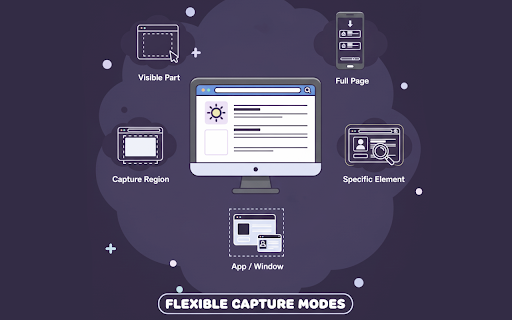
1️⃣ Multiple Ways to Capture – Capture a full page screenshot, visible area, selected regions or elements, or any app/window.
2️⃣ Multiple Export Formats – Save as high-quality PNG, JPEG, or PDF.
3️⃣ Side-by-Side Comparison – Quickly identify visual differences between two screenshots. Ideal for QA teams, developers, and designers. Plus, you can download the side-by-side view as a single image for easy sharing
4️⃣ Pro Annotation Tools – Add text, arrows, highlights, blur sensitive info, crop, or drop in icons.
5️⃣ Seamless Email Integration – Attach captures directly in Gmail or Outlook compose windows.
6️⃣ Delayed Capture Mode – Perfect for menus, hover states, or timed interactions.
7️⃣ One-Click Clipboard Copy – Copy your finished screenshot instantly.
8️⃣ Capture History Panel – Browse, revisit, or delete past captures with ease.
9️⃣ Smart Element Hider – Select any element on any website to hide it during capture. Save your selections so they’re automatically applied every time you revisit that website.

What Makes It Different
🔥 True Full-Page Capture – Save even endless scrolling pages as a single seamless PNG.
✨ Smart Element Snap – Hold Alt to instantly highlight and capture any page element with pixel-perfect precision.
📂 Organized & Accessible – Keep up to 50 recent captures neatly stored and instantly accessible.

With Capture Master, you get a fast, private, and feature-packed screenshot solution — without the clutter or compromises.
Technical
- Version
- 1.0.83
- Manifest
- V3
- Size
- 7.04MiB
- Min Chrome
- 88
- Languages
- 1
- Featured
- No
Metadata
- ID
- pdnonlgmpimnbmfkjepijmoneheenokg
- Developer ID
- u184a81cab2135b8a89a636a19862c717
- Developer Email
- [email protected]
- Created
- Aug 22, 2025
- Last Updated (Store)
- Dec 3, 2025
- Last Scraped
- Jun 4, 2026
- Website
- —
- Support URL
- —
- Privacy Policy
- —
Similar extensions
Alternatives to Capture Master – Full Page Screenshot & Annotation Tool, ranked by description similarity.

Screenety - Screen Recorder & Annotation Tool
Screenshot tool
154
★ 5.0

Recorder & Screenshot | Sitespedia - Screen Video Recorder & Screenshot
Take screenshots entirely or partially of websites, annotate them, and manage them in a centralized place.
6

Screenshot (Capture Page) Tool - WebCapturePro
Capture, edit, and customize webpage screenshots to your liking. Adjust proportions and add watermarks—all for free!
83
★ 5.0

FullPageScreenshot - Custom Screenshots & Advanced Editor
Capture full-page or custom-area screenshots & Edit with an advanced dashboard and save in multiple formats like JPEG, PNG, and PDF.
1.0K
★ 4.3

Capture Full Page
Use Capture Full Page — a lightweight Chrome extension for creating online screen and full web page
screenshots.
1.0K
★ 4.8

Simple Screen Capture: Full Page Screenshot
Simple Screen Capture is a handy Chrome Extension that allows you to effortlessly capture full page screenshots with just a click.
5.0K
★ 4.3

Easy Screenshot
Capture full-page screenshots instantly. Manually select any part of the page to capture exactly what you need.
4

Easy Screenshot
Capture parts of the screen
19
★ 1.0
Data sourced from the Chrome Web Store · last verified Jun 4, 2026.