
VideoMind: Quick ChatGPT for Youtube
1-Click summary, translation or qa for Youtube Videos.
As of May 2026, VideoMind: Quick ChatGPT for Youtube has 71 users in the Workflow & Planning category.
Usersdown 1.4 percent−1.4%
71
71
Ratingno change0%
—
— reviews
Reviewsno change0%
—
Version
0.0.3
Manifest V3
History
2 snapshotsTracking since Apr 25, 2026.
View as table
| Date | Users | Rating | Reviews | Version |
|---|---|---|---|---|
| Apr 25, 2026 | 72 | — | — | 0.0.3 |
| May 22, 2026 | 74 | — | — | 0.0.3 |
| Now | 71 | — | — | 0.0.3 |
Permissions & access
- Permissions
- storageactiveTabscripting
- Host access
- https://*/*
Screenshots

About
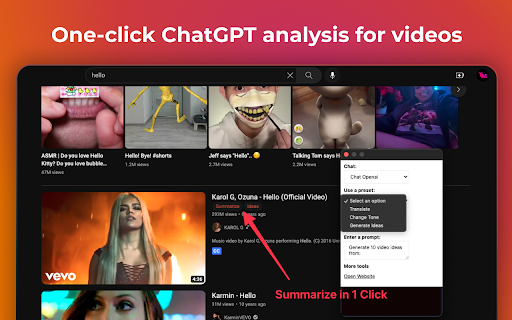
VideoMind is a powerful Chrome extension powered by ChatGPT.
It provides a 1-CLICK video summary, translation, format for social post or anything prompt you would use directly.
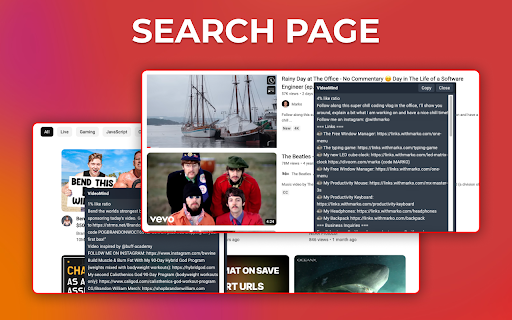
Access it directly from your homepage or search results for FREE.

With this tool, you can easily avoid clickbait and become more productive by making informed decisions on whether a video is worth watching. Whether you’re a content creator or marketer, Quick Insights from Youtube is an essential tool that can help you save time and boost your productivity.

Some key questions and possibilities you can ask:

1.	What is the main topic of the video?
2.	What is the purpose of the video?
3.	What are the main points made in the video?
4.	What are some next steps or actions that viewers can take based on the information presented in the video?
5.	What are some potential counterarguments or alternative perspectives related to the video’s topic?
6.	What are some common misconceptions or misunderstandings related to the video’s topic?
7.	What are some potential implications or consequences of the ideas presented in the video?
8.	What is the speaker’s main argument or thesis?
9.	Who is the intended audience for the video?
10.	What are some examples or evidence provided in the video?

Use cases include:

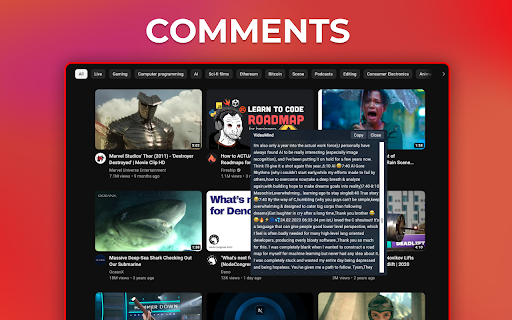
• Researching a topic: Quickly find videos that are relevant to your research and get a sense of what people are saying about them in the comments.

• Avoiding clickbait: Get a better understanding of what a video is about before clicking on it, saving you time and frustration.

• Improving productivity: Use the extension to quickly scan through search results and find the most relevant videos based on their descriptions and comments.

• Learning from others: Use ChatGPT in combination with the extension to receive summarized insights from the comments, allowing you to learn from others’ experiences and opinions.

VideoMind: Quick ChatGPT for Youtube is a powerful tool for anyone who wants to make the most of their time on the platform.

Start now with a preset or your own prompt.

Support:
contact us for any questions or feedback? at [email protected]
Technical
- Version
- 0.0.3
- Manifest
- V3
- Size
- 429KiB
- Min Chrome
- 88
- Languages
- 1
- Featured
- No
Metadata
- ID
- pdjlekomlillgidghchhahakgiggnpgo
- Developer ID
- u23e27b8ae201c8e389ca16c4d701fff4
- Developer Email
- [email protected]
- Created
- Apr 23, 2023
- Last Updated (Store)
- May 14, 2023
- Last Scraped
- May 22, 2026
- Website
- videomind.online
- Support URL
- —
- Privacy Policy
- https://videomind.online/privacy
Similar extensions
Alternatives to VideoMind: Quick ChatGPT for Youtube, ranked by description similarity.

YouTube to ChatGPT
Seamlessly extract YouTube video transcripts and prompt ChatGPT for instant summaries, content generation, brainstorming, and more.
24

VidSummize - AI YouTube Summary with Chat GPT
Let ChatGPT watch YouTube videos for you, stop wasting time and harness the power of artificial intelligence to make you more…
10.0K
★ 3.0
SayDub - YouTube Summary with ChatGPT
Generate YouTube videos summary using ChatGPT for free
287
★ 4.0

Content Summarizer (YT & Articles)
Summarize YouTube videos (Cmd+X+X) or web articles (Cmd+X+X) using ChatGPT.
2

Youtube video summaries - Powered by ChatGPT
Get Youtube video summaries before watching them, so you know instantly if they're worth watching.
29
★ 3.0

YouTube To Text
Use YouTube To Text to transcribe video to text, download youtube subtitles, and summarize it in seconds
270
★ 4.5

AI Page & Youtube Summaries using ChatGPT
AI summaries for Youtube videos, webpages and articles. Uses ChatGPT. Supports text-to-speech.
7

Youtube Summary with Gemini
Youtube summary with Google Gemini AI extension for intelligent video summaries
226
★ 5.0
Data sourced from the Chrome Web Store · last verified May 22, 2026.