
Suno Automation
Auto-fill lyrics, styles, and title from CSV, then auto-download WAV audio from Suno
As of June 2026, Suno Automation has 79 users in the Productivity category.
Usersup 31.7 percent+31.7%
79
79
Ratingno change0%
—
— reviews
Reviewsno change0%
—
Version
1.0.0
Manifest V3
History
9 snapshotsTracking since Apr 1, 2026.
View as table
| Date | Users | Rating | Reviews | Version |
|---|---|---|---|---|
| Apr 1, 2026 | 60 | — | — | 1.0.0 |
| Apr 19, 2026 | 66 | — | — | 1.0.0 |
| Apr 24, 2026 | 69 | — | — | 1.0.0 |
| May 1, 2026 | 75 | — | — | 1.0.0 |
| May 12, 2026 | 80 | — | — | 1.0.0 |
| May 18, 2026 | 76 | — | — | 1.0.0 |
| May 24, 2026 | 83 | — | — | 1.0.0 |
| May 31, 2026 | 82 | — | — | 1.0.0 |
| Jun 6, 2026 | 77 | — | — | 1.0.0 |
| Now | 79 | — | — | 1.0.0 |
Changelog
- Apr 19, 2026description
Boost your music creation workflow on Suno with this powerful automation tool.

Suno Auto Filler & Downloader is designed for creators who want to streamline the process of generating songs. Instead of manually copying and pasting lyrics, styles, and titles for every single track, this extension allows you to upload a CSV file and let the automation handle the rest.

**Key Features:**
- **Bulk Automation:** Upload a CSV file containing your Lyrics, Styles, and Song Titles.
- **Smart Auto-Fill:** Automatically populates the fields on the Suno Create page.
- **Auto-Download:** Detects when a song generation is complete and automatically downloads the WAV audio file to your computer.
- **Workspace Downloader:** One-click backup of your entire song library. Scans your workspace, handles pagination automatically, and downloads all your tracks as WAV files.
- **Queue System:** Processes your list song-by-song with customizable delays to prevent rate limiting.
- **Sidebar Interface:** Runs conveniently in the side panel, allowing you to monitor progress while browsing.

**How to use:**
**Mode 1: Auto-Create from CSV**
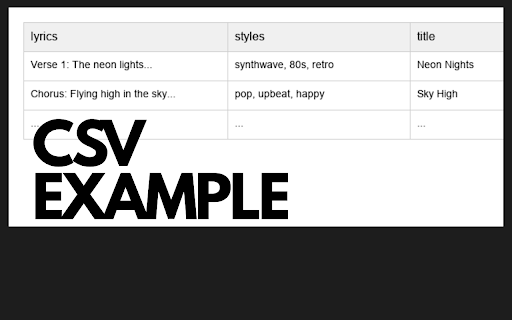
1. Prepare a CSV file with columns: `lyrics`, `styles`, `title`.
2. Open the extension in the Side Panel.
3. Log in with your license credentials.
4. Upload your CSV file.
5. Set your preferred delay times.
6. Click "Start" and watch it work!

**Mode 2: Download My Workspace**
1. Navigate to your Library or Workspace page on Suno.
2. Open the extension Side Panel.
3. Click the "Download my Workspace" button.
4. The extension will automatically scroll through your list and download every song found.

**License Information:**
This extension requires a valid license key/account to operate. Please ensure you have your credentials ready before installation.

**Disclaimer:**
This extension is an independent productivity tool created by a third-party developer. It is not affiliated with, associated with, authorized by, endorsed by, or in any way officially connected with Suno, or any of its subsidiaries or its affiliates.
Boost your music creation workflow on Suno with this powerful automation tool.
(Request for Test Please Email to me : หากต้องการทดลองใช้งาน รบกวนติดต่อทางอีเมล)

Suno Auto Filler & Downloader is designed for creators who want to streamline the process of generating songs. Instead of manually copying and pasting lyrics, styles, and titles for every single track, this extension allows you to upload a CSV file and let the automation handle the rest.

**Key Features:**
- **Bulk Automation:** Upload a CSV file containing your Lyrics, Styles, and Song Titles.
- **Smart Auto-Fill:** Automatically populates the fields on the Suno Create page.
- **Auto-Download:** Detects when a song generation is complete and automatically downloads the WAV audio file to your computer.
- **Workspace Downloader:** One-click backup of your entire song library. Scans your workspace, handles pagination automatically, and downloads all your tracks as WAV files.
- **Queue System:** Processes your list song-by-song with customizable delays to prevent rate limiting.
- **Sidebar Interface:** Runs conveniently in the side panel, allowing you to monitor progress while browsing.

**How to use:**
**Mode 1: Auto-Create from CSV**
1. Prepare a CSV file with columns: `lyrics`, `styles`, `title`.
2. Open the extension in the Side Panel.
3. Log in with your license credentials.
4. Upload your CSV file.
5. Set your preferred delay times.
6. Click "Start" and watch it work!

**Mode 2: Download My Workspace**
1. Navigate to your Library or Workspace page on Suno.
2. Open the extension Side Panel.
3. Click the "Download my Workspace" button.
4. The extension will automatically scroll through your list and download every song found.

**License Information:**
This extension requires a valid license key/account to operate. Please ensure you have your credentials ready before installation.

**Disclaimer:**
This extension is an independent productivity tool created by a third-party developer. It is not affiliated with, associated with, authorized by, endorsed by, or in any way officially connected with Suno, or any of its subsidiaries or its affiliates.
Permissions & access
- Permissions
- activeTabdownloadssidePanelscripting
- Host access
- https://suno.com/*, https://*.suno.com/*, https://us-central1-license-crafts.cloudfunctions.net/*
Screenshots

About
Boost your music creation workflow on Suno with this powerful automation tool.
(Request for Test Please Email to me : หากต้องการทดลองใช้งาน รบกวนติดต่อทางอีเมล)

Suno Auto Filler & Downloader is designed for creators who want to streamline the process of generating songs. Instead of manually copying and pasting lyrics, styles, and titles for every single track, this extension allows you to upload a CSV file and let the automation handle the rest.

**Key Features:**
- **Bulk Automation:** Upload a CSV file containing your Lyrics, Styles, and Song Titles.
- **Smart Auto-Fill:** Automatically populates the fields on the Suno Create page.
- **Auto-Download:** Detects when a song generation is complete and automatically downloads the WAV audio file to your computer.
- **Workspace Downloader:** One-click backup of your entire song library. Scans your workspace, handles pagination automatically, and downloads all your tracks as WAV files.
- **Queue System:** Processes your list song-by-song with customizable delays to prevent rate limiting.
- **Sidebar Interface:** Runs conveniently in the side panel, allowing you to monitor progress while browsing.

**How to use:**
**Mode 1: Auto-Create from CSV**
1. Prepare a CSV file with columns: `lyrics`, `styles`, `title`.
2. Open the extension in the Side Panel.
3. Log in with your license credentials.
4. Upload your CSV file.
5. Set your preferred delay times.
6. Click "Start" and watch it work!

**Mode 2: Download My Workspace**
1. Navigate to your Library or Workspace page on Suno.
2. Open the extension Side Panel.
3. Click the "Download my Workspace" button.
4. The extension will automatically scroll through your list and download every song found.

**License Information:**
This extension requires a valid license key/account to operate. Please ensure you have your credentials ready before installation.

**Disclaimer:**
This extension is an independent productivity tool created by a third-party developer. It is not affiliated with, associated with, authorized by, endorsed by, or in any way officially connected with Suno, or any of its subsidiaries or its affiliates.
Technical
- Version
- 1.0.0
- Manifest
- V3
- Size
- 22.59KiB
- Min Chrome
- 88
- Languages
- 1
- Featured
- No
Metadata
- ID
- pdhbjbnfmmjhngmliipdeagdkbhmfgao
- Developer ID
- ub6519b054206b4a5f076a5d0c671accc
- Developer Email
- [email protected]
- Created
- Dec 4, 2025
- Last Updated (Store)
- Apr 17, 2026
- Last Scraped
- Jun 6, 2026
- Website
- —
- Support URL
- —
Similar extensions
Alternatives to Suno Automation, ranked by description similarity.

Suno Library Pro
Bulk actions & workspace organization for Suno creators. Select, download, and manage thousands of songs effortlessly.
112
★ 2.3

Suno Tracks Exporter
Quickly export your Suno tracks from each workspace as MP3 or WAV files with metadata
9.0K
★ 4.5

SongSmith AI
Generate song concepts with AI and send them to Suno
107

Suno Music Assistant
Compose Suno prompts faster with bilingual lyrics, parameter presets, and AI helpers.
40

Suno Manager
Bulk download and export your complete Suno Song Library.
6.0K
★ 3.4

Suno Downloader Pro
Download MP3s from Suno profiles seamlessly.
200
★ 1.0

Solaris
Advanced Library Manager for Suno: Organize, Filter, and Download your songs with a premium UI.
23

Suno Explorer
Browse your entire Suno library offline. Beautiful insights, lineage tracking, version grouping, and backup tools.
1.0K
★ 4.4
Data sourced from the Chrome Web Store · last verified Jun 6, 2026.