
SideAll: Chat Sidebar - GPT, Claude, DeepSeek
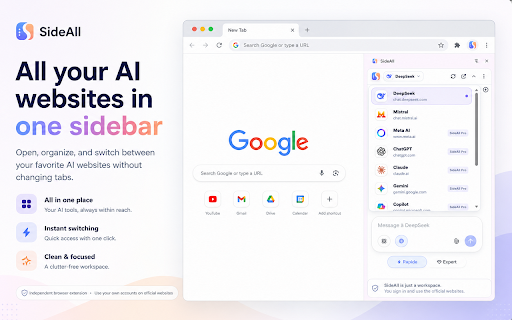
Access your favorite AI chat websites in one sidebar — side-by-side with your work. No tab switching needed.
As of June 2026, SideAll: Chat Sidebar - GPT, Claude, DeepSeek has 9,000 users and a 4.85/5 rating from 152 reviews in the Productivity category.
Usersno change0%
9.0K
9,000
Ratingdown 1.2 percent−1.2%
4.85
152 reviews
Reviewsup 7.8 percent+7.8%
152
Version
1.0.9
Manifest V3
90-day change · In the last 90 days this extension 1 version update, changed permissions.
History
5 snapshotsTracking since Apr 1, 2026.
View as table
| Date | Users | Rating | Reviews | Version |
|---|---|---|---|---|
| Apr 1, 2026 | 9.0K | 4.91 | 141 | 1.0.5 |
| May 2, 2026 | 9.0K | 4.89 | 142 | 1.0.5 |
| May 31, 2026 | 10.0K | 4.89 | 146 | 1.0.5 |
| Jun 5, 2026 | 10.0K | 4.89 | 150 | 1.0.9 |
| Jun 18, 2026 | 10.0K | 4.87 | 151 | 1.0.9 |
| Now | 9.0K | 4.85 | 152 | 1.0.9 |
Changelog
- May 31, 2026description
🔍 **Deep Seek - AI Assistant for chrome - Smart Assistant for Browsing**

Boost your productivity with **AI Sidebar**, the intelligent assistant designed to help you research, chat, and get real-time insights—all without leaving your browser! Whether you're writing, coding, or looking for quick answers, this sidebar makes your workflow smoother and more efficient.

🚀 **Why Choose Sidebar for DeepSeek?**
- **Instant AI Chat** ✨ – Get quick responses, brainstorm ideas, and clarify complex topics effortlessly.
- **Smart Search & Research** 🌍 – Find relevant information without switching tabs. Gain deep web insights in seconds.
- **Context-Aware Assistance** 🔍 – Need help with writing, coding, or research? The AI provides real-time suggestions tailored to your tasks.
- **Effortless Workflow** ⏳ – No more tab-hopping! Keep everything within reach for a seamless browsing experience.
- **User-Friendly Design** 🔧 – A sleek, distraction-free sidebar that integrates smoothly with Chrome.

🚀 **Powered by Cutting-Edge AI**
This AI-powered sidebar leverages advanced models to assist you in various tasks, from generating content to solving technical problems. Experience next-level browsing with AI at your side!

🛠️ **How to Use:**
1️⃣ Install AI Sidebar from the Chrome Web Store.
2️⃣ Click the extension icon to open the sidebar.
3️⃣ Start chatting, searching, and enhancing your workflow instantly!

💌 **We’d Love Your Feedback!**
If you enjoy using AI Sidebar for deepseek, please leave a review. Your feedback helps us improve and bring you even better features! 🌟

Ready to supercharge your browsing? Install **AI Sidebar - Your Smart Assistant** today! 💪

🚫 **Disclaimer:** This extension is an independent project and is **not affiliated with DeepSeek or its parent company.**
Stop juggling tabs. SideAll puts your favorite AI chat websites right in Chrome's side panel, so you can chat, research, and code — all without leaving your current page.

🟢 Why did we create SideAll? 🟢

We're in the middle of an AI revolution, but managing dozens of tabs just to chat with different AI models is exhausting. Our answer? Bring the official AI websites you already use directly into your browser's side panel. One click, instant access, right alongside your work.

🟢 Why Use SideAll? 🟢

Think of SideAll as the ultimate wingman to your existing AI accounts. It doesn't replace anything — it enhances your workflow:

1️⃣ Side by Side: Pull up any supported AI website on any webpage without toggling between tabs. Multitasking made incredibly easy.
2️⃣ Use Your Own Accounts: No API wrappers or proxy services. Just log into your existing accounts directly through the sidebar and keep your full chat history.
3️⃣ Always Up to Date: Whenever an AI provider releases a new feature (like Canvas, Artifacts, or Voice), you get it instantly because you are on their official website.
4️⃣ Zero Learning Curve: Because SideAll loads the official websites, there's nothing new to learn.

🟢 Key Features 🟢

✅ Multi-Provider Support: Access multiple popular AI chat services from one unified sidebar.
✅ Persistent Sessions: Your chat histories, custom instructions, and logged-in sessions remain active — just like they do in a normal browser tab.
✅ Instant Access: Highlight text on any page, right-click, and open SideAll instantly.
✅ Keyboard Shortcuts: Jump between different AI providers using intuitive keyboard shortcuts.

🟢 Unbeatable Privacy 🟢

✅ No Middlemen: You interact directly with each AI provider through their official website.
✅ No Logging: SideAll does NOT log your prompts, read your web page content automatically, or collect your browsing history.
✅ Local Storage: Your extension preferences are stored securely on your local device.

Why juggle multiple tabs when you can have a Swiss Army knife? SideAll integrates the power of generative AI right into your existing workflow, making your browser a true AI productivity engine.

🚀🚀 Click 'Add to Chrome' and transform how you work today! 🚀🚀

Disclaimer: SideAll is an independent browser productivity utility and is not affiliated with, endorsed by, or sponsored by any AI provider. All product names, logos, and brands are property of their respective owners.
- May 31, 2026short_description
Quick access to Chat DeepSeek for All tasks. Free and fast AI interaction in your sidebar.
Access your favorite AI chat websites in one sidebar — side-by-side with your work. No tab switching needed.
- May 31, 2026name
DeepSeek - AI Assistant for chrome
SideAll: Chat Sidebar - GPT, Claude, DeepSeek
- May 31, 2026host_permissions
*://chat.deepseek.com/*, *://deepseek.com/*, *://www.deepseek.com/*
https://api.sideall.app/*, https://chat.deepseek.com/*, https://chat.mistral.ai/*, https://www.meta.ai/*, https://chatgpt.com/*, https://chat.openai.com/*, https://claude.ai/*, https://gemini.google.com/*, https://copilot.microsoft.com/*, https://grok.com/*
- May 31, 2026permissions
sidePanel, declarativeNetRequest, contextMenus, storage
identity, sidePanel, storage, contextMenus, declarativeNetRequest, declarativeNetRequestWithHostAccess
Permissions & access
- Permissions
- identitysidePanelstoragecontextMenusdeclarativeNetRequestdeclarativeNetRequestWithHostAccess
- Host access
- https://api.sideall.app/*, https://chat.deepseek.com/*, https://chat.mistral.ai/*, https://www.meta.ai/*, https://chatgpt.com/*, https://chat.openai.com/*, https://claude.ai/*, https://gemini.google.com/*, https://copilot.microsoft.com/*, https://grok.com/*
Screenshots


About
Stop juggling tabs. SideAll puts your favorite AI chat websites right in Chrome's side panel, so you can chat, research, and code — all without leaving your current page.

🟢 Why did we create SideAll? 🟢

We're in the middle of an AI revolution, but managing dozens of tabs just to chat with different AI models is exhausting. Our answer? Bring the official AI websites you already use directly into your browser's side panel. One click, instant access, right alongside your work.

🟢 Why Use SideAll? 🟢

Think of SideAll as the ultimate wingman to your existing AI accounts. It doesn't replace anything — it enhances your workflow:

1️⃣ Side by Side: Pull up any supported AI website on any webpage without toggling between tabs. Multitasking made incredibly easy.
2️⃣ Use Your Own Accounts: No API wrappers or proxy services. Just log into your existing accounts directly through the sidebar and keep your full chat history.
3️⃣ Always Up to Date: Whenever an AI provider releases a new feature (like Canvas, Artifacts, or Voice), you get it instantly because you are on their official website.
4️⃣ Zero Learning Curve: Because SideAll loads the official websites, there's nothing new to learn.

🟢 Key Features 🟢

✅ Multi-Provider Support: Access multiple popular AI chat services from one unified sidebar.
✅ Persistent Sessions: Your chat histories, custom instructions, and logged-in sessions remain active — just like they do in a normal browser tab.
✅ Instant Access: Highlight text on any page, right-click, and open SideAll instantly.
✅ Keyboard Shortcuts: Jump between different AI providers using intuitive keyboard shortcuts.

🟢 Unbeatable Privacy 🟢

✅ No Middlemen: You interact directly with each AI provider through their official website.
✅ No Logging: SideAll does NOT log your prompts, read your web page content automatically, or collect your browsing history.
✅ Local Storage: Your extension preferences are stored securely on your local device.

Why juggle multiple tabs when you can have a Swiss Army knife? SideAll integrates the power of generative AI right into your existing workflow, making your browser a true AI productivity engine.

🚀🚀 Click 'Add to Chrome' and transform how you work today! 🚀🚀

Disclaimer: SideAll is an independent browser productivity utility and is not affiliated with, endorsed by, or sponsored by any AI provider. All product names, logos, and brands are property of their respective owners.
Technical
- Version
- 1.0.9
- Manifest
- V3
- Size
- 479KiB
- Min Chrome
- 116
- Languages
- 1
- Featured
- No
Metadata
- ID
- pdebmboeclmkhcbldifomfpekphdmlgb
- Developer ID
- ucc59da548bece6573f3048acedc393c5
- Developer Email
- [email protected]
- Created
- Feb 4, 2025
- Last Updated (Store)
- May 17, 2026
- Last Scraped
- Jun 18, 2026
- Website
- sideall.app
- Support URL
- —
- Privacy Policy
- https://sideall.app/privacy
Similar extensions
Alternatives to SideAll: Chat Sidebar - GPT, Claude, DeepSeek, ranked by description similarity.

DeepSeek Sidebar
DeepSeek Sidebar for Chrome
69
★ 5.0

DeepSeek AI
Use DeepSeek AI – smart instant AI-powered conversations with DeepSeek. Chat seamlessly and boost productivity with Deepseek!
9.0K
★ 4.2

AI Smart DeepSeek Chat
Smart AI chat powered by DeepSeek AI - Fast, intelligent conversations right in your browser
220

DeepSeek AI
Chat with DeepSeek AI – supercharge creativity and productivity using deepseek, a powerful browser-based tool with AI DeepSeek.
20.0K
★ 4.6

AI Sidebar with Deepseek, ChatGPT, Claude and more.
Chat with Deepseek AI, ChatGPT, Claude, and more. Boost creativity and productivity using this powerful AI-powered browser tool.
200.0K
★ 4.7

DeepSider™:AI Sidebar | DeepSeek, Gemini, Claude, GPT
AI sidebar support chat with all AI models (DeepSeek, Gemini, Claude, GPT) for advanced AI search, read, and write.
200.0K
★ 4.8

insidebar.ai
Multi-AI sidebar extension for quick access to ChatGPT, Claude, Gemini, and more
1.0K
★ 5.0

Deepseek AI Quick Search
Activate this extension to search on Google by using !S before your query or right-click for instant Deepseek Chat access
19
Data sourced from the Chrome Web Store · last verified Jun 18, 2026.