Web Audio Recorder – Capture & Save MP3/WAV
Effortlessly record browser audio on any tab into high-quality MP3 or WAV files—perfect for podcasts, lectures, music & more.
As of June 2026, Web Audio Recorder – Capture & Save MP3/WAV has 80,000 users and a 4.20/5 rating from 46 reviews in the Productivity category.
Usersup 100.0 percent+100.0%
80.0K
80,000
Ratingdown 3.9 percent−3.9%
4.20
46 reviews
Reviewsup 53.3 percent+53.3%
46
Version
2.4.9
Manifest V3
90-day change · In the last 90 days this extension gained 40.0K users, 2 version updates.
History
12 snapshotsTracking since Apr 5, 2026.
View as table
| Date | Users | Rating | Reviews | Version |
|---|---|---|---|---|
| Apr 5, 2026 | 40.0K | 4.37 | 30 | 2.4.7 |
| Apr 16, 2026 | 40.0K | 4.34 | 32 | 2.4.7 |
| Apr 22, 2026 | 50.0K | 4.34 | 35 | 2.4.7 |
| Apr 26, 2026 | 60.0K | 4.34 | 35 | 2.4.7 |
| May 7, 2026 | 60.0K | 4.36 | 36 | 2.4.7 |
| May 14, 2026 | 60.0K | 4.43 | 40 | 2.4.7 |
| May 18, 2026 | 70.0K | 4.44 | 41 | 2.4.7 |
| May 24, 2026 | 70.0K | 4.44 | 41 | 2.4.8 |
| May 26, 2026 | 70.0K | 4.45 | 42 | 2.4.9 |
| May 29, 2026 | 80.0K | 4.37 | 43 | 2.4.9 |
| Jun 12, 2026 | 80.0K | 4.34 | 44 | 2.4.9 |
| Jun 18, 2026 | 90.0K | 4.27 | 45 | 2.4.9 |
| Now | 80.0K | 4.20 | 46 | 2.4.9 |
Changelog
- May 18, 2026short_description
Record browser audio from any tab to high-quality MP3 or WAV - ideal for podcasts, lectures & streaming. Offline, no uploads.
Effortlessly record browser audio on any tab into high-quality MP3 or WAV files—perfect for podcasts, lectures, music & more.
- May 18, 2026name
Web Audio Recorder - Record Browser Audio to MP3 & WAV
Web Audio Recorder – Capture & Save MP3/WAV
Permissions & access
- Permissions
- storageactiveTaboffscreentabCapturedownloadsalarms
- Host access
- None declared
Screenshots
About
Web Audio Recorder — Your Ultimate Browser Audio Capture Tool

Quickly and effortlessly record browser audio from any tab directly into high-quality MP3 or WAV files — no external software needed. Perfect for creators who need a simple, privacy-focused way to capture streaming audio, internet radio, webinars, lectures, podcasts, and music.

🎙️ Perfect for:
▸ Podcasts & Interviews — record live shows or remote discussions directly from your browser.
▸ Lectures & Webinars — save online classes and training with a single click.
▸ Music & Streams — capture streaming audio, internet radio, or sound effects.
▸ Tutorials & Voice Notes — create voice memos, guides, and quick demos without exporting.

🔧 Key Features (what you can do):
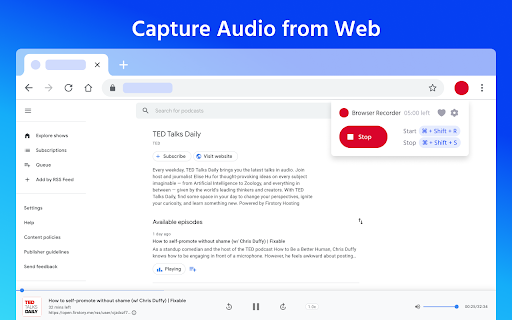
▸ Tab audio capture — record audio from any active tab (system/browser audio).
▸ MP3 & WAV output — choose compressed MP3 (low/medium/high bitrate) or lossless WAV for highest fidelity.
▸ High-quality audio — control MP3 quality and preserve stereo channels when available.
▸ Custom duration — set a maximum recording time (e.g., 20 minutes).
▸ Mute tab while recording — automatically silence the recording tab for private sessions.
▸ Hotkeys — start/stop instantly with Shift + R / Shift + S.
▸ Local saving, no uploads — all files are saved locally; no server uploads, ensuring privacy and offline use.
▸ Lightweight & real-time — records in real time with minimal CPU usage and no delays.

🚀 How it works:

1.Install Web Audio Recorder from the Chrome Web Store.
2.Open the tab with the audio you want to capture.
3.Click Record or press Shift + R.
4.Stop with Shift + S and download your MP3 or WAV file.

⭐ Why choose Web Audio Recorder?
✅ Simple, intuitive interface for fast recording.
✅ Record streaming audio and save locally in MP3/WAV.
✅ High-quality, low-latency capture — suitable for podcasts and music.
✅ Privacy-focused: no ads, no sign-ups, 100% offline.
✅ Free to use and lightweight.

📌 Pro tips: use WAV for lossless archives and MP3 (high) for podcast publishing. For webinars or recordings where you need maximum clarity, enable the highest MP3 quality or choose WAV.

🌟 Start capturing audio from your browser — fast, private, and under your control.
Install Web Audio Recorder now and turn your browser into a powerful audio capture tool.
Technical
- Version
- 2.4.9
- Manifest
- V3
- Size
- 558KiB
- Min Chrome
- 88
- Languages
- 33
- Featured
- Yes
Metadata
- ID
- pddjlpangidimliafldcpfkbkifmegbd
- Developer ID
- ud72edc0b96c936724fa110e691e13dd8
- Developer Email
- [email protected]
- Created
- Apr 1, 2024
- Last Updated (Store)
- Jun 4, 2026
- Last Scraped
- Jun 18, 2026
- Website
- soundstreamcapture.com
- Support URL
- —
- Privacy Policy
- https://soundstreamcapture.com/Privacy_Policy.html
Similar extensions
Alternatives to Web Audio Recorder – Capture & Save MP3/WAV, ranked by description similarity.

Audio Recorder: Free & Unlimited Recordings
Capture audio from your browser and auto-download it directly to your computer in your preferred format (MP3, WebM, WAV).
4.0K
★ 4.8

Simple Audio Capture
Capture audio from the current browser tab and save it as an MP3 file.
179

Tab Audio Recorder
Records audio from the current tab.
129
★ 5.0

Tab Audio Recorder
Record audio from a specific tab and edit it.
1.0K
★ 5.0

Browser Audio Recorder
Record audio playing in your browser
—

Chrome Audio Recorder
Record tab audio instantly. Save audio as high-quality MP4 or WEBM. Simple, unlimited, and free audio recorder for Chrome.
524
★ 4.5

Audio Recorder
Transform your computer into a dictaphone with Audio Recorder app. Perfect for easily recording voice memos, notes & sounds online.
1.0K
★ 3.6

Local Audio Recorder
Record audio from your browser and save it locally with full privacy.
123
Data sourced from the Chrome Web Store · last verified Jun 18, 2026.