
RiseVerse Library: Prevent class duplication in Webflow
RiseVerse Library, a Chrome Extension to prevent class duplication in Webflow and improve your development workflow.
As of May 2026, RiseVerse Library: Prevent class duplication in Webflow has 104 users and a 5.00/5 rating from 1 reviews in the Developer Tools category.
Usersup 22.4 percent+22.4%
104
104
Ratingno change0%
5.00
1 reviews
Reviewsno change0%
1
Version
0.2.2
Manifest V3
History
3 snapshotsTracking since Apr 1, 2026.
View as table
| Date | Users | Rating | Reviews | Version |
|---|---|---|---|---|
| Apr 1, 2026 | 85 | — | — | 0.2.2 |
| May 2, 2026 | 87 | — | — | 0.2.2 |
| May 31, 2026 | 89 | 5.00 | 1 | 0.2.2 |
| Now | 104 | 5.00 | 1 | 0.2.2 |
Permissions & access
- Permissions
- storageclipboardReadclipboardWrite
- Host access
- None declared
Screenshots


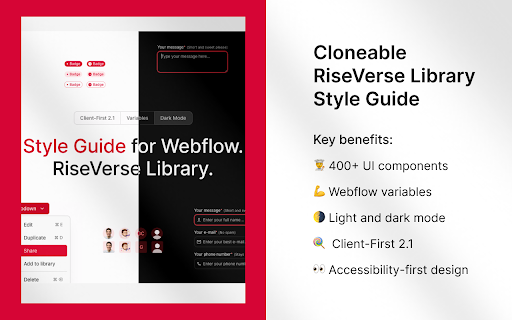
About
Improve your Webflow workflow with the RiseVerse Library Chrome Extension.

Tired of duplicated classes cluttering your Webflow projects? Say goodbye to class duplication with RiseVerseSync! 🚀

Our free, high-performance Chrome Extension prevents class duplication when you copy and paste elements from the RiseVerse Library or between projects. Keep your workflow smooth and focus on what you do best—building remarkable websites.

Key Benefits:

- ⏰ Save time : No more manual cleanup of duplicate classes.
- 📂 Stay organized : Maintain consistent class names across all your projects.
- ⚡ Boost efficiency : Optimized for best performance without slowing you down.
- 😍  Enjoy the process : Focus on what you do the best.
- 🆓 Completely free : Enjoy all features at no cost.

How to use RiseVerseSync:

- Clone Style Guides: Add our Light Mode or Dark Mode Style Guide to your Webflow project.
- Install the Extension: Add RiseVerseSync to your Chrome browser.
- Activate It: Click the icon in your toolbar to turn it on.
- Copy Elements: Copy components from our Component Library or any Webflow projects.
- Paste Seamlessly: Paste into another project without creating duplicate classes.

Style Guides:

☀️ Light Mod by default  ➜ webflow.com/made-in-webflow/website/riseverse-light-mode-style-guide
🌑 Dark Mode by default  ➜ webflow.com/made-in-webflow/website/riseverse-dark-mode-style-guide

It's that simple!

At RiseVerse, we empower designers to build remarkable sites. Our mission is to inspire and help designers, developers, and agencies focus on what you do best—building remarkable websites.

Simplify your Webflow workflow and keep your projects organized. Try RiseVerseSync Today!

⚠️ Our extension, RiseVerse, was inspired by xSync by Virat. While we initially recommended it for its great functionality, we ran into some internal edge cases that led us to create our own. Huge thanks to Virat for the original work that helped shape this project.

👉 Learn more at riseverse.com/library

📢 Follow us on Twitter: @RiseVerseLib
Technical
- Version
- 0.2.2
- Manifest
- V3
- Size
- 22.04KiB
- Min Chrome
- 88
- Languages
- 1
- Featured
- No
Metadata
- ID
- pddgnfchkhejgbgifelohpkmcnicmkel
- Developer ID
- ue34bbb7514c935dcdc0c52f1d0e3bc3a
- Developer Email
- [email protected]
- Created
- Sep 30, 2024
- Last Updated (Store)
- Mar 13, 2025
- Last Scraped
- May 31, 2026
- Website
- riseverse.com
- Privacy Policy
- https://riseverse.com/library/legal/privacy-policy
Similar extensions
Alternatives to RiseVerse Library: Prevent class duplication in Webflow, ranked by description similarity.

xSync by xAtom
A Chrome extension to prevent class duplication when pasting in Webflow.
1.0K
★ 4.5

Relume Chrome Extension for Webflow
Boost your productivity in Webflow with the Relume Chrome Extension.
20.0K
★ 4.9

Pagifye Sync
A Chrome extension to prevent class duplication when pasting in Webflow.
53
★ 5.0

Lumos Extension for Webflow
Searcher
6.0K
★ 4.9

Markflow: Copy Elements to Figma, React, etc.
Introducing Markflow, the ultimate Chrome extension designed to simplify the workflow for web designers and developers. Easily copy…
665
★ 2.7
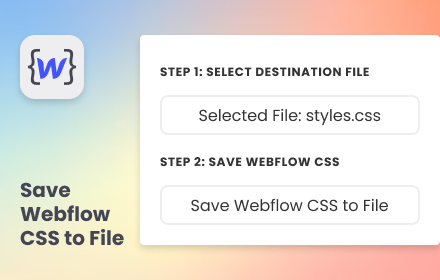
Save Webflow CSS to File
Simplify your development flow by pre-select a destination CSS file and save Webflow CSS directly into it.
94
★ 5.0

Flowgiri - Webflow chrome extension
Just Copy & Paste Webflow components and start building your website easily, and effortlessly with Flowgiri Chrome Extension.
781
★ 5.0

TheSprkl
TheSprkl is an extension for Webflow
78
★ 5.0
Data sourced from the Chrome Web Store · last verified May 31, 2026.