
Notion Prettier
Notion Prettier makes the code look prettier in Notion.
As of May 2026, Notion Prettier has 110 users in the Accessibility category.
Usersdown 3.5 percent−3.5%
110
110
Ratingno change0%
—
— reviews
Reviewsno change0%
—
Version
0.0.15
Manifest V3
History
3 snapshotsTracking since Apr 1, 2026.
View as table
| Date | Users | Rating | Reviews | Version |
|---|---|---|---|---|
| Apr 1, 2026 | 114 | — | — | 0.0.15 |
| May 2, 2026 | 120 | — | — | 0.0.15 |
| May 31, 2026 | 118 | — | — | 0.0.15 |
| Now | 110 | — | — | 0.0.15 |
Permissions & access
- Permissions
- contextMenus
- Host access
- None declared
Screenshots


About
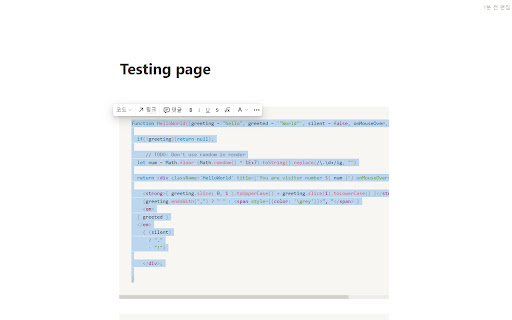
Feature 1 - code prettier
1. Select the code you want to organize in the Notion.
2. Press Ctrl + S ( command + S on Mac).
# Now you can use prettier,  if you select code on any website and right-click

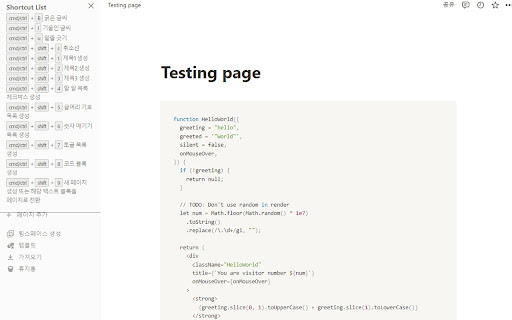
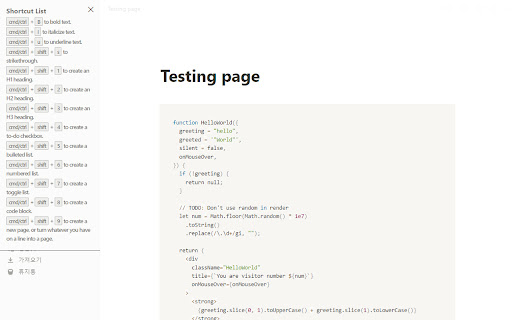
Feature 2 - Notion shortcut
1. Press Alt + Shift(option + shift on MAC) to toggle the note shortcut window.
2. You can close the note shortcut window using Alt + Shift(option +shift on MAC) , ESC, and X buttons.


기능 1 -  code prettier
1. 노션에서 정리할 코드를 선택하세요.
2. Ctrl + S(맥에서는 command + S) 를 누르세요.
# 이제 다른 웹사이트에서도 코드를 선택하고 오른쪽 클릭을 누르면 프리티어를 사용할 수 있어요!

기능 2 - Notion shortcut
1. Alt + Shift(맥에서는 option +shift)를 누르면 노션 단축키 창이 토글됩니다.
2. Alt + Shift(맥에서는 option +shift), ESC, X버튼을 이용하여 노션 단축키 창을 닫을 수 있습니다.
Technical
- Version
- 0.0.15
- Manifest
- V3
- Size
- 1.3MiB
- Min Chrome
- 88
- Languages
- 1
- Featured
- No
Metadata
- ID
- pcoijhnjkibiglbcgjcamilcdlfklbhn
- Developer ID
- u76853d70f40a9456d1b6eb88a5d50345
- Developer Email
- [email protected]
- Created
- Dec 22, 2022
- Last Updated (Store)
- Feb 10, 2024
- Last Scraped
- May 31, 2026
- Website
- —
- Support URL
- —
- Privacy Policy
- —
Similar extensions
Alternatives to Notion Prettier, ranked by description similarity.

Highlight - Little Helper
Highlight text, draw shapes, add sticky notes, and capture screenshots on any webpage.
15

NAI Prompt Manager Pro
# 사용 설명서 (User Manual)
- Kor: https://humble-nurse-81e.notion.site/NAI-Prompt-Manager-Pro-2e1fd930206a80dbb1f3db4705d83a7a
- Eng:…
189
★ 5.0

Pin Tab Protector
固定タブを誤って閉じられるのを防ぐChrome拡張機能
13

집중 리더
과학적 근거 기반 읽기 집중력 향상 도구 - 타이포그래피 최적화, 바이오닉 리딩, 난독증 친화 모드
13

note執筆 booster
## 概要
noteでの執筆を強力にサポート。サイドパネルで過去記事を瞬時に検索・参照し、リンク貼り付けもワンクリックで完結。
## 詳細説明
「note執筆 booster」は、noteクリエイターのための執筆効率化ツールです。…
32

TabSense
TabSense is an AI-powered Chrome extension that organizes your tabs into groups and streamlines your browsing.
28
★ 5.0

SiteNote
Quick notes for any website. Dashboard on new tab, note bubbles on sites.
3
★ 5.0

Web Note
Add and manage sticky notes on web pages.
31
Data sourced from the Chrome Web Store · last verified May 31, 2026.