
Cmd-E AI
An LLM which can see your open tab
As of May 2026, Cmd-E AI has 21 users and a 5.00/5 rating from 1 reviews in the Workflow & Planning category.
Usersdown 25.0 percent−25.0%
21
21
Ratingno change0%
5.00
1 reviews
Reviewsno change0%
1
Version
3.2.2
Manifest V3
History
2 snapshotsTracking since May 2, 2026.
View as table
| Date | Users | Rating | Reviews | Version |
|---|---|---|---|---|
| May 2, 2026 | 28 | 5.00 | 1 | 3.2.2 |
| May 31, 2026 | 23 | 5.00 | 1 | 3.2.2 |
| Now | 21 | 5.00 | 1 | 3.2.2 |
Permissions & access
- Permissions
- activeTabscriptingstorage
- Host access
- None declared
Screenshots
About
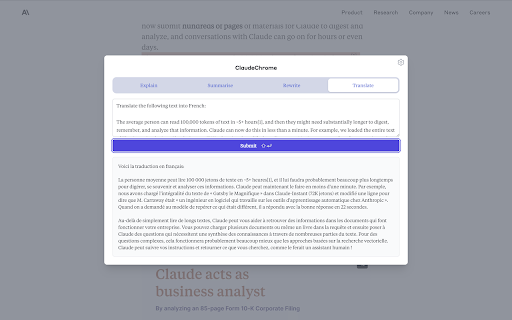
Cmd-E AI is a rapid way to query a large language model, without leaving your browser tab.

When reading or writing content in the browser, you might find yourself doing this dance too often:
- copying some text on the page
- opening a new Claude or ChatGPT tab
- pasting the text and annotating the input field with some question or instruction
- waiting for the response before returning to where you were

Or maybe you just switch tabs a lot to ask Claude something. What if you had a shortcut key to open a modal on any page, and could ask Claude in one or two keypresses?

Cmd-E opens a modal with fully customizable template prompts, prefilled with any text you had selected on the webpage.

Instructions:
1. Install the chrome extension
2. Optionally, select some text on any webpage
3. Press Cmd + E (or Ctrl + Shift + E on windows)
Technical
- Version
- 3.2.2
- Manifest
- V3
- Size
- 160KiB
- Min Chrome
- 88
- Languages
- 1
- Featured
- No
Metadata
- ID
- pcgefnihjmhkfnlckogmhamnofbdkdcb
- Developer ID
- ub3698445dad05dba9414bd6063205753
- Developer Email
- [email protected]
- Created
- May 14, 2023
- Last Updated (Store)
- Sep 17, 2024
- Last Scraped
- May 31, 2026
- Website
- —
- Support URL
- https://cmd-e.com/privacy
- Privacy Policy
- https://cmd-e.com/privacy
Similar extensions
Alternatives to Cmd-E AI, ranked by description similarity.

Accintia - Search Anything From Anywhere
Accintia Powered AI Bot
3
ChromeAI
Your AI-powered sidekick, always only two clicks away
156

AI SideChat: Send Text & Images with Prompts
Boost productivity: open ChatGPT, Gemini, DeepSeek & more in a side panel. Send text & images instantly with pre-defined prompts.
3

Smart Mind.
ASK the AI about any websites in 1 click.
6

SideMagic
Attach website content to AI chatbots as files
15

AI-Based Query Enhancement Tool
This Chrome extension transforms basic queries into more effective prompts for AI platforms like ChatGPT and Claude.
25
★ 5.0

GeePeeTee - OpenAi ChatGPT + Image assistant
Create text completions/edits, and generate images easily with a prompt.
9.0K
★ 2.6

ChatGPT & Claude AI Sidepanel
Access ChatGPT and Claude AI in a side panel
12
Data sourced from the Chrome Web Store · last verified May 31, 2026.