
Chat with GPT
Customize context menu and ChatGPT prompt on selected texts
As of May 2026, Chat with GPT has 9 users in the Workflow & Planning category.
Usersno change0%
9
9
Ratingno change0%
—
— reviews
Reviewsno change0%
—
Version
0.1
Manifest V3
History
2 snapshotsTracking since May 2, 2026.
View as table
| Date | Users | Rating | Reviews | Version |
|---|---|---|---|---|
| May 2, 2026 | 9 | — | — | 0.1 |
| May 31, 2026 | 10 | — | — | 0.1 |
| Now | 9 | — | — | 0.1 |
Permissions & access
- Permissions
- contextMenusstorage
- Host access
- None declared
Screenshots


About
A Chrome extension for customizing prompts easily.

1. In the option page, define context menu name and chat-gpt prompt (multiple ones)
2. Add your openai api key to the option page
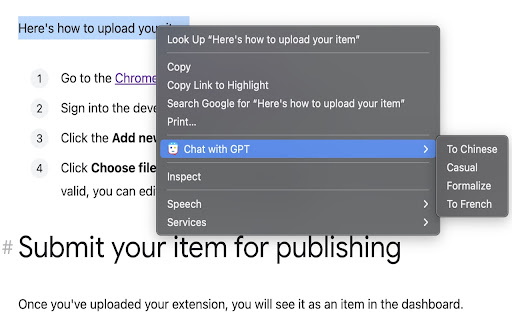
3. Load a web page, select texts, right click and choose a context menu defined in step 1
4. A popup window shows at the bottom-right corner, a background job sends prompt and selected texts to the openai api endpoint.
5. The result will show in the popup window.
6. Click anywhere in the page to dismiss the popup window.
Technical
- Version
- 0.1
- Manifest
- V3
- Size
- 710KiB
- Min Chrome
- 88
- Languages
- 1
- Featured
- No
Metadata
- ID
- pcfmecjeehobnnechaohmoofmlpmogab
- Developer ID
- uf5e7e6f8513eece822edbb7922f50bc6
- Developer Email
- [email protected]
- Created
- Mar 10, 2023
- Last Updated (Store)
- Mar 10, 2023
- Last Scraped
- May 31, 2026
- Website
- —
- Support URL
- —
Similar extensions
Alternatives to Chat with GPT, ranked by description similarity.

GPT-Prompter
Fast custom prompts to GPT-3.5, GPT-4 and ChatGPT API
9.0K
★ 4.3

Power Prompt For ChatGPT & OpenAi
Power Prompt - Enhance ChatGPT interaction. Seamless conversations. Choose models, save templates, set temp, length & tokens.
259
★ 3.0

ChatGPT Prompt Library
Built-in prompt manager for ChatGPT — quick, clean, and always at your fingertips.
5

Prompts Library
Chrome extension for chat.openai.com to show a Prompts Library
19

Prompt Builder
Unlock the full potential of AI tools like ChatGPT, Claude, Gemini, and Grok by crafting reusable prompts for personalized content.
1

ChatGPT Prompts Manager Extension
ChatGPT Prompts Manager Extension
297
★ 4.6
Open in GPT
Open selected text directly in ChatGPT with a customized prompt.
182
★ 4.0

PromptGPT
Easily save and load templates into ChatGPT. Copy pasting is outdated
40
Data sourced from the Chrome Web Store · last verified May 31, 2026.