
Accessibility Surfer
Universal dwell clicking on every site, with smart YouTube targeting on top. Plus text-accessibility controls.
As of June 2026, Accessibility Surfer has — users in the Accessibility category.
Usersno change0%
—
—
Ratingno change0%
—
— reviews
Reviewsno change0%
—
Version
0.5.0
Manifest V3
History
1 snapshotsTracking since Jun 22, 2026.
Not enough history yet for this metric — the chart fills in as we collect more snapshots.
View as table
| Date | Users | Rating | Reviews | Version |
|---|---|---|---|---|
| Jun 22, 2026 | — | — | — | 0.5.0 |
| Now | — | — | — | 0.5.0 |
Permissions & access
- Permissions
- activeTabstoragetabs
- Host access
- <all_urls>
Screenshots




About
Accessibility Surfer is a free Chrome extension built for anyone who finds clicking painful, unreliable, or just harder than it needs to be. If you use a head tracker, eye gaze device, mouth stick, joystick, or anything else that moves a cursor, this fills the gap. If you have ALS, MS, cerebral palsy, essential tremor, RSI, chronic fatigue, or a spinal cord injury, this was built with you in mind. And if you just find hovering easier than clicking, that's reason enough.
Dwell clicking on every website

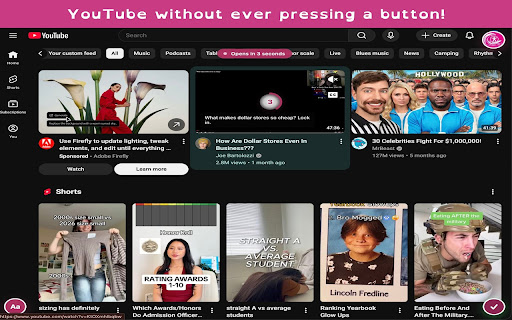
Hover any link, button, input, or dropdown and a blue ring appears and counts down. When it hits zero, Accessibility Surfer clicks it for you. No button press required. Works on every website automatically the moment you install it.
Smart YouTube mode

YouTube gets its own treatment. A 5 second dwell ring on video thumbnails, a separate 3 second countdown for player buttons and controls. Everything is adjustable from the popup.
Text accessibility on any page

Change the font to OpenDyslexic, Lexend, Atkinson Hyperlegible, Arial, or Comic Sans. Adjust text size, letter spacing, word spacing, and line height. Changes apply instantly to any website and stay applied as you browse.
Reading mode

Strip any article down to just the text. No ads, no sidebars, no distractions. Focus mode and Fatigue mode let you read at your own pace.
Everything stays on your device

No accounts. No tracking. No data sent anywhere. Your settings are stored locally in your browser and nowhere else.
Technical
- Version
- 0.5.0
- Manifest
- V3
- Size
- 447KiB
- Min Chrome
- 88
- Languages
- 1
- Featured
- No
Metadata
- ID
- pccmbliammnfaklpblehkonmhcdnedhn
- Developer ID
- u102c24c35bc480ed3d74c6f93d9c36b3
- Developer Email
- [email protected]
- Created
- Jun 21, 2026
- Last Updated (Store)
- Jun 21, 2026
- Last Scraped
- Jun 22, 2026
- Website
- https://axolassist.com/
- Support URL
- https://axolassist.com/privacy.html
- Privacy Policy
- https://axolassist.com/privacy.html
Data sourced from the Chrome Web Store · last verified Jun 22, 2026.