
Send 2 AI
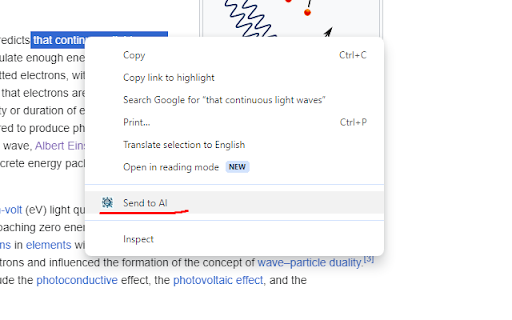
Mark text, right click, then click "send to AI". Then the marked text will be put into a template and copied to clipboard…
As of May 2026, Send 2 AI has 3 users in the Productivity category.
Usersdown 40.0 percent−40.0%
3
3
Ratingno change0%
—
— reviews
Reviewsno change0%
—
Version
1.0
Manifest V3
History
1 snapshotsTracking since Apr 1, 2026.
View as table
| Date | Users | Rating | Reviews | Version |
|---|---|---|---|---|
| Apr 1, 2026 | 5 | — | — | 1.0 |
| Now | 3 | — | — | 1.0 |
Permissions & access
- Permissions
- activeTabcontextMenusclipboardWritetabsstorage
- Host access
- None declared
Screenshots

About
Mark text, right click, then click "send to AI". Then the marked text will be put into a template and copied to clipboard automatically, and you'll be automatically redirected to chatGPT page, so you can paste it.

You can change the template on extension options, you can also change which link do you want to be redirected to.

Example template: "Please tell me about {text} in a very simple way as if I was 5 years old kid". Here {text} is the placeholder for the text you marked.

E.g. If you mark a text like "Himalayan mountains", right click and click on "Send2AI" on the context menu (the menu that appear when you right click), you'll be redirected automatically to the ChatGPT (or any link you set on extension options page) having this on your clipboard ready to paste:
"Please tell me about Himalayan mountains in a very simple way as if I was 5 years old kid".
which is based on the template abovce. You can change the template on the extension options-

Install this extension to avoid the hassle of having to open ChatGPT and write the same type of prompt every time. Here just write a prompt once, and let this extension make it easier for you to use the ChatGPT when you browse online. For example you can use it to let ChatGPT explain you something you read online fast, make translations fast etc.
Technical
- Version
- 1.0
- Manifest
- V3
- Size
- 10.5KiB
- Min Chrome
- 88
- Languages
- 1
- Featured
- No
Metadata
- ID
- pbhniadppdeflanfhkgcnejdpgabecke
- Developer ID
- uc02bfb2d51d2d9e5646790444e3d5369
- Developer Email
- [email protected]
- Created
- Jan 25, 2024
- Last Updated (Store)
- Jan 25, 2024
- Last Scraped
- May 31, 2026
- Website
- —
- Support URL
- —
- Privacy Policy
- —
Similar extensions
Alternatives to Send 2 AI, ranked by description similarity.

ScrollMark - AI Chat Bookmarks
Bookmark specific AI chat messages and jump back to them instantly
3

AI Prompt Tool — ChatGPT Hotkeys & Prompt Extension
Quickly insert prompt templates into AI chats. Features draggable sidebar and automatic clipboard merging.
23

Highlight2Prompt
Highlight any text → choose a prompt (Explain, Expand, Fact Check, or custom) → send it to your favorite AI
6

ChatGPT Conversation Bookmarks
Bookmark specific conversation turns in ChatGPT for easy navigation
6

LLM Page Automation:A Tool for Gemini™,Chatgpt™ and Claude™
LLM Page Automation is a tool that helps you predefine Promet and model workflows, enhancing the functionality of your LLM page.
15

Send to ChatGPT
Send selected text to ChatGPT with a custom prompt.
41
★ 5.0

Copy as Markdown for AI Chat
Copy AI chat responses as Markdown
18

ChatGPT Template Paster
Paste template text into ChatGPT prompt.
6
Data sourced from the Chrome Web Store · last verified May 31, 2026.