
File Links Opener
Open links to local files and folders (file:///) in system file manager or associated application.
As of May 2026, File Links Opener has 70 users in the Productivity category.
Usersdown 11.4 percent−11.4%
70
70
Ratingno change0%
—
— reviews
Reviewsno change0%
—
Version
0.7
Manifest V3
History
2 snapshotsTracking since May 2, 2026.
View as table
| Date | Users | Rating | Reviews | Version |
|---|---|---|---|---|
| May 2, 2026 | 79 | — | — | 0.7 |
| May 31, 2026 | 75 | — | — | 0.7 |
| Now | 70 | — | — | 0.7 |
Permissions & access
- Permissions
- nativeMessagingnotificationsstorage
- Host access
- None declared
Screenshots
About
File Links Opener is an extension for web browsers that allows you to open links to local files and folders (file:///) in the system file manager or associated application.

The main purpose of this extension is to provide transparent access to files and folders located on local or network drives from a web page opened in a browser.

Usage examples:

- A home or corporate electronic library with a web interface.
- An internal (home or corporate) website with links to files and folders hosted on local or network drives.
- A corporate database with a web interface containing links to files and folders located on network drives.

FEATURES

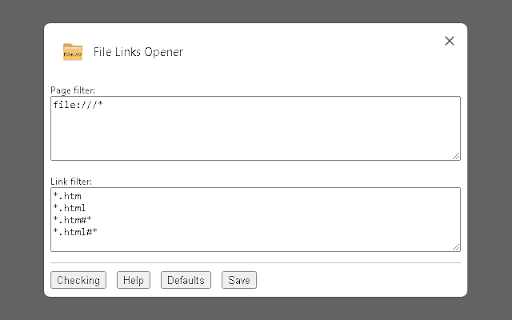
The ability to specify the addresses of the sites to which the extension will be applied.

The ability to specify which files (by extension) will be opened in the system file manager or associated application, and which ones the web browser will try to open on its own.

The ability to centrally configure all instances of the extension. This allows, for example, the system administrator to set extension parameters for all users through a single external configuration file.

Internationalization. Full support for the following languages: English, Russian. The list may be expanded in future versions.

Open source code.

NOTES

For the extension to work, you must additionally install an intermediate application that allows the extension to interact with native applications of the operating system.

Currently, the following web browsers are supported: Google Chrome, Microsoft Edge, Mozilla Firefox, Yandex Browser. The list may be expanded in future versions.

The following operating systems are currently supported: Microsoft Windows (7 and above). The list may be expanded in future versions.

Full documentation on installation, configuration and use is available at the link https://dmitryunruh.github.io/file-links-opener/index.html
Technical
- Version
- 0.7
- Manifest
- V3
- Size
- 27.57KiB
- Min Chrome
- 88
- Languages
- 2
- Featured
- No
Metadata
- ID
- pbgadmfpckgkkofhjelocdbokcgjcdee
- Developer ID
- u42c2ec938ff973a07469f4fb7026540d
- Developer Email
- [email protected]
- Created
- Jan 15, 2024
- Last Updated (Store)
- Feb 1, 2024
- Last Scraped
- May 31, 2026
- Website
- —
- Support URL
- —
- Privacy Policy
- —
Similar extensions
Alternatives to File Links Opener, ranked by description similarity.

Local File Server
Serve local files via "http://localhost/" URLs.
900
★ 2.0

Folder Opener
Opens up folder link
263

Open Links at Tab
Open multiple links from a text file with a specified delay.
3
★ 5.0

Open in Chromium Browser
Open the current tab or all tabs in Chromium browser or send links to Chromium from right-click context menu.
5.0K
★ 4.2

SecureFileOpener
Extensión para interactuar con contenido específico en pestañas activas.
—

Open Local Files in Google Chrome™
Opening links to local files is prohibited in chrome, but this extension allows you to open them.
4.0K
★ 2.5

Open All Links in Tabs
Extract links from text input and open each link in a separate tab. Perfect for quickly opening multiple URLs from copied text.
14
★ 5.0

Link your File
Companion for the LinkYourFile desktop app to skip the link page.
1.0K
★ 5.0
Data sourced from the Chrome Web Store · last verified May 31, 2026.