
Salesforce Profile Reader
Lists Various Salesforce Permissions of Profiles/Pemrmission Sets
As of June 2026, Salesforce Profile Reader has 5,000 users and a 4.70/5 rating from 10 reviews in the Developer Tools category.
Usersno change0%
5.0K
5,000
Ratingno change0%
4.70
10 reviews
Reviewsno change0%
10
Version
0.8.2
Manifest V3
Permissions & access
- Permissions
- cookiesdeclarativeContent
- Host access
- https://*.salesforce.com/*, https://*.force.com/*, https://*.cloudforce.com/*
Screenshots
About
*This extension is still in beta version. Functions may be added or deleted, or the screen design may be changed significantly.

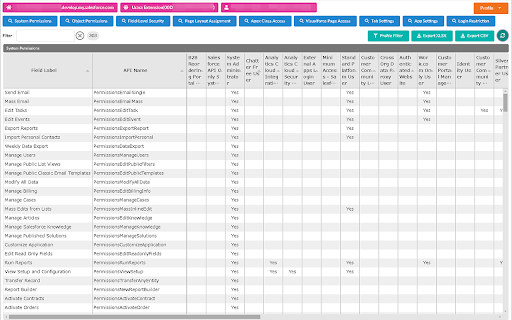
Lists various permissions for each Salesforce profile/permission set.

[How To Use]
When you open Salesforce, the icon for this extension will be enabled.
If you click the icon, the extension screen will open in another tab.

The user must have API access authority.
A Salesforce session must exist at the time the extension is opened.

[Main Functions]
The following can be retrieved for each profile/permission set, listed, and compared on the screen:

- System Permissions
- Object Permissions
- Field-Level Security
- Page Layout Assignment (profile only)
- Apex Class Access
- Visualforce Page Access
- Tab Settings
- App Settings
- Login Restriction (profile only)
- Permission Set Group (permission set only)
- Prmission Set Assignment (permission set only)

[SUb Functions]
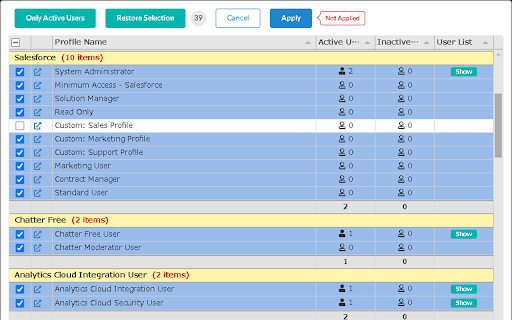
- Profile Filtering
- Excel/CSV Export
- Sortable Column
- User List of the Profile/Permission Set

You can also see how permissions are summarized by permission set group or by user.

For Permission Set Group Summary, the Permission Set Group (blue underline) is displayed in the leftmost fixed column and the Mute Permission Set (red underline) is displayed in the last column.

For User Summary, Summary (green underline) is shown in the leftmost fixed column and Profile (light blue underline) is shown right next to it. Permission set groups are underlined in blue. The user's permission summary is calculated internally, so please report any errors.

*This extension does not have an update function. However, it is safe to use in a production environment.

[Note]
Each function makes multiple API requests for each information retrieve/reload (varies depending on the number of profiles and target functions). Please pay attention to the API usage limit.

For organizations with a large number of profiles and permission management targets, it may take time to retrieve information.

Please let me know of any bug reports or requests in the evaluation comments for the time being.

[Limitations]
If the number of profiles is up to about 100 and the number of objects is up to about 400, it will take some time, but results can be retrieved. It is unknown whether it can be acquired in a higher environment.

"Permission set assignment" is not likely to work for large organizations that use Experience Cloud.

[Updates]
2024/03 Simple display of connection status is now available and slightly improved error handling in ver. 0.8.2
2024/03 Added support for permission sets in ver.0.8.0
Technical
- Version
- 0.8.2
- Manifest
- V3
- Size
- 5.49MiB
- Min Chrome
- 88
- Languages
- 2
- Featured
- No
Metadata
- ID
- pbecpmbbpaaibifnkknhhmigbaiaiagl
- Developer ID
- u86d2efb45142df0bb1205a3b0ddf4b74
- Developer Email
- [email protected]
- Created
- Nov 15, 2022
- Last Updated (Store)
- Mar 30, 2024
- Last Scraped
- Jun 8, 2026
- Website
- —
- Support URL
- —
- Privacy Policy
- —
Similar extensions
Alternatives to Salesforce Profile Reader, ranked by description similarity.

Salesforce Permission Comparator
Compare user permissions, profiles, and permission sets side-by-side in Salesforce.
36

Salesforce Access Toolkit
Diagnose 'Insufficient Privileges' errors in Salesforce. Find exactly which permission is missing and fix it in one click.
17
★ 5.0

Crazy Compare For Salesforce
Quickly compare two different salesforce profiles and find difference
5.0K
★ 3.6

EasyCrud(Salesforce)
Assign your CRUD and FLS for Salesforce in Bulk from Single Screen
4.0K
★ 4.6

Salesforce PowerTools
Supercharge your Salesforce admin and developer experience with our Firefox extension, designed to streamline your daily tasks.
46

Salesforce Field Metadata Exporter
Export Salesforce object and field metadata to CSV with advanced filtering. Filter by user permissions and system objects.
168

Salesforce Tool Suite
Compare Salesforce Metadata, Generate Metadata Excel Reports, Monitor Debug Logs, Explore Schema, & Bulk DML on Salesforce Metadata
10.0K
★ 4.8

Salesforce Inspector Reloaded
Productivity tools for Salesforce administrators and developers to inspect data and metadata directly from the Salesforce UI.
500.0K
★ 4.8
Data sourced from the Chrome Web Store · last verified Jun 8, 2026.