
Image Magic
Swiss Army Knife of Image Manipulation (Resize, crop, flip, rotate, or remove background color)
As of June 2026, Image Magic has 744 users and a 2.00/5 rating from 1 reviews in the art category.
Usersup 2.8 percent+2.8%
744
744
Ratingno change0%
2.00
1 reviews
Reviewsno change0%
1
Version
0.2.0
Manifest V3
History
3 snapshotsTracking since Apr 23, 2026.
View as table
| Date | Users | Rating | Reviews | Version |
|---|---|---|---|---|
| Apr 23, 2026 | 724 | 2.00 | 1 | 0.2.0 |
| May 13, 2026 | 766 | 2.00 | 1 | 0.2.0 |
| Jun 8, 2026 | 755 | 2.00 | 1 | 0.2.0 |
| Now | 744 | 2.00 | 1 | 0.2.0 |
Permissions & access
- Permissions
- storage
- Host access
- None declared
Screenshots
About
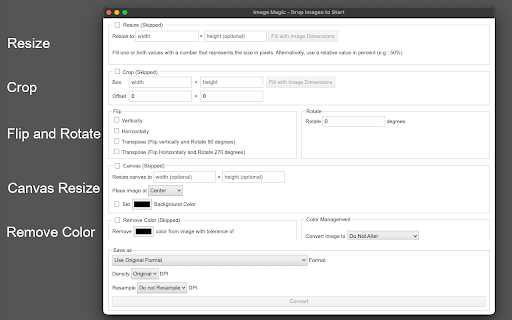
The "Image Magic" provides a set of tools to convert images offline without any native image editor required. This tool can read and manipulate almost all known image types, even if your browser cannot render the image. It uses the "ImageMagic" command-line tool internally for all conversions.

Features:
1. Resize all images in bulk (This function accepts units in pixel and percent)
2. Crop an image with an optional offset from the top left side of the canvas.
3. Fip and image (vertical, horizontal, transpose, and transverse)
4. Rotate and image at an arbitrary angle.
5. Resize the image's canvas. You can optionally apply a solid color to the canvas as well
6. Convert a color to a transparent layer.
7. Save the images as grayscale.
8. Save in most known image formats (PNG, JPEG, TIFF, BMP, ...) or even in PDF format.
9. Resample the image to 1200, or 600 DPI
10. Change image density

How to Use:

Drag and drop single or multiple image files to the extension's interface. Select one or more operations and press the "Convert" button. The extension starts converting images one by one and saves the output in the default download directory of your browser.

About the internal "ImageMagic" JavaScript library:
ImageMagick is a free and open-source cross-platform library for displaying, creating, converting, modifying, and editing raster images. Created in 1987 by John Cristy, it can read and write over 200 image file formats. It and its components are widely used in open-source applications.
Technical
- Version
- 0.2.0
- Manifest
- V3
- Size
- 1.42MiB
- Min Chrome
- 88
- Languages
- 1
- Featured
- No
Metadata
- ID
- pbdhabbdegnnjpdghecnibbeeicglfkc
- Developer ID
- u671f43fce17c1fd114ededef75edd56e
- Developer Email
- [email protected]
- Created
- Apr 28, 2020
- Last Updated (Store)
- Feb 21, 2022
- Last Scraped
- Jun 8, 2026
- Website
- —
- Support URL
- https://add0n.com/image-resizer.html
- Privacy Policy
- —
Similar extensions
Alternatives to Image Magic, ranked by description similarity.

Image Resizer
🖼️ Resize images, crop images, and compress photos online using Image Resizer. Perfect for social media, web, and bulk resizing.
4.0K
★ 4.8

Image editor PaintMagick for photos
PaintMagick to create and edit photos and images online using a web browser
2.0K
★ 2.6

PNG, GIF, JPEG Optimizer
Easy to use optimizer, resizer for image files. Your image files can be 10%-70% smaller. Supports PNG, Animation GIF, JPEG files.
2.0K
★ 4.7

Image Format Converter
Convert images to PNG, JPG, WebP, SVG, AVIF, or GIF with a right-click. Select images via thumbnails in the popup.
88
★ 4.0

Quick Image Tools
Edit images instantly, right from your browser.
—

Bulk Image Downloader - HImage
Easily batch download images from web pages
20.0K
★ 4.2

Image to PDF Converter
Convert PNG, JPEG, and WebP images to PDF
36

Image editor
Image resizing,resolution adjustment,image rotation,image watermarking,image compression,image to PDF,poster generation,and more.
106
★ 5.0
Data sourced from the Chrome Web Store · last verified Jun 8, 2026.