
URL Keeper
Save and manage URLs with notes
As of June 2026, URL Keeper has 49 users and a 3.00/5 rating from 1 reviews in the Education category.
Usersup 188.2 percent+188.2%
49
49
Ratingno change0%
3.00
1 reviews
Reviewsno change0%
1
Version
1.1
Manifest V3
History
3 snapshotsTracking since Apr 23, 2026.
View as table
| Date | Users | Rating | Reviews | Version |
|---|---|---|---|---|
| Apr 23, 2026 | 17 | 3.00 | 1 | 1.1 |
| May 13, 2026 | 29 | 3.00 | 1 | 1.1 |
| Jun 8, 2026 | 20 | 3.00 | 1 | 1.1 |
| Now | 49 | 3.00 | 1 | 1.1 |
Permissions & access
- Permissions
- activeTabstorage
- Host access
- None declared
Screenshots
About
Are you tired of constantly copying and pasting URLs into notes or documents, only to struggle finding them later? URL Keeper is the perfect Chrome extension to help you save, organize, and retrieve URLs effortlessly—without ever needing to copy-paste again!

📌 What Does URL Keeper Do?
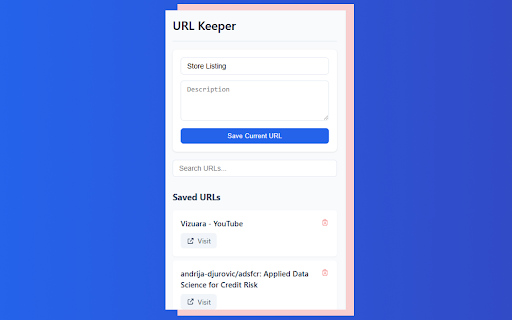
Whenever you come across an important webpage, URL Keeper automatically captures the page URL with just a click. You can add a custom note if needed, and everything gets stored in an organized list within the extension. The next time you need that link, simply search within URL Keeper instead of digging through bookmarks or old documents.

🚀 Why Install URL Keeper?
✅ No More Copy-Paste Hassles – The extension automatically picks the URL of the page you’re on, saving you time and effort.
✅ Stay Organized – Store all your important URLs in one place instead of cluttering bookmarks or scattered notes.
✅ Add Context with Notes – Save a brief note alongside the URL to remember why you saved it in the first place.
✅ Instant Search & Access – Find your saved URLs quickly using the built-in search, without scrolling through long lists.
✅ Boost Productivity – Whether you’re researching, working, or managing projects, keep your important links structured and easy to retrieve.

🔒 Privacy First – Your Data Stays With You
We take privacy seriously. URL Keeper does not require login, does not retrieve or track any data, and does not send your saved URLs anywhere. Everything is securely stored locally on your system, ensuring full control over your information.

🛠️ Who Is It For?
Professionals – Keep track of work-related articles, reports, and tools without losing them.
Students & Researchers – Save academic papers, study resources, and references for quick access.
Developers & Designers – Organize code snippets, documentation, and design inspirations with notes.
Anyone Who Browses A Lot – If you frequently save links for later, URL Keeper is the simplest and fastest way to keep them handy.

✨ How Does It Work?

1️⃣ Open the page you want to save.
2️⃣ Click on the URL Keeper extension icon.
3️⃣ (Optional) Add a note to remember why you saved the link.
4️⃣ Click "Save" – that's it! Your URL is securely stored for future use.

When you need it later, just open URL Keeper and search for the URL or your notes—no more endless scrolling through bookmarks!

Stop wasting time hunting for links. Install URL Keeper today and organize your browsing like a pro!
Technical
- Version
- 1.1
- Manifest
- V3
- Size
- 66.22KiB
- Min Chrome
- 88
- Languages
- 1
- Featured
- No
Metadata
- ID
- papijegpggddkaglefblokeibdagdlnn
- Developer ID
- ucba6178f83a1f1a767b8b6c8fa2fc3df
- Developer Email
- [email protected]
- Created
- Mar 6, 2025
- Last Updated (Store)
- Mar 9, 2025
- Last Scraped
- Jun 8, 2026
- Website
- —
- Support URL
- —
- Privacy Policy
- —
Similar extensions
Alternatives to URL Keeper, ranked by description similarity.

LinkNote
Save titled notes for different URLs and easily revisit them directly from the extension's organized saved notes section.
11
★ 5.0

Save Smart Notes & Knowledge Manager
Save highlighted text from any website as organized notes with categories and tags.
3

Save for Later - The Bookmarking Tool
Save for Later - The Bookmarking Tool
Save for Later is your personal web curator, a Chrome extension designed to transform the way…
40

Recallify
Your internet knowledge assistant
10

My Notes Keeper
A compact, modern notes extension — add, edit, save, copy, delete, and clear all notes. Made by Invodev.
11

YouTube Bookmarks Saver (Local)
Save your favorite YouTube moments locally with IndexedDB - works completely offline
2

Hint - Quick Notes. No Pen.
Save and organize notes instantly while browsing. Create collections and access everything quickly from a side panel.
8
★ 5.0

Bookmark CE | Save, Search, Simplify & Learn
Manage and search your knowledge base & saved searches seamlessly, with the power of AI.
66
★ 5.0
Data sourced from the Chrome Web Store · last verified Jun 8, 2026.