
Ask Chatgpt
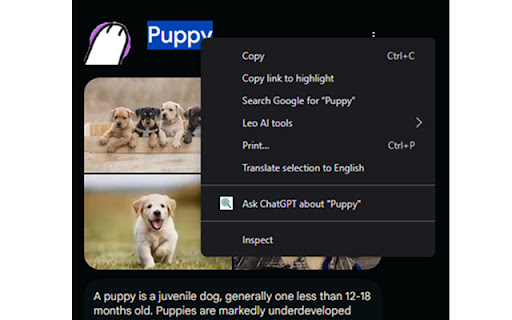
Right-click selected text to instantly ask ChatGPT.
As of May 2026, Ask Chatgpt has 33 users and a 5.00/5 rating from 4 reviews in the Productivity category.
Usersdown 8.3 percent−8.3%
33
33
Ratingno change0%
5.00
4 reviews
Reviewsno change0%
4
Version
1.1
Manifest V3
History
2 snapshotsTracking since May 5, 2026.
View as table
| Date | Users | Rating | Reviews | Version |
|---|---|---|---|---|
| May 5, 2026 | 36 | 5.00 | 4 | 1.1 |
| May 16, 2026 | 39 | 5.00 | 4 | 1.1 |
| Now | 33 | 5.00 | 4 | 1.1 |
Permissions & access
- Permissions
- contextMenus
- Host access
- None declared
Screenshots
About
Ask ChatGPT — Right-click Search Extension
Ask ChatGPT anything instantly. Select text on any webpage, right-click, and open a new ChatGPT tab with your query already submitted.

✔ Fast, minimal, and privacy-friendly
✔ No setup needed — works out of the box
✔ Saves time by skipping manual copy-paste
✔ Perfect for research, summaries, code help, definitions, and more
Technical
- Version
- 1.1
- Manifest
- V3
- Size
- 1.74MiB
- Min Chrome
- 88
- Languages
- 1
- Featured
- No
Metadata
- ID
- paopamjjfpjncejndlieapchmfabjmfn
- Developer ID
- uf73130666726a5f5760734657e7dbc4e
- Developer Email
- [email protected]
- Created
- May 8, 2025
- Last Updated (Store)
- May 8, 2025
- Last Scraped
- May 16, 2026
- Website
- —
- Support URL
- —
- Privacy Policy
- —
Similar extensions
Alternatives to Ask Chatgpt, ranked by description similarity.

Ask ChatGPT - Text Search
Highlight text on any site, right-click to search with ChatGPT instantly. Your AI assistant is always one right-click away.
14
★ 5.0

Search on ChatGPT
Quickly search for selected text on any webpage directly in ChatGPT
2

AskChatGPT
A Chrome extension that adds ChatGPT quick access to your browser context menu and popup.
30
★ 5.0

ChatGPT Quick Search
Quickly search ChatGPT from any context with omnibox, right-click menu, or popup interface and show historical records
7

ChatGPT Fast Search
Allows to make requests to OpenAI's ChatGPT directly from the search bar. Just type `gpt`, press `Tab` and your search request
1
★ 5.0

Search In ChatGPT
Quickly search highlighted text in ChatGPT
3

ChatGPT Search
Add ChatGPT to the address bar: type 'chat' + Tab to search. Optional auto-send when using ?prompt= (toggle in popup).
10

GptSend: Send any text to ChatGPT
Right-click highlighted text to send it to ChatGPT.
6
★ 5.0
Data sourced from the Chrome Web Store · last verified May 16, 2026.