
HexDump - Hex Viewer
Display file contents in hexadecimal, and ascii
As of June 2026, HexDump - Hex Viewer has 326 users in the Developer Tools category.
Usersup 5.2 percent+5.2%
326
326
Ratingno change0%
—
— reviews
Reviewsno change0%
—
Version
0.1.3
Manifest V3
History
3 snapshotsTracking since Apr 23, 2026.
View as table
| Date | Users | Rating | Reviews | Version |
|---|---|---|---|---|
| Apr 23, 2026 | 310 | — | — | 0.1.3 |
| May 13, 2026 | 320 | — | — | 0.1.3 |
| Jun 8, 2026 | 333 | — | — | 0.1.3 |
| Now | 326 | — | — | 0.1.3 |
Permissions & access
- Permissions
- storage
- Host access
- None declared
Screenshots
About
File Inspection and Analysis Tool
--

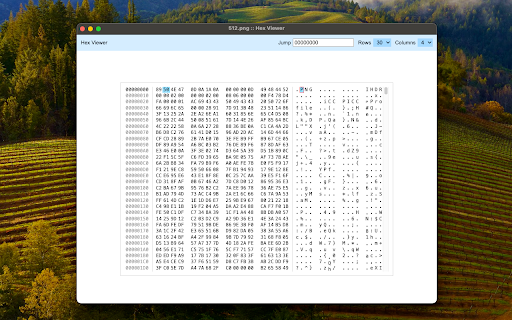
This extension serves as a versatile tool for displaying file contents in both hexadecimal and ASCII formats. It functions as an inspection utility, facilitating tasks such as data recovery, reverse engineering, and programming. Moreover, it aids in identifying file types using magic numbers. The extension boasts customizable features, allowing users to define the number of rows and columns displayed.

Instructions:
After installation, access the extension by clicking the toolbar button and opening the interface. Subsequently, either double-click on the interface or drag and drop a file into the view.

The extension comprises three main segments: the current offset, hex view, and ASCII view. Users can use the jump tool to navigate to specific positions within the file. To load another file, drop a new file into the view. This tool works offline and does not use any remote services.
Technical
- Version
- 0.1.3
- Manifest
- V3
- Size
- 423KiB
- Min Chrome
- 88
- Languages
- 1
- Featured
- No
Metadata
- ID
- paoagpopkpfnoniompgfpoobmlmphmek
- Developer ID
- u7feba4b844efc05c66dc61c318b30c89
- Developer Email
- [email protected]
- Created
- Mar 3, 2024
- Last Updated (Store)
- Apr 4, 2024
- Last Scraped
- Jun 8, 2026
- Website
- —
- Privacy Policy
- —
Similar extensions
Alternatives to HexDump - Hex Viewer, ranked by description similarity.

MP4Inspector
Inspect MP4 Boxes from the DevTools!
853
★ 5.0

Web page stats
Base Level Extension
—

HTML Tag Error Checker
Check the HTML start and end tags for problems.
6.0K
★ 5.0

Unicode Inspector
Break down strings into unicode codepoints
237

Monocle
A log analysis tool which is an chrome offline extension or web-based online service to help you analyze log or text files.
151
★ 5.0

ALT-DEV TOOLS
A powerful sidebar DevTools alternative — Elements, Console, Network, Sources & Application panels right in your browser sidebar
—
★ 5.0

Web Decoder
A helper to decode text encodings such as base64 or UNIX timestamps
7

Encoding Tool
Encode/decode: Base64/URL/Unicode/Hex/HTML, MD5/SHA hash, UUID/GUID. Offline, 10 languages.
485
★ 5.0
Data sourced from the Chrome Web Store · last verified Jun 8, 2026.