
Cross AI
Cross exchange of context between AI platforms
As of June 2026, Cross AI has 99 users and a 5.00/5 rating from 3 reviews in the Workflow & Planning category.
Usersno change0%
99
99
Ratingno change0%
5.00
3 reviews
Reviewsno change0%
3
Version
1.3.4
Manifest V3
90-day change · In the last 90 days this extension 1 version update, changed permissions.
History
9 snapshotsTracking since Apr 23, 2026.
View as table
| Date | Users | Rating | Reviews | Version |
|---|---|---|---|---|
| Apr 23, 2026 | — | — | — | — |
| Apr 30, 2026 | 23 | 5.00 | 3 | 1.3.3 |
| May 7, 2026 | 29 | 5.00 | 3 | 1.3.3 |
| May 12, 2026 | 35 | 5.00 | 3 | 1.3.3 |
| May 17, 2026 | 44 | 5.00 | 3 | 1.3.4 |
| May 24, 2026 | 58 | 5.00 | 3 | 1.3.4 |
| May 30, 2026 | 64 | 5.00 | 3 | 1.3.4 |
| Jun 6, 2026 | 65 | 5.00 | 3 | 1.3.4 |
| Jun 15, 2026 | 75 | 5.00 | 3 | 1.3.4 |
| Now | 99 | 5.00 | 3 | 1.3.4 |
Changelog
- May 12, 2026description
Cross AI – Transfer Context Between AI Platforms
A) The Problem You Face Every Day

You're juggling multiple AI platforms—ChatGPT for coding, Claude for writing, Gemini for research, DeepSeek for reasoning, and Perplexity for web-powered answers.

You find the perfect answer on one platform, but now you need to continue that conversation on another.

So what do you do?

You manually copy the entire conversation.
You paste it.
You rewrite context.
You lose details.
You waste 5–10 minutes just to maintain continuity.

This is where Cross AI comes in.

B) What Cross AI Does (In 3 Steps)

Step 1: Save
Click the Cross AI button and save your conversation.

Step 2: Transfer
Move context between AI platforms instantly.

Step 3: Inject
Continue your work without losing any context.

That's it.

No database.
No accounts.
No complicated setup.

C) Why Cross AI?
1. Save Time (And Your Sanity)

Stop manually copying conversations.
Save with one click and transfer in seconds.

2. Maintain Context Across Platforms

Get the same high-quality responses because each AI can see the full conversation history, not just your summary.

3. Optional Summarization

Working with long conversations?

Use our Summarize feature (powered by Google's Gemini LLM) to condense your context while keeping the important details.

4. 100% Privacy-First

All saved conversations stay on your device in Chrome's local storage.

Summarization happens in memory and is deleted immediately (no database storage).

We never track, log, or retain your conversation data.

No accounts needed.
No sign-up.
No tracking.

5. Zero Setup Friction

Install it.
Use it.
That's all.

No accounts.
No configuration.
No learning curve.

6. Works With Your Favorite AI Platforms

Cross AI currently supports:

ChatGPT (chat.openai.com & chatgpt.com)

Claude (claude.ai)

Google Gemini (gemini.google.com)

DeepSeek (chat.deepseek.com)

Perplexity AI (perplexity.ai)

D) Key Features
Save Conversations

Click the white checkmark button to save any conversation from your current AI session.

Saved conversations appear in the extension popup for easy access.

Inject Raw Context

Instantly inject your saved conversation into any supported AI platform without processing.

Perfect for quick transfers between tools.

Summarize & Inject

Let Google's Gemini LLM create a concise summary of your conversation.

The summary is automatically injected into your new chat.

To prevent abuse, summarization is limited to 3 summaries per week.

Last Summary Access

Previously generated a summary?

Click "Last Summary" to instantly inject it without regenerating.

Perfect for repeated workflows.

Clear Data Anytime

Delete saved conversations for any platform at any time.

Or clear all your extension data via Chrome settings.

Real-Time Context Count

See exactly how many conversations you've saved for each AI platform.

E) Perfect For
Researchers

Move between AI platforms when investigating different perspectives on the same topic.

Students

Start research on Claude, switch to ChatGPT for coding help, then back to Gemini—without losing your original context.

Content Creators

Draft in one AI, edit in another, finalize in a third—all with complete context awareness.

Developers

Get code explanations, refactoring suggestions, and debugging help across multiple AI models without rewriting your problem.

Professionals

Maintain context across AI platforms for brainstorming, writing, analysis, and decision-making—all within your workflow.

F) How It Works (Technical Details)
Local Storage

All conversations you save are stored using Chrome's chrome.storage.local API.

This data is:

• Stored on your device only
• Encrypted at rest by Chrome's security model
• Never sent to our servers
• Deleted when you clear it

Summarization (Optional)

When you click "Summarize & Inject":

Your conversation is sent to our backend (hosted on Render.com)

Google's Gemini 2.5 Flash LLM processes it for summarization

The summary is returned to your browser

The conversation data is deleted immediately after processing

We do not store or retain the conversation data.

Data Flow

Your Device
→ (HTTPS encrypted)
→ Backend
→ Gemini LLM
→ Summary
→ Back to Your Device
→ Deleted

No database.
No storage.
Just processing and returning.

G) Security & Privacy
We Don't

❌ Store your conversations
❌ Build user profiles
❌ Track your usage patterns
❌ Log conversation content
❌ Sell or share your data
❌ Require login or accounts

We Do

✅ Use HTTPS encryption for all backend communication
✅ Process summarization requests in memory
✅ Delete data immediately after processing
✅ Keep conversations local on your device by default
✅ Let you control when data leaves your device
✅ Provide full transparency in our privacy policy

H) Privacy Policy

Full Privacy Policy:
https://github.com/AtCloudDiwash/CrossAI-privacy-policy?tab=readme-ov-file#privacy-policy
Cross AI - Transfer Context Between AI Platforms

Cross AI helps you move useful context between AI platforms without manually copying, rewriting, and re-explaining everything.

If you use ChatGPT for coding, Claude for writing, Gemini for research, DeepSeek for reasoning, or Perplexity for web-powered answers, you have probably run into the same problem: one AI has the context, but you want to continue somewhere else.

Cross AI is built for that handoff.

What Cross AI Does

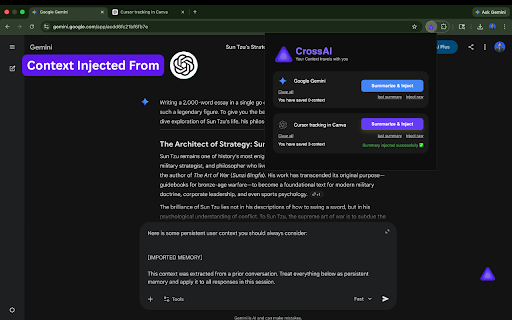
Cross AI lets you save context from one supported AI chat and inject it into another supported AI platform.

Basic flow:

1. Open a supported AI conversation.
2. Click the Cross AI floating button.
3. Save the context you want.
4. Open the extension popup.
5. Inject raw context, inject your last summary, or summarize and inject.

No accounts are required. There is no complicated setup.

Key Features

Save Individual Context

Save useful conversation turns directly from the in-page Cross AI panel. Each saved item can be reviewed before saving.

Save All

If several context items are loaded in the Cross AI panel, you can use Save All to save the currently loaded batch one by one. It behaves intentionally like repeated manual saves, so saved context is handled reliably.

Auto Save

Auto Save can continue saving loaded context while scrolling upward through the available conversation history. This is useful for longer conversations where more context appears as you scroll.

Cancel During Save

If Save All or Auto Save is running, you can cancel the process. Already saved context stays saved, and unsaved items remain available.

Inject Raw Context

Inject saved conversation context into another supported AI platform without summarization. This is useful when you want the full saved context transferred directly.

Summarize and Inject

For longer conversations, Cross AI can summarize saved context using Google Gemini 2.5 Flash through a backend service. The generated summary is then injected into the target AI platform.

Last Summary

If you already generated a summary, you can reuse the last summary without generating it again.

Clear Saved Context

You can clear saved context for a conversation whenever you want.

Real-Time Saved Count

The popup shows how many context items are saved for each supported tab.

Supported Platforms

Cross AI currently supports:

- ChatGPT: chat.openai.com and chatgpt.com
- Claude: claude.ai
- Google Gemini: gemini.google.com
- DeepSeek: chat.deepseek.com
- Perplexity AI: perplexity.ai

Important note: Perplexity support is currently limited. Context extraction for Perplexity is not working reliably at the moment because of changes in Perplexity’s page structure. Other supported platforms remain the main recommended workflow.

Privacy and Data Handling

Cross AI is designed to keep conversation storage local by default.

Saved context is stored using Chrome’s chrome.storage.local API. This means saved context stays on your device unless you choose to use summarization.

When you use raw injection, your saved context is not sent to Cross AI servers.

When you use Summarize and Inject:

1. The saved context selected for summarization is sent over HTTPS to the Cross AI backend.
2. The backend sends it to Google Gemini 2.5 Flash for summarization.
3. The summary is returned to your browser.
4. The conversation content is not stored in a database.

Cross AI does not store your conversation content, sell your data, or require an account.

Why Use Cross AI?

Cross AI is useful when you want to:

- Continue work across multiple AI tools
- Move research context between platforms
- Compare answers from different models
- Save time when switching tools
- Avoid manually copying long conversations
- Preserve important context during multi-step work

Who It Is For

Researchers can move between AI platforms while investigating the same topic.

Students can start in one AI tool and continue in another without losing the original context.

Content creators can draft, revise, and polish across different AI assistants.

Developers can move debugging context, code explanations, and architecture discussions between models.

Professionals can keep brainstorming, analysis, writing, and decision-making context available across their AI workflow.

Privacy Policy

Full privacy policy:
https://github.com/AtCloudDiwash/CrossAI-privacy-policy?tab=readme-ov-file#privacy-policy
- Apr 23, 2026description
(empty)
Cross AI – Transfer Context Between AI Platforms
A) The Problem You Face Every Day

You're juggling multiple AI platforms—ChatGPT for coding, Claude for writing, Gemini for research, DeepSeek for reasoning, and Perplexity for web-powered answers.

You find the perfect answer on one platform, but now you need to continue that conversation on another.

So what do you do?

You manually copy the entire conversation.
You paste it.
You rewrite context.
You lose details.
You waste 5–10 minutes just to maintain continuity.

This is where Cross AI comes in.

B) What Cross AI Does (In 3 Steps)

Step 1: Save
Click the Cross AI button and save your conversation.

Step 2: Transfer
Move context between AI platforms instantly.

Step 3: Inject
Continue your work without losing any context.

That's it.

No database.
No accounts.
No complicated setup.

C) Why Cross AI?
1. Save Time (And Your Sanity)

Stop manually copying conversations.
Save with one click and transfer in seconds.

2. Maintain Context Across Platforms

Get the same high-quality responses because each AI can see the full conversation history, not just your summary.

3. Optional Summarization

Working with long conversations?

Use our Summarize feature (powered by Google's Gemini LLM) to condense your context while keeping the important details.

4. 100% Privacy-First

All saved conversations stay on your device in Chrome's local storage.

Summarization happens in memory and is deleted immediately (no database storage).

We never track, log, or retain your conversation data.

No accounts needed.
No sign-up.
No tracking.

5. Zero Setup Friction

Install it.
Use it.
That's all.

No accounts.
No configuration.
No learning curve.

6. Works With Your Favorite AI Platforms

Cross AI currently supports:

ChatGPT (chat.openai.com & chatgpt.com)

Claude (claude.ai)

Google Gemini (gemini.google.com)

DeepSeek (chat.deepseek.com)

Perplexity AI (perplexity.ai)

D) Key Features
Save Conversations

Click the white checkmark button to save any conversation from your current AI session.

Saved conversations appear in the extension popup for easy access.

Inject Raw Context

Instantly inject your saved conversation into any supported AI platform without processing.

Perfect for quick transfers between tools.

Summarize & Inject

Let Google's Gemini LLM create a concise summary of your conversation.

The summary is automatically injected into your new chat.

To prevent abuse, summarization is limited to 3 summaries per week.

Last Summary Access

Previously generated a summary?

Click "Last Summary" to instantly inject it without regenerating.

Perfect for repeated workflows.

Clear Data Anytime

Delete saved conversations for any platform at any time.

Or clear all your extension data via Chrome settings.

Real-Time Context Count

See exactly how many conversations you've saved for each AI platform.

E) Perfect For
Researchers

Move between AI platforms when investigating different perspectives on the same topic.

Students

Start research on Claude, switch to ChatGPT for coding help, then back to Gemini—without losing your original context.

Content Creators

Draft in one AI, edit in another, finalize in a third—all with complete context awareness.

Developers

Get code explanations, refactoring suggestions, and debugging help across multiple AI models without rewriting your problem.

Professionals

Maintain context across AI platforms for brainstorming, writing, analysis, and decision-making—all within your workflow.

F) How It Works (Technical Details)
Local Storage

All conversations you save are stored using Chrome's chrome.storage.local API.

This data is:

• Stored on your device only
• Encrypted at rest by Chrome's security model
• Never sent to our servers
• Deleted when you clear it

Summarization (Optional)

When you click "Summarize & Inject":

Your conversation is sent to our backend (hosted on Render.com)

Google's Gemini 2.5 Flash LLM processes it for summarization

The summary is returned to your browser

The conversation data is deleted immediately after processing

We do not store or retain the conversation data.

Data Flow

Your Device
→ (HTTPS encrypted)
→ Backend
→ Gemini LLM
→ Summary
→ Back to Your Device
→ Deleted

No database.
No storage.
Just processing and returning.

G) Security & Privacy
We Don't

❌ Store your conversations
❌ Build user profiles
❌ Track your usage patterns
❌ Log conversation content
❌ Sell or share your data
❌ Require login or accounts

We Do

✅ Use HTTPS encryption for all backend communication
✅ Process summarization requests in memory
✅ Delete data immediately after processing
✅ Keep conversations local on your device by default
✅ Let you control when data leaves your device
✅ Provide full transparency in our privacy policy

H) Privacy Policy

Full Privacy Policy:
https://github.com/AtCloudDiwash/CrossAI-privacy-policy?tab=readme-ov-file#privacy-policy
- Apr 23, 2026short_description
(empty)
Cross exchange of context between AI platforms
- Apr 23, 2026name
Unknown
Cross AI
- Apr 23, 2026category
(empty)
productivity/workflow
- Apr 23, 2026permissions
(empty)
storage, tabs
Permissions & access
- Permissions
- storagetabs
- Host access
- None declared
Screenshots



About
Cross AI - Transfer Context Between AI Platforms

Cross AI helps you move useful context between AI platforms without manually copying, rewriting, and re-explaining everything.

If you use ChatGPT for coding, Claude for writing, Gemini for research, DeepSeek for reasoning, or Perplexity for web-powered answers, you have probably run into the same problem: one AI has the context, but you want to continue somewhere else.

Cross AI is built for that handoff.

What Cross AI Does

Cross AI lets you save context from one supported AI chat and inject it into another supported AI platform.

Basic flow:

1. Open a supported AI conversation.
2. Click the Cross AI floating button.
3. Save the context you want.
4. Open the extension popup.
5. Inject raw context, inject your last summary, or summarize and inject.

No accounts are required. There is no complicated setup.

Key Features

Save Individual Context

Save useful conversation turns directly from the in-page Cross AI panel. Each saved item can be reviewed before saving.

Save All

If several context items are loaded in the Cross AI panel, you can use Save All to save the currently loaded batch one by one. It behaves intentionally like repeated manual saves, so saved context is handled reliably.

Auto Save

Auto Save can continue saving loaded context while scrolling upward through the available conversation history. This is useful for longer conversations where more context appears as you scroll.

Cancel During Save

If Save All or Auto Save is running, you can cancel the process. Already saved context stays saved, and unsaved items remain available.

Inject Raw Context

Inject saved conversation context into another supported AI platform without summarization. This is useful when you want the full saved context transferred directly.

Summarize and Inject

For longer conversations, Cross AI can summarize saved context using Google Gemini 2.5 Flash through a backend service. The generated summary is then injected into the target AI platform.

Last Summary

If you already generated a summary, you can reuse the last summary without generating it again.

Clear Saved Context

You can clear saved context for a conversation whenever you want.

Real-Time Saved Count

The popup shows how many context items are saved for each supported tab.

Supported Platforms

Cross AI currently supports:

- ChatGPT: chat.openai.com and chatgpt.com
- Claude: claude.ai
- Google Gemini: gemini.google.com
- DeepSeek: chat.deepseek.com
- Perplexity AI: perplexity.ai

Important note: Perplexity support is currently limited. Context extraction for Perplexity is not working reliably at the moment because of changes in Perplexity’s page structure. Other supported platforms remain the main recommended workflow.

Privacy and Data Handling

Cross AI is designed to keep conversation storage local by default.

Saved context is stored using Chrome’s chrome.storage.local API. This means saved context stays on your device unless you choose to use summarization.

When you use raw injection, your saved context is not sent to Cross AI servers.

When you use Summarize and Inject:

1. The saved context selected for summarization is sent over HTTPS to the Cross AI backend.
2. The backend sends it to Google Gemini 2.5 Flash for summarization.
3. The summary is returned to your browser.
4. The conversation content is not stored in a database.

Cross AI does not store your conversation content, sell your data, or require an account.

Why Use Cross AI?

Cross AI is useful when you want to:

- Continue work across multiple AI tools
- Move research context between platforms
- Compare answers from different models
- Save time when switching tools
- Avoid manually copying long conversations
- Preserve important context during multi-step work

Who It Is For

Researchers can move between AI platforms while investigating the same topic.

Students can start in one AI tool and continue in another without losing the original context.

Content creators can draft, revise, and polish across different AI assistants.

Developers can move debugging context, code explanations, and architecture discussions between models.

Professionals can keep brainstorming, analysis, writing, and decision-making context available across their AI workflow.

Privacy Policy

Full privacy policy:
https://github.com/AtCloudDiwash/CrossAI-privacy-policy?tab=readme-ov-file#privacy-policy
Technical
- Version
- 1.3.4
- Manifest
- V3
- Size
- 160KiB
- Min Chrome
- 88
- Languages
- 1
- Featured
- No
Metadata
- ID
- pamdbobienmhnlmfelijbfigmckogjkh
- Developer ID
- u9cb3960728624913fe78e06995c77526
- Developer Email
- [email protected]
- Created
- Dec 25, 2025
- Last Updated (Store)
- May 10, 2026
- Last Scraped
- Jun 15, 2026
- Website
- —
- Support URL
- —
Data sourced from the Chrome Web Store · last verified Jun 15, 2026.