
Character Input
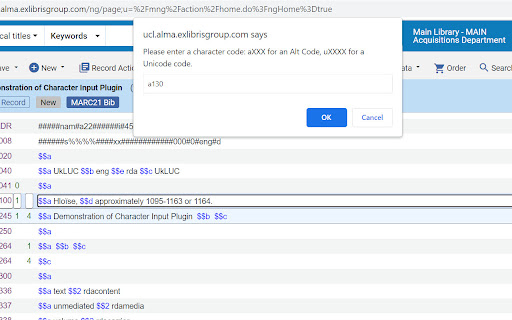
Press Insert key, then: aXXX for an Alt Code, XXXX for Unicode, c for (c), or HTML entity reference. Designed for Ex Libris Alma.
As of June 2026, Character Input has 106 users in the Workflow & Planning category.
Usersup 1.0 percent+1.0%
106
106
Ratingno change0%
—
— reviews
Reviewsno change0%
—
Version
4
Manifest V3
History
3 snapshotsTracking since Apr 23, 2026.
View as table
| Date | Users | Rating | Reviews | Version |
|---|---|---|---|---|
| Apr 23, 2026 | 105 | — | — | 4 |
| May 13, 2026 | 108 | — | — | 4 |
| Jun 8, 2026 | 102 | — | — | 4 |
| Now | 106 | — | — | 4 |
Permissions & access
- Permissions
- None declared
- Host access
- None declared
Screenshots
About
Allows entering of symbols and diacritics into the Alma Metadata Editor (MDE) using Unicode, Alt-key codes, or HTML entity codes. It is designed to make the input of diacritics and symbols easy without needing to use a separate application or copy and paste from a website. It supports 4-digit Unicode hex codes, almost all HTML entity references, as well as Alt-key codes; it also allows quick entry of the copyright symbol.

Press Insert key, then enter a character code:

- aXXX for an Alt Code (e.g. a130 for é) ,
- XXXX for a Unicode code (e.g. 00e9 for é)
- Any valid HTML entity (e.g. eacute for é) except IJ
- c for a copyright symbol ©. Note that a0169, 00a9, and copy also work.

Note that HTML entity references do not need the & and ; to be entered. Where possible some fuller and alternative names for accents are permissable, e.g. ehacek and ecircumflex will work although the correct codes are ecaron and ecirc. Codes can be all lower case although capital letters need to be entered properly, e.g. Eacute for É.

Designed for Ex Libris Alma.

Entering uXXXX for Unicode is deprecated from version 4.
Technical
- Version
- 4
- Manifest
- V3
- Size
- 398KiB
- Min Chrome
- 88
- Languages
- 1
- Featured
- No
Metadata
- ID
- palopabccigloiidhjpehnphbcblfhcn
- Developer ID
- u2d006685618fa9454524d5b087e1836a
- Developer Email
- [email protected]
- Created
- Feb 15, 2023
- Last Updated (Store)
- Nov 29, 2023
- Last Scraped
- Jun 8, 2026
- Website
- —
- Support URL
- —
- Privacy Policy
- —
Similar extensions
Alternatives to Character Input, ranked by description similarity.

Alt Keys
Those pesky key codes we all keep forgetting
342
★ 4.5

Alt Codes
the all alt codes list for special characters and symbols. Learn how to use alt key codes.
137
★ 4.0

Accent Letters
Copy and paste accent letters on just one click.
1.0K
★ 2.0

Unicode Math With LaTeX
Replace LaTeX to unicode math symbols
209
★ 5.0

TeX to Unicode
Convert LaTeX to Unicode by pressing 'Alt + W' ('Control + W' for Mac) in browser inputs.
6.0K
★ 4.2

Accented capital letters
Allows one-click copy / paste of accented uppercase and special characters
1.0K
★ 5.0

Accents for Google Chrome™
Easy access to accent and symbol characters.
10.0K
★ 2.9

Majuscules Accentuées
Permet d'écrire simplement les majuscules accentuées en français.
9.0K
★ 4.6
Data sourced from the Chrome Web Store · last verified Jun 8, 2026.