
VidLingo AI - YouTube Translator & Voice Dubbing
Automatically translate and dub YouTube videos into a natural AI voice.
As of June 2026, VidLingo AI - YouTube Translator & Voice Dubbing has — users in the Productivity category.
Usersno change0%
—
—
Ratingno change0%
—
— reviews
Reviewsno change0%
—
Version
0.6.10
Manifest V3
History
1 snapshotsTracking since Jun 11, 2026.
Not enough history yet for this metric — the chart fills in as we collect more snapshots.
View as table
| Date | Users | Rating | Reviews | Version |
|---|---|---|---|---|
| Jun 11, 2026 | — | — | — | 0.6.10 |
| Now | — | — | — | 0.6.10 |
Permissions & access
- Permissions
- activeTabscriptingstoragewebRequestcookies
- Host access
- https://*.youtube.com/*, https://youtube.com/*, https://api.brickai.io/*, https://vidlingo.brickai.io/*
Screenshots


About
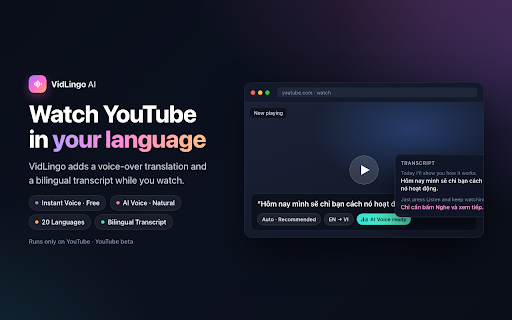
Ever opened a great YouTube video, then realized you don't understand the language? VidLingo AI is a YouTube translator and voice dubbing tool that helps you listen in your own language.

Press Listen, choose a language, and VidLingo translates the video while it plays. You hear a voice-over on top of the original audio, and a bilingual transcript appears beside the video so you can follow along.

It is made for people who want to watch more than just videos in their own language — lessons, interviews, podcasts, tutorials, travel videos, product reviews, and long talks from around the world.

What you get

* Voice translation while the YouTube video plays.
* Instant Voice, using your browser or OS voice. Fast and free.
* AI Voice for a more natural voice-over when available.
* Auto mode, which starts quickly and upgrades to AI Voice when it is ready.
* A bilingual transcript with the original text and translated text side by side.
* Click any transcript line to jump back to that part of the video.
* Export the script as .txt or .srt.
* 20 target languages.
* Separate volume controls for the original audio and translated voice.
* Local translation cache, so rewatched videos can load faster.
* Shortcut: Alt+Shift+L to start or stop on the current tab.

Modes
Smart Mode is for most YouTube videos. It works best when captions are available, and can also handle some videos without clean subtitles.

Live Mode is being prepared for Max accounts and is not part of this beta release yet.

Plans

* Free: 10 minutes of AI Voice and 60 minutes of Instant Voice each month.
* Pro: more AI Voice minutes for regular watching.
* Max: higher limits for heavy users and future Live Mode access.

You can also add more minutes if you need them. Pricing is available on our website.

Privacy
VidLingo only runs when you start it. This beta is focused on YouTube.

Translation and voice requests go through the BrickAI proxy. Provider API keys are not stored inside the extension. VidLingo is not a YouTube downloader, and it does not save videos to your device.

Good to know

* Instant Voice depends on the voices available in your browser or operating system.
* Some YouTube videos do not expose captions.
* AI Voice may switch to Instant Voice if the voice service is busy.
* This is a beta, so some videos may work better than others.

Questions or feedback? Email [[email protected]](mailto:[email protected]) or visit https://vidlingo.brickai.io/
Technical
- Version
- 0.6.10
- Manifest
- V3
- Size
- 139KiB
- Min Chrome
- 116
- Languages
- 11
- Featured
- No
Metadata
- ID
- palgmpmjjhbehlnhaenhcgbdolokeiim
- Developer ID
- ua7f5bb0b92e3fff33d19371977c39638
- Developer Email
- [email protected]
- Created
- Jun 10, 2026
- Last Updated (Store)
- Jun 10, 2026
- Last Scraped
- Jun 11, 2026
- Website
- —
- Support URL
- https://vidlingo.brickai.io/privacy
- Privacy Policy
- https://vidlingo.brickai.io/privacy
Data sourced from the Chrome Web Store · last verified Jun 11, 2026.