
LinProfi: Job Application Tracker
Save jobs in one click and keep your whole job search organized: roles, companies, stages, notes, and follow-ups.
As of June 2026, LinProfi: Job Application Tracker has — users in the Productivity category.
Usersno change0%
—
—
Ratingno change0%
—
— reviews
Reviewsno change0%
—
Version
0.1.10
Manifest V3
90-day change · In the last 90 days this extension 1 version update.
History
2 snapshotsTracking since Jun 2, 2026.
Not enough history yet for this metric — the chart fills in as we collect more snapshots.
View as table
| Date | Users | Rating | Reviews | Version |
|---|---|---|---|---|
| Jun 2, 2026 | — | — | — | 0.1.5 |
| Jun 8, 2026 | — | — | — | 0.1.5 |
| Now | — | — | — | 0.1.10 |
Permissions & access
- Permissions
- storagetabsalarms
- Host access
- https://www.linkedin.com/*, https://app.linprofi.com/*
Screenshots


About
Your job search lives in twelve open tabs, a messy spreadsheet, and your memory. LinProfi pulls it all into one calm, organized place.

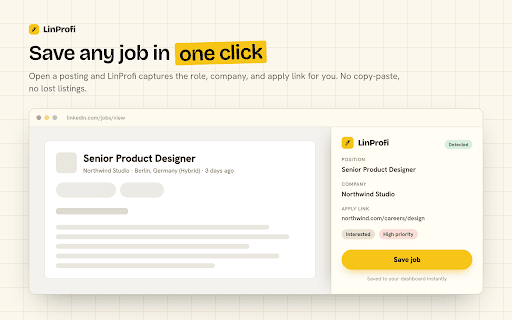
When you open a job, LinProfi captures the role, the company, and the apply link for you. One click saves it. No copy-paste, no retyping, no lost listings.

Then it gets out of your way and keeps everything in order: what you have saved, what you have applied to, who you are interviewing with, and what needs a follow-up this week.


WHAT YOU CAN DO

• Save any job in one click. LinProfi reads the posting you are viewing and fills in the role, company, and application link automatically.

• See your whole search at a glance. Switch between three views:
   - List, for a clean, sortable rundown of everything.
   - Board, to drag jobs across stages like a pipeline.
   - Calendar, to see interviews and follow-ups by date.

• Track every stage. Move each job through Interested, Applied, Interview, Offer, Hired, Rejected, or Archived.

• Never miss a follow-up. Set follow-up and interview dates and see what is due today the moment you open your dashboard.

• Add context that matters. Set a priority, jot notes, recruiter names, salary, or anything you want to remember before the call.

• Add jobs from anywhere. Found a role outside a job board? Add it by hand in a few seconds.

• Take your data with you. Export your whole list to CSV or copy it as a spreadsheet-ready table whenever you want. It is your data.


WHY PEOPLE USE IT

• It is fast. Saving a job is one click, and your dashboard updates instantly across every open tab.

• It is calm. A clean, focused workspace instead of a sprawling spreadsheet you dread opening.

• It is honest about your progress. See how many roles you have applied to, what is still in Interested, and what is coming up, without guessing.

• It respects your privacy. Your job list is stored in your own browser. Nothing is sold, and nothing is shared with advertisers.


HOW IT WORKS

1. Install LinProfi and open a job posting.
2. Click save. LinProfi captures the details for you.
3. Open your dashboard to organize, prioritize, and plan your follow-ups.

That is it. No account required to start, no setup, no learning curve.


WHO IT IS FOR

• Active job seekers applying to many roles at once.
• Career switchers who need to stay organized across weeks of searching.
• Anyone tired of tracking applications in a spreadsheet that never stays current.


Start your search organized from day one. Install LinProfi and never lose another opportunity.
Technical
- Version
- 0.1.10
- Manifest
- V3
- Size
- 151KiB
- Min Chrome
- 88
- Languages
- 1
- Featured
- No
Metadata
- ID
- pajamaaagcmjpimohefbelhaagdmfaoa
- Developer ID
- u261623d1c2e7bbe461ec801342f1f06d
- Developer Email
- [email protected]
- Created
- Jun 1, 2026
- Last Updated (Store)
- Jun 7, 2026
- Last Scraped
- Jun 8, 2026
- Website
- linprofi.com
- Support URL
- https://linprofi.com
- Privacy Policy
- https://linprofi.com/privacy
Data sourced from the Chrome Web Store · last verified Jun 8, 2026.