
Social Vault
Save your social links and contact details once. Copy them, or right-click any form field to paste a saved value.
As of June 2026, Social Vault has — users in the Education category.
Usersno change0%
—
—
Ratingno change0%
—
— reviews
Reviewsno change0%
—
Version
1.0.0
Manifest V3
History
1 snapshotsTracking since Jun 15, 2026.
Not enough history yet for this metric — the chart fills in as we collect more snapshots.
View as table
| Date | Users | Rating | Reviews | Version |
|---|---|---|---|---|
| Jun 15, 2026 | — | — | — | 1.0.0 |
| Now | — | — | — | 1.0.0 |
Permissions & access
- Permissions
- clipboardWritestoragecontextMenusscriptingactiveTab
- Host access
- <all_urls>
Screenshots


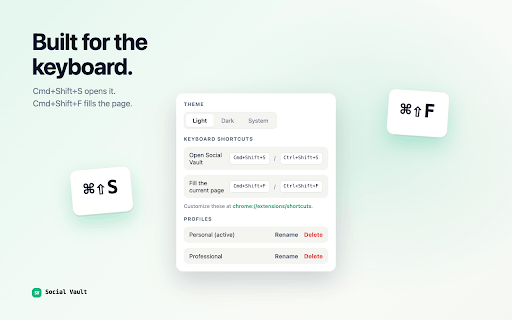

About
Social Vault is the fastest way to share the same handful of details you type into forms every day — your name, email, phone, and your LinkedIn / Twitter / GitHub / portfolio links.

Save them once. Then, on any web form:

• Right-click a field and pick a value from the "Social Vault" menu to paste it in.
• Or open the popup and copy any value with one click.

Features

✓ Save unlimited social links and contact details.
✓ Multiple profiles — keep Work and Personal separate, switch in one click.
✓ Right-click context menu to paste a specific saved value into any form.
✓ One-click shareable profile card.
✓ Inline edit for personal details — no separate form.
✓ Light, dark, and system themes.
✓ Sync across your Chrome browsers via your Google account.
✓ JSON import/export for backups.
✓ Local usage analytics — see how much time you saved.

Privacy

Your data never leaves your device. No servers, no analytics, no ads. Stored in Chrome's encrypted sync storage, tied to your Google account. Read the full policy at the privacy link below.

Who it's for

Freelancers, recruiters, students, job seekers, and anyone who fills the same forms more than once a week.
Technical
- Version
- 1.0.0
- Manifest
- V3
- Size
- 448KiB
- Min Chrome
- 88
- Languages
- 1
- Featured
- No
Metadata
- ID
- pahdaegdbkbakdfipbfngffolladjmpk
- Developer ID
- ue8f61a632011934fb4736c4a61bb2745
- Developer Email
- [email protected]
- Created
- Jun 14, 2026
- Last Updated (Store)
- Jun 14, 2026
- Last Scraped
- Jun 15, 2026
- Website
- —
- Support URL
- —
Data sourced from the Chrome Web Store · last verified Jun 15, 2026.