
Tab Map Visualizer
Visualize and manage browser tabs
As of June 2026, Tab Map Visualizer has 27 users in the Productivity category.
Usersup 35.0 percent+35.0%
27
27
Ratingno change0%
—
— reviews
Reviewsno change0%
—
Version
1.0
History
3 snapshotsTracking since Apr 23, 2026.
View as table
| Date | Users | Rating | Reviews | Version |
|---|---|---|---|---|
| Apr 23, 2026 | 20 | — | — | 1.0 |
| May 13, 2026 | 16 | — | — | 1.0 |
| Jun 8, 2026 | 20 | — | — | 1.0 |
| Now | 27 | — | — | 1.0 |
Permissions & access
- Permissions
- None declared
- Host access
- None declared
Screenshots
About
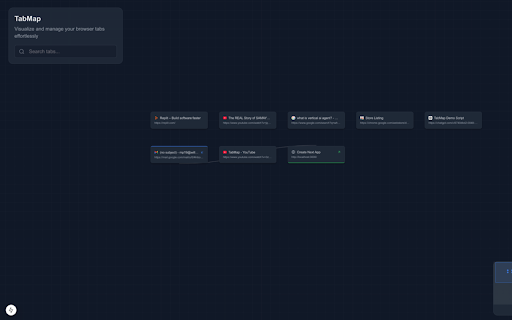
TabMap is an innovative browser extension designed to revolutionize the way you manage and interact with your browser tabs, offering a seamless and efficient solution to the common problem of tab overload that many users face daily; by transforming your browsing experience into a more organized, productive, and stress-free activity, TabMap addresses the frustration of having numerous tabs open simultaneously—whether it's 10, 50, or even over 100 tabs—by providing a dynamic, interactive canvas where all your open tabs are displayed in a clear, visual grid layout, allowing you to see and access all your tabs at a glance without the need to scroll through tiny, unreadable tab icons crammed at the top of your browser window; this grid layout not only enhances visibility but also enables you to drag and rearrange your tabs effortlessly on the canvas, giving you the freedom to organize them in a way that best suits your workflow. Moreover, TabMap includes a powerful search feature that allows you to quickly locate any open tab by typing keywords into the search bar on the canvas, instantly highlighting relevant tabs and further reducing the time and effort required to find specific webpages; in addition to the main canvas, TabMap offers a convenient floating search icon that remains accessible no matter which page or tab you're currently viewing, enabling you to search for and navigate to any of your open tabs directly from any webpage without having to return to the main canvas repeatedly, thus enhancing efficiency and user convenience; the inclusion of a minimap provides an overview of your entire tab canvas, assisting you in navigating through large numbers of tabs by indicating which part of the canvas contains your tabs and allowing you to quickly jump to different sections, which is particularly useful when managing an extensive collection of tabs; further enhancing its utility, TabMap allows you to close tabs directly from the canvas, with any closed tab being simultaneously closed in your browser, helping you declutter your workspace and improve browser performance by freeing up system resources that unnecessary tabs consume; clicking on any tab within the canvas takes you directly to that tab, providing a seamless navigation experience that eliminates the frustration of hunting through multiple tabs to find the one you need; by addressing the common issue of tab overload, TabMap promotes responsible browsing habits and encourages users to stay organized, which can lead to increased productivity, reduced stress, and a more positive interaction with online content; whether you're a student juggling research papers and resources, a professional managing multiple projects and tools, or simply an avid browser who enjoys exploring the web, TabMap offers a customizable and intuitive solution that adapts to your needs; its user-friendly interface ensures that even those who are not tech-savvy can easily harness its powerful features to enhance their browsing experience; by installing TabMap, you're equipping yourself with a tool that not only simplifies tab management but also transforms it into an enjoyable part of your online routine; the extension's seamless integration into your browser means it doesn't interfere with your normal browsing habits but instead adds valuable functionality that enhances how you interact with your tabs; with TabMap, you no longer have to endure the frustration of losing track of important tabs or dealing with a cluttered browser interface; instead, you gain control over your browsing environment, allowing you to focus on the content that matters most to you; in summary, TabMap is more than just a tab manager—it's a comprehensive tool designed to improve your online experience by providing clarity, organization, and efficiency in managing your browser tabs, making it an essential extension for anyone looking to optimize their web browsing and enhance their productivity; so why should you install TabMap? Because it empowers you to take charge of your browsing habits, reduces the cognitive load associated with managing multiple tabs, and ultimately contributes to a more streamlined and enjoyable online experience, transforming the way you interact with the internet one tab at a time.
Technical
- Version
- 1.0
- Manifest
- —
- Size
- 11.24KiB
- Min Chrome
- 88
- Languages
- 1
- Featured
- No
Metadata
- ID
- oppicfadmmggnjjdockjafefdhpagcfp
- Developer ID
- ub14fdeaf19125e2103368f3f37fa1a41
- Developer Email
- [email protected]
- Created
- Nov 25, 2024
- Last Updated (Store)
- Nov 25, 2024
- Last Scraped
- Jun 8, 2026
- Website
- —
- Support URL
- —
Similar extensions
Alternatives to Tab Map Visualizer, ranked by description similarity.

Tab Master
Experience organized browsing with Tab Master, enhancing productivity and tab management.
7

Tab Manager Pro
Welcome! View all tabs, search, compare side-by-side, consolidate windows, close duplicates, and manage tabs easily
53
★ 4.7

Tab Tamer
A Extension for Managing Tab
33
★ 4.8

Tab Atlas
A visual map of all your Chrome workspaces across windows, tab groups, and incognito.
13

TabMaster
Automatically groups your open tabs by topic for better organization.
3
★ 5.0

TabMarker
Save active tabs and quickly switch or remove them via a popup.
9
★ 5.0

Tab Tamer - Control and Limit Tabs
Base Level Extension
5

Astute Tab Manager
Your Ultimate Chrome Tab and Group Organizer
55
★ 5.0
Data sourced from the Chrome Web Store · last verified Jun 8, 2026.