
Estimations Plugin for Microsoft Planner
This extension sums up numbers given in the title of Microsoft Planner cards
As of June 2026, Estimations Plugin for Microsoft Planner has 2,000 users and a 3.96/5 rating from 23 reviews in the Workflow & Planning category.
Usersno change0%
2.0K
2,000
Ratingup 1.3 percent+1.3%
3.96
23 reviews
Reviewsup 4.5 percent+4.5%
23
Version
1.68
Manifest V3
History
3 snapshotsTracking since Apr 20, 2026.
View as table
| Date | Users | Rating | Reviews | Version |
|---|---|---|---|---|
| Apr 20, 2026 | 2.0K | 3.91 | 22 | 1.68 |
| May 5, 2026 | 2.0K | 3.91 | 22 | 1.68 |
| May 25, 2026 | 2.0K | 3.91 | 22 | 1.68 |
| Now | 2.0K | 3.96 | 23 | 1.68 |
Changelog
- May 16, 2026description
This is a plugin for Microsoft Planner which allows you to organize tasks as cards in multiple columns.

GOAL
This plugin will extend the functionality of Planner by estimations. For each card, you can set an original estimation and a remaining estimation. Typically, the original estimation is given at the time when you create a new card. Only when you start working on a card, you will update the remaining estimation. E.g., imagine you create a card labelled "Prepare dinner", and you estimate the effort with "3" hours. This would be your original estimation. Now, if you start working on that card, and you take a break after "1" hour, you would update the remaining estimation with "2" hours.

HOW DOES IT WORK?
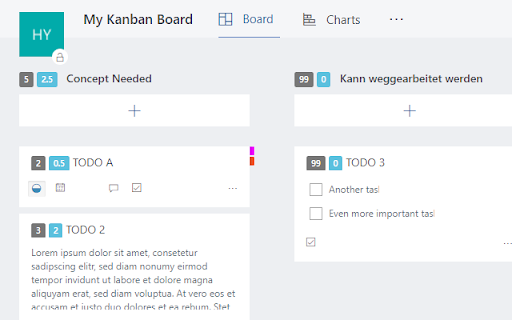
The original estimation will be given as number in round brackets as part of the card's label, while the remaining estimation will be given as number in square brackets. E.g., you would write "(3) Prepare Dinner [5]".

The plugin sums up all original (remaining) estimations for all cards of a column, and displays the sum as part of the column's title.
DEPRECATED: This Chrome extension is no longer supported. There have been 2.3k active weekly active users. If you want to continue the support, please fork the code on Github, https://github.com/drabiger/estimationsChromePlugin

----

This is a plugin for Microsoft Planner which allows you to organize tasks as cards in multiple columns.

GOAL
This plugin will extend the functionality of Planner by estimations. For each card, you can set an original estimation and a remaining estimation. Typically, the original estimation is given at the time when you create a new card. Only when you start working on a card, you will update the remaining estimation. E.g., imagine you create a card labelled "Prepare dinner", and you estimate the effort with "3" hours. This would be your original estimation. Now, if you start working on that card, and you take a break after "1" hour, you would update the remaining estimation with "2" hours.

HOW DOES IT WORK?
The original estimation will be given as number in round brackets as part of the card's label, while the remaining estimation will be given as number in square brackets. E.g., you would write "(3) Prepare Dinner [5]".

The plugin sums up all original (remaining) estimations for all cards of a column, and displays the sum as part of the column's title.
Permissions & access
- Permissions
- None declared
- Host access
- None declared
Screenshots
About
DEPRECATED: This Chrome extension is no longer supported. There have been 2.3k active weekly active users. If you want to continue the support, please fork the code on Github, https://github.com/drabiger/estimationsChromePlugin

----

This is a plugin for Microsoft Planner which allows you to organize tasks as cards in multiple columns.

GOAL
This plugin will extend the functionality of Planner by estimations. For each card, you can set an original estimation and a remaining estimation. Typically, the original estimation is given at the time when you create a new card. Only when you start working on a card, you will update the remaining estimation. E.g., imagine you create a card labelled "Prepare dinner", and you estimate the effort with "3" hours. This would be your original estimation. Now, if you start working on that card, and you take a break after "1" hour, you would update the remaining estimation with "2" hours.

HOW DOES IT WORK?
The original estimation will be given as number in round brackets as part of the card's label, while the remaining estimation will be given as number in square brackets. E.g., you would write "(3) Prepare Dinner [5]".

The plugin sums up all original (remaining) estimations for all cards of a column, and displays the sum as part of the column's title.
Technical
- Version
- 1.68
- Manifest
- V3
- Size
- 27.54KiB
- Min Chrome
- 88
- Languages
- 1
- Featured
- No
Metadata
- ID
- opojklifmgglalpfgbhfnocboncbfcdj
- Developer ID
- ud682a743e2999ad5f97cdf9fde9619dc
- Developer Email
- [email protected]
- Created
- Aug 18, 2017
- Last Updated (Store)
- May 15, 2026
- Last Scraped
- Jun 15, 2026
- Website
- —
- Support URL
- —
- Privacy Policy
- —
Similar extensions
Alternatives to Estimations Plugin for Microsoft Planner, ranked by description similarity.

Estimations for Microsoft Planner
This extension sums up nos. given in the title of Microsoft Planner cards.Numbers can be defined in (..), {..} and [..] brackets.
420
★ 5.0

Jira Estimates Sum
Sum of Jira point and time estimates for columns and total for sprint
39

Trello Points and Hours Calculator
Calculates total points and worked hours from Trello cards per column, respecting active filters.
30
★ 5.0

Jira Add-on
Jira Extension
2

ScrumPoker-Online Average Calculator
Calculates the average of current estimates
11
★ 5.0
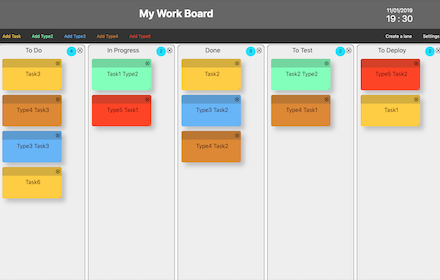
My work Board
Build your own Work Board, Kanban board, Business Model Board and manage your cards
1.0K
★ 3.7

Project Plans editor
Create and edit project plans with ProjectLibre online
6.0K
★ 3.1

Productive Outlook
Display presence and productive time on Outlook and Teams calendar.
7
Data sourced from the Chrome Web Store · last verified Jun 15, 2026.