
Twitch FlowSwitch
Switches between primary and secondary video in paid presentations. Lets you keep watching the stream and supporting your creator.
As of June 2026, Twitch FlowSwitch has 6 users in the Entertainment category.
Usersup 50.0 percent+50.0%
6
6
Ratingno change0%
—
— reviews
Reviewsno change0%
—
Version
1.0.1
Manifest V3
History
5 snapshotsTracking since Apr 18, 2026.
View as table
| Date | Users | Rating | Reviews | Version |
|---|---|---|---|---|
| Apr 18, 2026 | 4 | — | — | 1.0.1 |
| May 2, 2026 | 3 | — | — | 1.0.1 |
| May 11, 2026 | 4 | — | — | 1.0.1 |
| May 24, 2026 | 6 | — | — | 1.0.1 |
| Jun 6, 2026 | 7 | — | — | 1.0.1 |
| Now | 6 | — | — | 1.0.1 |
Permissions & access
- Permissions
- tabs
- Host access
- None declared
Screenshots
About
🌊 Twitch FlowSwitch

Keep watching without interruptions.
Twitch FlowSwitch automatically switches between the main and secondary video players during paid presentations — ensuring your stream keeps flowing smoothly.

🎯 What It Does

Detects when Twitch triggers a “paid presentation” (ad break).
Instantly switches to the backup (secondary) video feed.
Restores the main player as soon as the presentation ends.
Mutes and unmutes the correct player automatically.
Displays a small overlay badge showing which player is active and the remaining countdown time.

You stay connected to your streamer — no black screens, no silent minutes, just continuous content.

⚙️ How It Works

FlowSwitch runs locally in your browser, seamlessly monitoring Twitch’s player state.
When an ad starts, it:

1. Mutes the main player.
2. Brings the secondary player into view.
3. Shows a countdown badge with the remaining presentation time.
4. Automatically restores the main feed afterward.

All processing happens on your machine. No data is sent anywhere.

🔒 Privacy

FlowSwitch **does not collect, store, or transmit** any personal data.
It only interacts with the Twitch player elements in your browser.

🧠 Features Summary

🪄 Automatic player switching
🔇 Smart mute control
🕒 Live countdown overlay
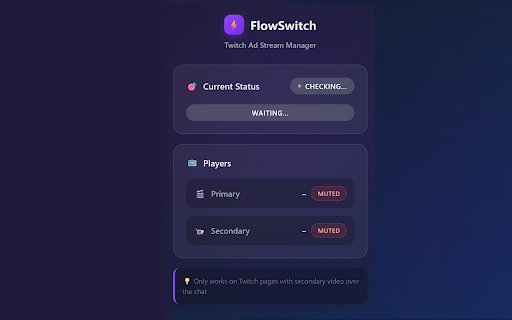
🧩 Clean popup status dashboard
🛡️ 100% local — zero tracking, zero analytics

💬 Note

This extension is not affiliated with or endorsed by Twitch Interactive, Inc.
All trademarks belong to their respective owners.
FlowSwitch is designed for educational and personal use to improve stream continuity.

❤️ Open Source

Built with love by independent developers.
Feedback, ideas, or improvements?
Join us on GitHub and help make FlowSwitch even smoother.

💡 Category: Entertainment
🌍 Language: English
🔧 Version: 1.0.1
Technical
- Version
- 1.0.1
- Manifest
- V3
- Size
- 83.09KiB
- Min Chrome
- 88
- Languages
- 1
- Featured
- No
Metadata
- ID
- opjggbjleidhimicbmolpcancjeoplko
- Developer ID
- uf22b3dd0a537e127fa8a953551f2a22d
- Developer Email
- [email protected]
- Created
- Oct 8, 2025
- Last Updated (Store)
- Oct 14, 2025
- Last Scraped
- Jun 6, 2026
- Website
- —
- Support URL
- —
Similar extensions
Alternatives to Twitch FlowSwitch, ranked by description similarity.

Twitch-in-Twitch
Open Twitch players inside Twitch player.
10.0K
★ 4.3

Twitch Link Hover Preview
Shows quick preview popups for YouTube and Twitter links when hovering in Twitch chat
32
★ 5.0

Live Stream Panel
A modern Twitch dashboard for Chrome. See your followed streams, get live previews, sort, multiview, and more!
29
★ 5.0

YouTube Player for Twitch
Watch YouTube livestreams with Twitch chat - the best of both worlds
62
★ 5.0

Find Twitch Games on Steam
Find Twitch games on Steam and see which other stores carry them, via IGDB.
23
★ 5.0

Twitch Stream Swapper
Automatically swap between Twitch streams based on priority. Auto-switches when higher priority streams go live.
8

Cowlor's Sidebar for Twitch
Live preview on hover, stream uptime, co-streams, sidebar cleaned up. Twitch, but better.
32
★ 5.0

Chat Highlight
Highlight Twitch chat messages and display them on your stream as a Browser Source.
10
Data sourced from the Chrome Web Store · last verified Jun 6, 2026.