
Close Duplicate Tabs
Closes duplicate tabs in the current window, keeping one unique tab per URL.
As of June 2026, Close Duplicate Tabs has 71 users and a 4.00/5 rating from 2 reviews in the Workflow & Planning category.
Usersup 34.0 percent+34.0%
71
71
Ratingno change0%
4.00
2 reviews
Reviewsno change0%
2
Version
1.1
Manifest V3
History
2 snapshotsTracking since Apr 23, 2026.
View as table
| Date | Users | Rating | Reviews | Version |
|---|---|---|---|---|
| Apr 23, 2026 | 53 | 4.00 | 2 | 1.1 |
| Jun 8, 2026 | 59 | 4.00 | 2 | 1.1 |
| Now | 71 | 4.00 | 2 | 1.1 |
Permissions & access
- Permissions
- tabsstorage
- Host access
- None declared
Screenshots


About
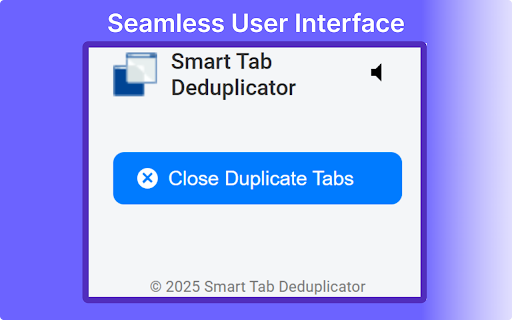
🌟 Smart Tab Deduplicator: Streamline Your Browsing Experience 🌟 🚀 Overview In the fast-paced digital age, managing numerous browser tabs can quickly become overwhelming. Introducing Smart Tab Deduplicator—the ultimate solution to declutter your browsing environment effortlessly. Designed with elegance and intelligence, this browser extension not only identifies and closes duplicate tabs but does so with unparalleled precision and style. 🎨✨ 🔑 Key Features 1. Intelligent Duplicate Detection 🧠🔍 Advanced URL Recognition: Smart Tab Deduplicator employs sophisticated algorithms to analyze and normalize URLs, ensuring accurate identification of duplicate tabs. Whether it's standard websites or media platforms like YouTube, our extension intelligently discerns which tabs to retain and which to close. 📺🎥 Domain-Specific Handling: Recognizing the unique structure of platforms like YouTube and Vimeo, the extension preserves essential URL parameters and fragments for these domains. This ensures that valuable content, such as specific video IDs or timestamps, remains accessible even when duplicates are removed. 🛡️🔗 2. Seamless User Interface 🖥️✨ Modern & Sleek Design: Crafted with a minimalist aesthetic, Smart Tab Deduplicator boasts a sleek and intuitive interface. The clean design not only enhances visual appeal but also ensures ease of use, allowing users to navigate and operate the extension with minimal effort. 🖌️👌 Responsive Confirmation Modal: Upon detecting duplicate tabs, a beautifully designed confirmation modal appears, providing a clear summary of duplicates found. With smooth animations and thoughtful layout, the modal integrates seamlessly within the browser popup without causing clutter or the need for excessive scrolling. 🎨🔄 3. Enhanced Accessibility ♿💡 Toggle Accessibility Sounds 🔊🔇: Understanding the diverse needs of users, Smart Tab Deduplicator includes a discreet and stylish toggle button to enable or disable accessibility sounds. Whether you prefer auditory feedback or a silent operation, this feature ensures that the extension adapts to your preferences without compromising on functionality. 🎧🛑 Focus Management & ARIA Compliance ✅🔧: The extension adheres to the latest accessibility standards, ensuring that all interactive elements are easily navigable via keyboard and screen readers. Proper focus trapping within modals and intelligent use of ARIA attributes make the extension inclusive for all users. 🌐📝 4. Efficient Tab Management 🗂️⚡ Automatic Deduplication: With a single click, initiate the deduplication process to automatically identify and close redundant tabs. This not only declutters your workspace but also optimizes browser performance by reducing unnecessary resource consumption. 🖱️💨 Customizable Settings ⚙️🎚️: Tailor the extension to your browsing habits with customizable settings. Exclude specific domains from deduplication, adjust notification preferences, and more, ensuring that Smart Tab Deduplicator aligns perfectly with your workflow. 🛠️📊 5. Robust Performance 💪🚀 Lightweight & Fast: Built with performance in mind, Smart Tab Deduplicator operates smoothly in the background without impacting your browsing speed or system resources. Its efficient algorithms ensure rapid detection and closure of duplicates, providing a hassle-free experience. ⚡🕹️ Reliable Operation: Leveraging the latest web technologies, the extension guarantees stability and reliability across all major browsers. Regular updates and maintenance ensure that it remains compatible with evolving web standards and browser versions. 🔄🔒 Why Choose Smart Tab Deduplicator? Boost Productivity 📈🎯: By eliminating the clutter of duplicate tabs, focus on what's truly important and enhance your overall productivity. Save Resources 💾🔋: Reduce memory and CPU usage by minimizing the number of open tabs, leading to a more efficient browsing experience. User-Centric Design 🧑💻❤️: Every feature and design element is thoughtfully crafted to cater to user needs, ensuring maximum satisfaction and ease of use. Commitment to Accessibility 🤝♿: Inclusive design practices make the extension usable for everyone, regardless of their abilities or preferences. 🛠️ How It Works Installation 📥: Easily add Smart Tab Deduplicator to your browser from the Chrome Web Store. Activation 🟢: Click on the extension icon in your browser toolbar to access the sleek popup interface. Initiate Deduplication 🖱️🔄: Press the "Close Duplicate Tabs" button to start the intelligent deduplication process. Confirmation ✅: A stylish confirmation modal will display the number of duplicates found. Choose to "Proceed" or "Cancel" based on your preference. Manage Accessibility Sounds 🔊🔇: Use the discreet toggle button in the header to enable or disable accessibility sounds as desired. 🎉 Get Started Today! Transform your browsing experience with Smart Tab Deduplicator—where intelligence meets elegance. Say goodbye to tab chaos and hello to a streamlined, efficient, and aesthetically pleasing workspace. 🌟🖥️ 🔗 Download Now and experience the future of browser tab management. 🗣️ User Testimonials "Smart Tab Deduplicator has revolutionized the way I browse. It's sleek, efficient, and incredibly user-friendly!" — Jane D., Digital Marketer 💼✨ "I love how it intelligently recognizes YouTube and Vimeo tabs, ensuring my important videos remain accessible." — Mark S., Content Creator 🎥🌟 📞 Support & Feedback We value your feedback! If you encounter any issues or have suggestions for improvements, please reach out to our support team at [email protected]. 📧🤗
Technical
- Version
- 1.1
- Manifest
- V3
- Size
- 14.03KiB
- Min Chrome
- 88
- Languages
- 1
- Featured
- No
Metadata
- ID
- opbdgfhhngelmbjbfmchodndjdlhbmad
- Developer ID
- uacda0171a24fa6893b630f1db9c1401a
- Developer Email
- [email protected]
- Created
- Jan 19, 2025
- Last Updated (Store)
- Jan 19, 2025
- Last Scraped
- Jun 8, 2026
- Website
- —
- Support URL
- —
- Privacy Policy
- —
Similar extensions
Alternatives to Close Duplicate Tabs, ranked by description similarity.

SmartTabs - Intelligent Tab Manager
Organize and archive browser tabs with productivity analytics. Automatically manage tab clutter and boost productivity.
76
★ 5.0

Smart Tab Saver
Smart Tab Saver, your smart tab manager
934
★ 3.4

Duplicate Tab Helper
Prevent duplicate tabs effortlessly.
3.0K
★ 3.4

Kill Clone Tabs
Find and close duplicate tabs. Sort, group, and manage tabs. Highlight text on pages. Copy tab URLs. Boost your productivity!
593
★ 4.2

Dedupe Tabs
Close duplicate browser tabs with the click of a button.
24

DupeSweep
Sweep away duplicate browser tabs instantly. Frees memory, keeps your browser organized. Compatible with tab suspender extensions.
240
★ 4.3

Tab manager pro
Transform browser chaos into organized productivity with smart tab grouping, session saving, and duplicate removal.
1

Tab(s) – Memory and Productivity Manager
Save tabs into folders that auto-delete after 7 days — keeping your browser clean, fast, and focused.
3
Data sourced from the Chrome Web Store · last verified Jun 8, 2026.