
Grammar Checker
Your personal editor — Grammar Checker helps you write better.
As of May 2026, Grammar Checker has 15 users in the Productivity category.
Usersup 50.0 percent+50.0%
15
15
Ratingno change0%
—
— reviews
Reviewsno change0%
—
Version
0.0.1
Manifest V3
History
4 snapshotsTracking since Apr 20, 2026.
View as table
| Date | Users | Rating | Reviews | Version |
|---|---|---|---|---|
| Apr 20, 2026 | 10 | — | — | 0.0.1 |
| May 5, 2026 | 11 | — | — | 0.0.1 |
| May 16, 2026 | 10 | — | — | 0.0.1 |
| May 30, 2026 | 14 | — | — | 0.0.1 |
| Now | 15 | — | — | 0.0.1 |
Permissions & access
- Permissions
- storage
- Host access
- https://engineofmystartups.online/
Screenshots


About
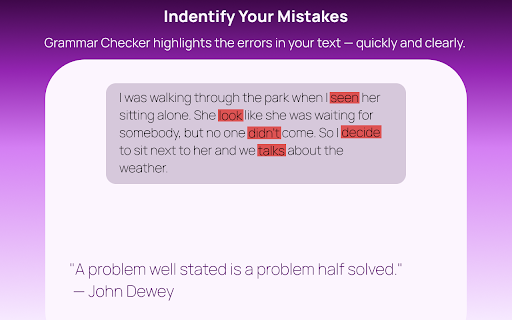
✨ Have you ever wondered if you're writing something the best way?

Do you sometimes feel stuck, trying to write better, but the right words just don’t come? Writing a resume and worried that a forgotten comma might make you look unprofessional?

Grammar Checker is here to help!
This AI-powered, easy-to-use browser extension checks your writing instantly — right where you work. Whether you're typing in Google Docs, web forms, or online editors, Grammar Checker makes sure your text looks and sounds its best.

💡 What is Grammar Checker?
It’s a smart writing assistant built into your browser, powered by ChatGPT. It helps you:
✅ Correct grammar and punctuation
✅ Improve clarity and tone
✅ Polish your style — even if your text is already good

Use it for:
✉️ Emails
📄 Resumes & cover letters
📚 Homework
💬 Social media posts (X, LinkedIn, Reddit — you name it!)
Because well-written text always makes a better impression.

🚀 Key Features
1. Instant analysis and feedback – get corrections in seconds.
2. Tone selection – choose between Casual, Business, or Academic.
3. Simple interface – familiar and intuitive, especially if you've used any AI tools before.
4. Explanations included – ChatGPT doesn’t just fix mistakes, it teaches you why.
5. Quick access – just click the extension icon and start typing!

Why Choose Grammar Checker?
⚡ Fast & efficient – real-time analysis saves you time
🎯 High quality – improve both accuracy and fluency
🧩 Seamless integration – works directly in your browser, no app-switching required

👥 Who is it for?
1. Students – make sure your essays, homework, and emails are grammatically correct and meaningful
2. Professionals – polish your reports, presentations, or daily messages
3. Bloggers, YouTubers, Influencers – save time writing posts that shine
4. Writers – get helpful suggestions on how to express your ideas more clearly

🛠️ How to Use It?
1. Install Grammar Checker from the Chrome Web Store
2. Click the extension icon
3. Type or paste your text into the input field
4. Press “Check”
5. Enjoy fast and reliable results
Technical
- Version
- 0.0.1
- Manifest
- V3
- Size
- 1.21MiB
- Min Chrome
- 88
- Languages
- 1
- Featured
- No
Metadata
- ID
- ooheojcgmonecbhecjmhnahaiccfgmha
- Developer ID
- u708030039aa2ecb4a01d275aeab22697
- Developer Email
- [email protected]
- Created
- Aug 18, 2025
- Last Updated (Store)
- Aug 18, 2025
- Last Scraped
- May 30, 2026
- Website
- —
- Support URL
- —
Similar extensions
Alternatives to Grammar Checker, ranked by description similarity.

Grammar Check Pro
AI-powered grammar and writing assistant using Pollinations.AI
10

Sentence Checker
Enhance your writing with Sentence Checker — a powerful grammar and spell checker that instantly corrects mistakes and adjusts style
412
★ 2.0

Spell Check
Try Spell Check for auto correct texts using ai grammar checker and ortografia corrector. Improve sentence online.
8.0K
★ 4.4

AI Grammar Checker
Use AI Grammar Checker for flawless writing. Enjoy punctuation and grammar corrector, spell checker and AI grammar check in one tool
7.0K
★ 4.5

iGrammar
Enhance your writing with AI-powered grammar correction, paraphrasing, and summarization tools.
50
★ 4.9

Punctuation Check
Use Punctuation Check to easily spelling check. Our punctuation checker ensures clarity and enhances the quality of your text.
1.0K
★ 5.0

Parafrazo | Grammar, Rewrite, Translate
Master your writing with instant grammar correction, smart rephrasing, and seamless translation for faster language learning.
542
★ 5.0

Write Better Everywhere
Real-time grammar, style, and clarity suggestions in any text field using AI
2
★ 5.0
Data sourced from the Chrome Web Store · last verified May 30, 2026.