
Replizen
Replizen - Tailored ChatGPT replies for Twitter posts
As of May 2026, Replizen has 4 users and a 5.00/5 rating from 3 reviews in the Workflow & Planning category.
Usersup 33.3 percent+33.3%
4
4
Ratingno change0%
5.00
3 reviews
Reviewsno change0%
3
Version
1.2
Manifest V3
History
1 snapshotsTracking since Apr 30, 2026.
View as table
| Date | Users | Rating | Reviews | Version |
|---|---|---|---|---|
| Apr 30, 2026 | 3 | 5.00 | 3 | 1.2 |
| Now | 4 | 5.00 | 3 | 1.2 |
Permissions & access
- Permissions
- storage
- Host access
- None declared
Screenshots


About
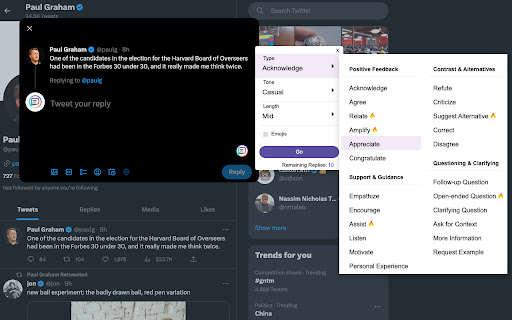
Create engaging and thought-provoking responses with just a single click using ChatGPT for Twitter.
Achieve significant growth in your audience, reach, and influence.

Crafting the perfect response on social media has never been easier! RepliZen is a state-of-the-art Chrome extension that leverages the power of ChatGPT to help you create thoughtful and engaging replies on platforms like Twitter.

By using RepliZen, you can:
🚀 Boost your online presence: High-quality, customized replies generated by RepliZen will make your profile more visible and attractive to your target audience.

🤝 Foster meaningful connections: RepliZen helps you craft personalized responses that foster deeper connections, strengthening your relationships with existing followers and attracting new ones.

⏱️ Save time and effort: RepliZen streamlines the process of generating thoughtful replies, allowing you to focus on other aspects of your social media strategy.

📈 Expand your reach: With over 500 unique configurations, RepliZen enables you to cater to a diverse range of audiences, broadening your impact across the platform.

Key Features:
Effortlessly customize your replies by selecting the style, tone, and length that suit your needs.
Choose from over 500 unique configurations to generate the ideal response.
User-friendly interface takes the stress out of prompt generation, making it a breeze to interact with your audience.

How it works:
1. Install RepliZen Chrome extension.
2. Head over to Twitter and select a post you'd like to reply to.
3. Click on the RepliZen icon to open the extension.
4. Choose your preferred reply style, tone, and length.
5. Click "GO" to get your ChatGPT-crafted response.
Edit the generated reply (if needed) to match your personal tone or just hit send!

Install RepliZen now and elevate your online presence like never before!
Technical
- Version
- 1.2
- Manifest
- V3
- Size
- 75.71KiB
- Min Chrome
- 88
- Languages
- 1
- Featured
- No
Metadata
- ID
- oochnpbokgnmfbbcmdiebflmbmflfjpl
- Developer ID
- u3651cde245a99c62a4d74ed940a288c7
- Developer Email
- [email protected]
- Created
- Apr 19, 2023
- Last Updated (Store)
- Aug 29, 2023
- Last Scraped
- May 27, 2026
- Website
- replizen.com
- Support URL
- https://www.replizen.com/support
- Privacy Policy
- https://www.replizen.com/policy
Similar extensions
Alternatives to Replizen, ranked by description similarity.

Replizen
Replizen - Tailored ChatGPT replies for Twitter posts
29
★ 4.6

Klemo.co
Create meaningful replies 10x faster in just a 1 click with ChatGPT for Twitter & LinkedIn.
🤯Create meaningful replies 10x faster…
5
★ 5.0

Contentify AI
Generate an email or message reply with one click using ChatGPT, or write in any input box on any website.
—
★ 5.0

GPTweet: Instant Twitter replies using AI
Generate tweet replies with AI.
16
Reacti AI
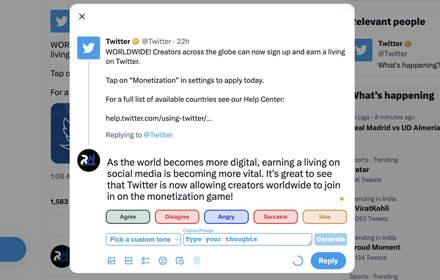
Reinvent Your Twitter Game: Go Beyond Posting and Start Engaging by Replying More and Posting Less with Reacti.ai
217
★ 5.0

ChatGPT Assistant For Reddit™
This is an Open-AI ChatGPT powerful tool to give you the AI magic on Reddit™ for marketing promotion.
3.0K
★ 4.2

Elite ChatGPT Maximizer-Boost Your Efficiency
Empower ChatGPT with Elite ChatGPT Maximizer to enhance its value, elevate personal efficiency, and professional expertise.
45
★ 5.0

ChatGPT to Help
Get Instant Help Anywhere and Anytime with ChatGPT AI Assistant on Chrome
506
★ 4.6
Data sourced from the Chrome Web Store · last verified May 27, 2026.