
Character Counter
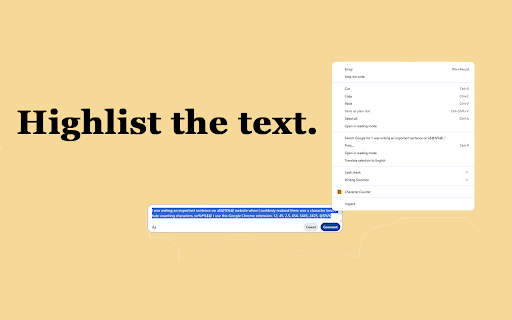
Highlight text, right-click, and get detailed statistics about the selection.
As of June 2026, Character Counter has — users in the Productivity category.
Usersno change0%
—
—
Ratingno change0%
—
— reviews
Reviewsno change0%
—
Version
1.0
Manifest V3
History
1 snapshotsTracking since Jun 11, 2026.
Not enough history yet for this metric — the chart fills in as we collect more snapshots.
View as table
| Date | Users | Rating | Reviews | Version |
|---|---|---|---|---|
| Jun 11, 2026 | — | — | — | 1.0 |
| Now | — | — | — | 1.0 |
Permissions & access
- Permissions
- contextMenusstoragescriptingactiveTabnotifications
- Host access
- None declared
Screenshots



About
Character Counter - Quick and Detailed Text Statistics

Get instant, detailed statistics about any text on a webpage! Are you fed up with manually counting words or characters when filling out limited text boxes? Character Counter is a lightweight, easy-to-use tool that lets you highlight text, right-click, and instantly view a comprehensive breakdown of your selection.

Features:

Multiple Display Modes: Choose exactly what you want to see—Characters, Words, Alphabets, Symbols, or Numbers.

Global Language Support: Flawlessly detects characters and accurately counts words across a massive list of languages worldwide, seamlessly handling both complex scripts and languages that do not use spaces.

Detailed Number Analysis: Extract digits, count integers, and instantly calculate the sum, average, highest, and lowest numbers in your selection.

Right-Click Integration: No need to open clunky menus. Just highlight, right-click, and select "Character Counter".

Draggable Results Box: The statistics appear in a clean, draggable pop-up directly on your screen so it never gets in the way of your reading.

Privacy First: All calculations are done locally on your device. No text or personal data is ever sent to external servers.

Whether you are a developer checking string lengths, a student tracking word counts, a data analyst summing up highlighted numbers, or just someone tired of guessing if they've hit a strict text limit, Character Counter is the perfect tool for the job!
Technical
- Version
- 1.0
- Manifest
- V3
- Size
- 13.99KiB
- Min Chrome
- 88
- Languages
- 1
- Featured
- No
Metadata
- ID
- onjnhjmihdcoclpmjbfgnlcdmcjbfpmp
- Developer ID
- u4c7b301909c16f2efd8154ec82c9ba92
- Developer Email
- [email protected]
- Created
- Jun 10, 2026
- Last Updated (Store)
- Jun 10, 2026
- Last Scraped
- Jun 11, 2026
- Website
- https://www.jaybro.net/
- Privacy Policy
- https://www.jaybro.net/CharacterCounter.policy/
Data sourced from the Chrome Web Store · last verified Jun 11, 2026.