
ColorCraft — Color picker and Eyedropper
A comprehensive color picker and eyedropper tool for designers and developers
As of May 2026, ColorCraft — Color picker and Eyedropper has 6 users in the Developer Tools category.
Usersdown 25.0 percent−25.0%
6
6
Ratingno change0%
—
— reviews
Reviewsno change0%
—
Version
1.0.0
Manifest V3
History
4 snapshotsTracking since Apr 20, 2026.
View as table
| Date | Users | Rating | Reviews | Version |
|---|---|---|---|---|
| Apr 20, 2026 | 8 | — | — | 1.0.0 |
| May 6, 2026 | 12 | — | — | 1.0.0 |
| May 17, 2026 | 10 | — | — | 1.0.0 |
| May 30, 2026 | 7 | — | — | 1.0.0 |
| Now | 6 | — | — | 1.0.0 |
Permissions & access
- Permissions
- activeTabscriptingstorageclipboardWrite
- Host access
- None declared
Screenshots


About
ColorCraft is a powerful, privacy-focused color picker and eyedropper extension designed for web designers and developers.

🎯 KEY FEATURES:
• Advanced Eyedropper - Click and drag to sample any pixel with magnified view
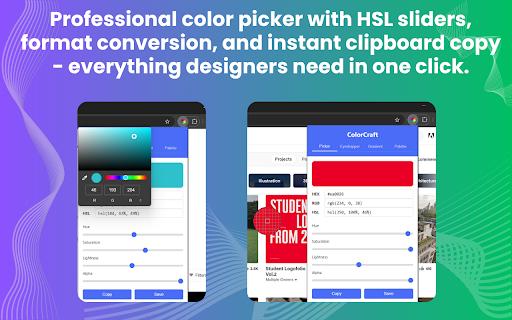
• Color Picker - HSL/HSV sliders with real-time preview
• Gradient Generator - Create linear and radial gradients with CSS output
• Color Palette Manager - Save, organize, and export color collections
• Page Color Analysis - Extract colors from any webpage
• Multiple Formats - HEX, RGB, HSL support with instant conversion

Usage:

A. Eyedropper Tool:
1. Click the ColorCraft icon in your browser toolbar
2. Select the "Eyedropper" tab
3. Click the "Activate Eyedropper" button
4. Move your cursor over the page to see a magnified view
5. Click to select a color

B. Color Picker:
1. Click the ColorCraft icon in your browser toolbar
2. Use the HSL sliders to adjust the color
3. Copy the color in your preferred format (HEX, RGB, HSL)

C. Gradient Generator:
1. Click the ColorCraft icon in your browser toolbar
2. Select the "Gradient" tab
3. Add color stops and adjust their positions
4. Choose between linear and radial gradients
5. Copy the generated CSS code

D. Color Palette:
1. Click the ColorCraft icon in your browser toolbar
2. Select the "Palette" tab
3. View your recently picked colors
4. Click "Analyze Page" to extract colors from the current page
5. Export your palette as JSON or CSS variables

🔒 PRIVACY-FIRST:
• Minimal permissions for maximum security
• No data collection or tracking

🎨 PERFECT FOR:
• Web designers and developers
• UI/UX professionals
• Digital artists
• Anyone working with colors

✨ FEATURES:
• Auto-copy functionality
• Color history
• Export palettes as JSON or CSS variables
• Responsive, accessible interface
• Native eyedropper API
Technical
- Version
- 1.0.0
- Manifest
- V3
- Size
- 34.36KiB
- Min Chrome
- 88
- Languages
- 1
- Featured
- No
Metadata
- ID
- onhbgalolfbpkmmgphcikecjmpfgpgah
- Developer ID
- uf0d72fef8e96fceea1ff564527d4cb64
- Developer Email
- [email protected]
- Created
- Jun 12, 2025
- Last Updated (Store)
- Jun 12, 2025
- Last Scraped
- May 30, 2026
- Website
- latestonlinetools.com
- Support URL
- https://latestonlinetools.com/contact
Similar extensions
Alternatives to ColorCraft — Color picker and Eyedropper, ranked by description similarity.

Color Craft
Make choosing colors on Chrome easy and fun!
8
★ 5.0

Color Picker Pro
A sleek color picker with history - pick colors from anywhere on your screen
1

Color Picker
Simple color picker - click to pick any color from the page and copy it
8

ColorCraft
ColorCraft is a must-have extension for every developer's toolkit. It's the ultimate time-saver in your web design process. With…
85
★ 5.0

Eye Dropper Pro - Color Picker & Palette Tool
Pick any color from any webpage. Get HEX, RGB, HSL codes instantly. Save color history. Free for designers and developers.
3

What the Color?
An advanced, movable color picker to select, modify, and copy colors from any webpage.
6

Color Picker
A color picker tool that allows you to pick and save colors from any webpage
4

Color Picker Pro - Eyedropper, Palette Generator, Gradient & CSS Colors
Pick colors from any webpage, build palettes, and copy color values instantly for web design.
6
★ 5.0
Data sourced from the Chrome Web Store · last verified May 30, 2026.