
JSON Formatter
Instantly transform raw JSON into a beautifully structured and color-coded format.
As of June 2026, JSON Formatter has 10,000 users and a 4.00/5 rating from 8 reviews in the Developer Tools category.
Usersno change0%
10.0K
10,000
Ratingno change0%
4.00
8 reviews
Reviewsno change0%
8
Version
0.032
Manifest V3
History
2 snapshotsTracking since May 6, 2026.
View as table
| Date | Users | Rating | Reviews | Version |
|---|---|---|---|---|
| May 6, 2026 | 10.0K | 4.00 | 8 | 0.032 |
| May 13, 2026 | 10.0K | 4.43 | 7 | 0.032 |
| Now | 10.0K | 4.00 | 8 | 0.032 |
Permissions & access
- Permissions
- activeTab
- Host access
- None declared
Screenshots


About
Improve Your JSON Viewing Experience with JSON Formatter!

When you encounter raw JSON data, it's often just an overwhelming wall of text. Navigating this maze can be tedious and error-prone. But with the enhanced JSON Formatter, you can now visualize, understand, and interact with JSON in ways you never imagined.

Why Choose JSON Formatter?

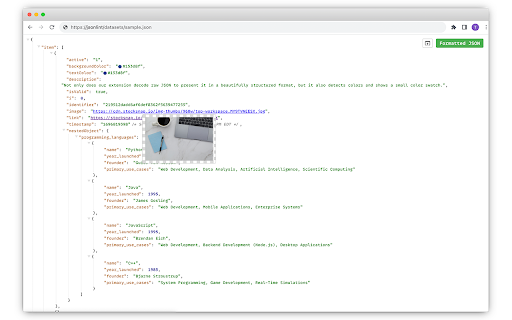
🌟 Intuitive Visualization: Not only does our extension decode raw JSON to present it in a beautifully structured format, but it also detects colors and shows a small color swatch. With clear indentations, color-coded elements, and organized blocks, you can discern different components at a glance.

🖼️ Image Previews: Whenever images are detected within your JSON data, JSON Formatter will provide a handy preview, making your data more interactive and easier to understand.

🔍 Effortless Navigation: Dive deep into nested structures with our collapsible trees and indent guides. And with the added feature of human-readable timestamps, understanding your data's timeline becomes a breeze.

🔗 Clickable URLs: Found a link within your JSON? It's now instantly clickable! No more copy-pasting. This streamlines your workflow and saves you time.

⏳ Human-Readable Timestamps: No more puzzling over cryptic timestamps. Our extension now converts them into a format that's easy to understand.

🔄 Toggle with Ease: Whether you need the original data or the formatted version, effortlessly switch between raw and parsed views with a simple click.

📤 Export to jsonlint.com: Want to edit your JSON? Easily export it to jsonlint.com and make your modifications there.

🛡️ Safe and Respectful: We prioritize your privacy. Our extension operates client-side, ensuring your data never leaves your browser. No tracking, no data collection, just pure JSON magic.

Speed Up Your Development Workflow

For developers, every second counts. Why squint at unformatted JSON when you can view, interact, and even edit it seamlessly? With JSON Formatter, you're not just reading data; you're experiencing it. Whether you're debugging, analyzing, or just curious, our tool is designed to speed up your workflow.

Install JSON Formatter today and transform chaos into clarity!
Technical
- Version
- 0.032
- Manifest
- V3
- Size
- 194KiB
- Min Chrome
- 88
- Languages
- 1
- Featured
- No
Metadata
- ID
- ondecobpcidaehknoegeapmclapnkgcl
- Developer ID
- u7cb9c4ea1d6cee9ff692873397376b8f
- Developer Email
- [email protected]
- Created
- Sep 25, 2023
- Last Updated (Store)
- Jan 7, 2026
- Last Scraped
- Jun 9, 2026
- Website
- jsonlint.com
- Support URL
- https://github.com/circlecell/jsonformatter
- Privacy Policy
- —
Similar extensions
Alternatives to JSON Formatter, ranked by description similarity.

JSON Formatter - Simple & Clean
Automatically formats JSON responses in the browser with themes, collapsible nodes, and other helpful features.
7
★ 5.0

JSON Formatter Extension
Format and beautify JSON data similar to jsonformatter.org
51

JSON Formatter by Code Architecture
Dark theme JSON formatter with Tree and Table views. Automatically formats JSON with syntax highlighting and navigation.
6
★ 5.0

JSON Formatter & Viewer for Chrome
JSON Formatter & Beautifier for Chrome.
222

JSON Formatter and Viewer
Instantly transform raw JSON into a beautifully structured and color-coded format.
307
★ 4.0

JSON Viewer & Beautifier, Formatter - Lumina JSON
JSON viewer & formatter to view JSON easily. JSON beautifier, JSON editor & JSON prettier for JSON (JavaScript Object Notation).
1

JSON Formatter Everywhere
Automatically formats JSON responses in any tab, not just raw JSON pages.
3

Better JSON Formatter
A powerful JSON formatter with advanced features including validation, tree view, search, and dark mode
16
★ 5.0
Data sourced from the Chrome Web Store · last verified Jun 9, 2026.