
ScreenCapture Pro
Advanced screenshot tool with annotations, full page capture, and area selection.
As of June 2026, ScreenCapture Pro has 17 users and a 5.00/5 rating from 6 reviews in the Productivity category.
Usersup 1600.0 percent+1600.0%
17
17
Ratingno change0%
5.00
6 reviews
Reviewsno change0%
6
Version
1.0.2
Manifest V3
90-day change · In the last 90 days this extension 1 version update, changed permissions.
History
9 snapshotsTracking since Apr 1, 2026.
View as table
| Date | Users | Rating | Reviews | Version |
|---|---|---|---|---|
| Apr 1, 2026 | 1 | — | — | 1.0.1 |
| Apr 17, 2026 | 1 | — | — | 1.0.1 |
| Apr 24, 2026 | 5 | 5.00 | 1 | 1.0.2 |
| May 1, 2026 | 11 | 5.00 | 6 | 1.0.2 |
| May 8, 2026 | 14 | 5.00 | 6 | 1.0.2 |
| May 13, 2026 | 10 | 5.00 | 6 | 1.0.2 |
| May 18, 2026 | 12 | 5.00 | 6 | 1.0.2 |
| Jun 1, 2026 | 11 | 5.00 | 6 | 1.0.2 |
| Jun 7, 2026 | 15 | 5.00 | 6 | 1.0.2 |
| Now | 17 | 5.00 | 6 | 1.0.2 |
Changelog
- Apr 17, 2026description
Advanced screenshot and screen recording tool with annotations and export options
A free and privacy-friendly screen-capturing Chrome extension for everyone. Capture a full page, edit, and add comments with no sign-in needed.

ScreenCapture Pro is a powerful, privacy-friendly screen-capturing extension to help you take high-quality screenshots for work, education, or any other task, so you can also add comments, highlight important parts, or show arrows to point at a particular line.

Now, instead of taking multiple screenshots, you can simply take a screenshot of the whole page.
Add comments on it or point an arrow to any information to highlight it.
You can capture the screen in very good quality, so it does not get blurry while you share it.
Download the screenshot in multiple formats, such as PDF, JPG, and PNG
- Apr 17, 2026category
lifestyle/social
productivity/tools
- Apr 17, 2026permissions
activeTab, storage, scripting, contextMenus, downloads, notifications, clipboardWrite
activeTab, storage, scripting, contextMenus, downloads, clipboardWrite
Permissions & access
- Permissions
- activeTabstoragescriptingcontextMenusdownloadsclipboardWrite
- Host access
- None declared
Screenshots
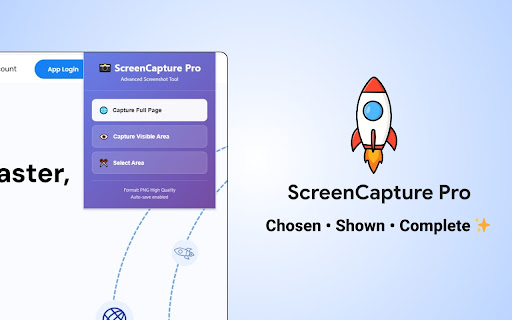


About
A free and privacy-friendly screen-capturing Chrome extension for everyone. Capture a full page, edit, and add comments with no sign-in needed.

ScreenCapture Pro is a powerful, privacy-friendly screen-capturing extension to help you take high-quality screenshots for work, education, or any other task, so you can also add comments, highlight important parts, or show arrows to point at a particular line.

Now, instead of taking multiple screenshots, you can simply take a screenshot of the whole page.
Add comments on it or point an arrow to any information to highlight it.
You can capture the screen in very good quality, so it does not get blurry while you share it.
Download the screenshot in multiple formats, such as PDF, JPG, and PNG
Technical
- Version
- 1.0.2
- Manifest
- V3
- Size
- 39.66KiB
- Min Chrome
- 88
- Languages
- 1
- Featured
- No
Metadata
- ID
- ompbhmhcmmhodbnhfokmjeboklonekhp
- Developer ID
- u250eeebc789d44c6a38f585f399a6f4e
- Developer Email
- [email protected]
- Created
- Mar 24, 2026
- Last Updated (Store)
- Apr 9, 2026
- Last Scraped
- Jun 7, 2026
- Website
- —
- Support URL
- —
- Privacy Policy
- https://littlesoftlab.com/privacy-policy
Data sourced from the Chrome Web Store · last verified Jun 7, 2026.