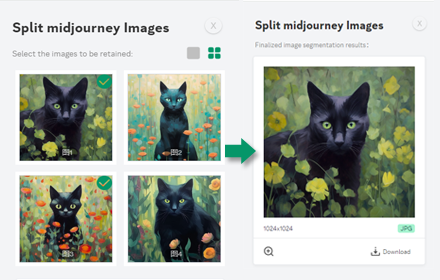
Split midjourney Images
Right-click on any image within a webpage and effortlessly batch cut MidJourney's grid image (like a 4-by-4) into single images
As of May 2026, Split midjourney Images has 1,000 users and a 4.64/5 rating from 14 reviews in the Productivity category.
Usersno change0%
1.0K
1,000
Ratingno change0%
4.64
14 reviews
Reviewsno change0%
14
Version
1.2
Manifest V3
History
1 snapshotsTracking since Apr 30, 2026.
View as table
| Date | Users | Rating | Reviews | Version |
|---|---|---|---|---|
| Apr 30, 2026 | 1.0K | 4.64 | 14 | 1.2 |
| Now | 1.0K | 4.64 | 14 | 1.2 |
Permissions & access
- Permissions
- contextMenusscripting
- Host access
- https://*/*
Screenshots
About
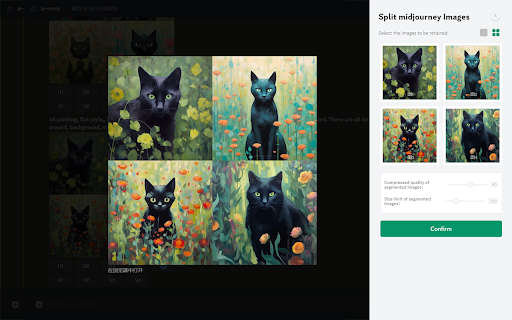
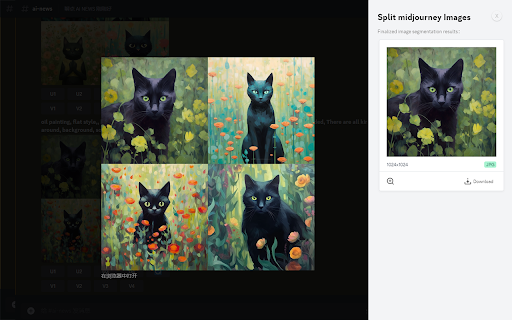
Split a grid of images, such as a 4-by-4 grid generated by diffusion models like Midjourney or Stable Diffusion, into individual images effortlessly. Use the "Split midjourney Images" tool to easily split your Midjourney Grid into separate images with just one click. Download and save them directly to your computer hassle-free.

Features:

Right-click on any image within a webpage and effortlessly batch cut MidJourney's grid image.

Allow users to select the images they want to keep, allow users to set the size of the cropped images, and the image quality.

Note: Split midjourney Imagesis not affiliated with Midjourney.

Why develop this plugin:

By default, Midjourney generates images in a 4-grid format. However, if users wish to have them split into 4 individual images, they would typically need to manually perform the task or generate each image separately, which can be time-consuming and inconvenient for those seeking a quick image generation solution. To address this, we have developed the Image Cutter plugin. With a simple right-click on the image, users can access the 'Midjourney Image Cutter' option from the menu. This powerful tool automatically splits the 4-grid image into 4 distinct and high-quality individual images, eliminating any blurriness or loss of detail. This streamlined process allows users to effortlessly download and view each image separately, saving valuable time and ensuring a seamless user experience.
Technical
- Version
- 1.2
- Manifest
- V3
- Size
- 57.49KiB
- Min Chrome
- 88
- Languages
- 1
- Featured
- Yes
Metadata
- ID
- omkdkhiolmoenpgjfemapeeiamfhnbkc
- Developer ID
- u7f983affb53c4ccfdc3bcedbf7559ad1
- Developer Email
- [email protected]
- Created
- Jun 25, 2023
- Last Updated (Store)
- Feb 7, 2024
- Last Scraped
- May 27, 2026
- Website
- —
- Support URL
- —
- Privacy Policy
- https://www.kandouyin.com/privacy.html
Similar extensions
Alternatives to Split midjourney Images, ranked by description similarity.

Image Splitter
Plugin Introduction
Image Splitter is a Chrome plugin designed specifically for handling grid images (like 4x4) generated by…
399
★ 4.7

Midjourney Image Splitter / Photo cutting
Allows you to easily divide images generated by Midjourney, as well as split photo lists arranged in rows and columns.
133
★ 5.0

瓜皮图片分割
可将上传的图片分割成4个部分并下载.瓜皮AI绘画网站:http://hh.gphh.cc
30

Image Splitter
Image Splitter: Effortlessly Split Images into Multiple Parts.
8

GridSnap - Photo Collage Maker
Create stunning photo collages with a minimalist grid-based layout engine. Collect images from any webpage and export in HD.
32

Image Grid Creator
Extract images from webpage and create customizable grid layouts
20

Mosaic Image Wall Tool
A tool to build a mosaic photo wall
8

CollageMaker - Free Online Collage Maker Tool
A powerful free online collage tool supporting various grid layouts and custom long image stitching.
27
Data sourced from the Chrome Web Store · last verified May 27, 2026.