
sitelen pona for Google Workspace
This extension lets you use custom fonts installed on your computer or sitelen pona fonts installed on your computer in Google…
As of May 2026, sitelen pona for Google Workspace has 243 users and a 3.67/5 rating from 6 reviews in the Productivity category.
Usersup 1.3 percent+1.3%
243
243
Ratingno change0%
3.67
6 reviews
Reviewsno change0%
6
Version
0.0.5
Manifest V3
History
3 snapshotsTracking since Apr 1, 2026.
View as table
| Date | Users | Rating | Reviews | Version |
|---|---|---|---|---|
| Apr 1, 2026 | 240 | 3.67 | 6 | 0.0.5 |
| Apr 30, 2026 | 238 | 3.67 | 6 | 0.0.5 |
| May 27, 2026 | 242 | 3.67 | 6 | 0.0.5 |
| Now | 243 | 3.67 | 6 | 0.0.5 |
Permissions & access
- Permissions
- None declared
- Host access
- None declared
Screenshots

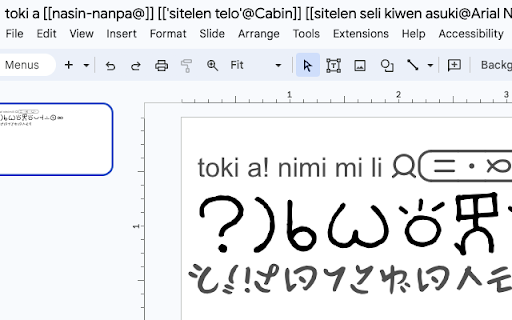

About
This extension lets you use custom fonts installed on your computer or sitelen pona fonts installed on your computer in Google Docs, Slides, or Sheets.

If you know sitelen pona, skip to "Overview (for tokiponists)".

## Overview

This extension lets you use fonts that are installed locally on your computer to
be used in Google Docs, Slides, and Sheets. Here's how:

If you put `[[Your Font Name@Arial Narrow]]` in your document title, you can
select "Arial Narrow" from the font dropdown, and text you type with it will be
rendered using Your Font Name.

If you put `[[Your Font Name>Cabin]]` in your document title, you can select
"Cabin" from the font dropdown and it'll show up as Your Font Name if you type a
character that's not in Cabin.

If you put `[[Your Font Name@]]` in your document title, any characters you type
that Your Font Name provides but which Google's fonts don't provide will be
rendered with Your Font Name.

You can mix, match, and style all text exactly as normal.

## Overview (for tokiponists)

You can now type with sitelen pona UCSUR characters.

If you put `[[nasin-nanpa@Arial Narrow]]` in your document title, you can select
"Arial Narrow" from the font dropdown, and text you type with it will be
rendered using nasin nanpa.

If you put `[[sitelen seli kiwen juniko>Cabin|]]` in your document title, you
can select "Cabin" from the font dropdown and UCSUR characters will show up as
sitelen seli kiwen, but everything else will be rendered with Cabin.

If you put `[[linja lipamanka@]]` in your document title, any UCSUR characters
you type will be rendered with linja lipamanka (unless they're overridden by
another config item). If you don't do this, nasin nanpa will be the default.

You can mix, match, and style all text exactly as normal.

## Extra Customization

To customize, add tags to your document title as explained below. Fonts are
added on a per-document basis, not a per-user basis, because it's important that
the document looks as similar as possible to people on different computers.

There are three kinds of tags:

- `[[local@docs]]` means that whenever you select the `docs` font from Google,
  it will be rendered instead with `local`. Whitespace characters are removed
  from the text.
- `[[local>docs]]` means that whenever you select the `docs` font from Google,
  its characters will be rendered with `local` UNLESS they are in `docs`.
  Whitespace characters are removed from the text.
- `[[local@]]` means that `local` will be the fallback font for any characters
  that are not present in other fonts. It can be written as `[[local>]]` with no
  change in effect.

The difference between `@` and `>` is that text using `@` will NOT use the
default font. For example, if I select "Cabin" from the Google Fonts dropdown
menu and I have the `[[nasin-nanpa@Cabin]]` tag in my document title, the Cabin
font will NEVER be used to render that text, with nasin-nanpa being the primary
font. However, if I use the `[[nasin-nanpa>Cabin]]` tag (with a `>` instead of
`@`), nasin-nanpa will become the fallback font (e.g. for UCSUR characters) with
Cabin being the primary font.

## Whitespace Quirks

Some fonts, such as `nasin-nanpa`, give odd whitespace results when written with
the English alphabet in Google Slides. To combat this, whitespace is trimmed
automatically when text is rendered with a custom font. To disable this, add a
vertical bar `|` inside the tag. For example, `[[nasin-nanpa@Cabin|]]` has a
vertical bar `|` at the end, and will not have whitespace trimmed.

The `|` character is especially useful with `>` style tags, because it means
that they look much better when mixed with English letters.

## An Example Config

The title "my document [[sitelen seli kiwen juniko@]] [[sitelen telo@Cabin]]
[[nasin-nanpa>Arial Narrow]]" means that:

1. If the Cabin font is selected in Google Docs, its characters will be rendered
   with "sitelen telo".
2. If the Arial Narrow font is selected in Google Docs, it will fallback to
   "nasin-nanpa".
3. Otherwise, "sitelen seli kiwen juniko" is used to render UCSUR characters.

This configuration means that I can type "mi wile pana e sona pi sitelen pona
tawa sina" in Cabin, and it'll show up as sitelen telo on my computer and
sitelen pona on other people's computers. But if I type using UCSUR characters,
they won't show up in non-Cabin text to anybody without this extension.
Technical
- Version
- 0.0.5
- Manifest
- V3
- Size
- 7.03KiB
- Min Chrome
- 88
- Languages
- 1
- Featured
- No
Metadata
- ID
- omjmjnmbcmilkcjadbihddaipogifnbb
- Developer ID
- u1771a377c50b474e236e3e5acf0cefba
- Developer Email
- [email protected]
- Created
- Mar 2, 2024
- Last Updated (Store)
- Mar 8, 2024
- Last Scraped
- May 27, 2026
- Website
- —
- Support URL
- —
- Privacy Policy
- —
Similar extensions
Alternatives to sitelen pona for Google Workspace, ranked by description similarity.

NotoSansへ置換するやつ(改修型)
読みづらいフォントをNoto Sans JP / UDEV Gothic JPDOCに自動置換。パフォーマンス改善版。
71

Sinhala Unicode Converter Extension
Browser extension to convert English literals to Sinhala Unicode in any input field
89
★ 5.0

Preferred Font
Change the font on webpage to improve readability
3
やっぱり Noto Sans
ウェブページ上の読みづらいフォントを、読みやすい Noto Sans に置き換えます。
4.0K
★ 4.7

Magic Userscript+
The power of Greasy Fork on the go!
5.0K
★ 3.0

Font Changer
Change font size, style, and spacing on any website! Improve readability and customize text to your preference.
149

Smart Font Changer
Smart font changing with preserved layout, custom fonts and safe exclusions.
26

UniGlyphs
UniGlyphs lets you style text on any website using a dynamic toolbar.
18
★ 5.0
Data sourced from the Chrome Web Store · last verified May 27, 2026.