
스팸 신고 | Spam Reporter
보안팀에 스팸/피싱 메일을 간편하게 신고합니다 | Report spam & phishing emails to your security team
As of June 2026, 스팸 신고 | Spam Reporter has — users in the Developer Tools category.
Usersno change0%
—
—
Ratingno change0%
—
— reviews
Reviewsno change0%
—
Version
1.0.0
Manifest V3
History
1 snapshotsTracking since Jun 21, 2026.
Not enough history yet for this metric — the chart fills in as we collect more snapshots.
View as table
| Date | Users | Rating | Reviews | Version |
|---|---|---|---|---|
| Jun 21, 2026 | — | — | — | 1.0.0 |
| Now | — | — | — | 1.0.0 |
Permissions & access
- Permissions
- storage
- Host access
- https://mail.google.com/*
Screenshots


About
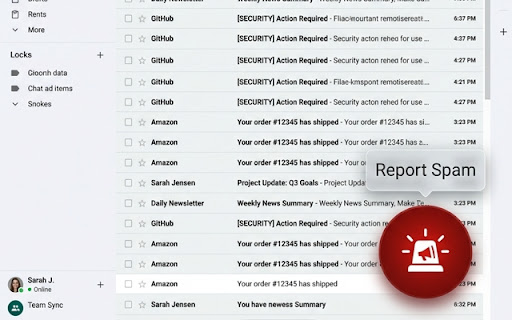
Report spam and phishing emails to your security team with a single click inside Gmail.

🚨 The Easiest Way to Report Spam & Phishing Emails to Your Security Team

Did you receive a suspicious email in Gmail?
No more manual copy-pasting or complex forwarding steps. 'Spam Reporter' is a lightweight extension that allows employees to securely report suspicious emails to their internal security operations center (SOC) with just one click.

✨ Key Features:
1. One-Click Report Button (FAB): A floating action button appears inside Gmail for instant reporting.
2. Auto-Forwarding with Original Content: Leverages Gmail's native forward features to pass raw sender details, subjects, and full HTML body/headers to security personnel.
3. Contextual Reporting reasons: Choose from predefined reasons (Subject line, Body text, Clicked links, or Opened attachments) to help security teams triage issues faster.
4. List-view Reporting: Safely report emails from the inbox list using checkboxes without having to open the message body.
5. Multi-language UI: Automatically detects and adapts to Korean, English, Japanese, and Chinese UI environments.

⚙️ Getting Started:
1. Click the 🚨 icon in the Chrome toolbar after installation.
2. Enter your organization's security reporting email (e.g., [email protected]) and click 'Save'.
3. Refresh your Gmail page to begin.


==============================================================================

Gmail에서 스팸/피싱 의심 메일을 발견했을 때, 클릭 한 번으로 보안팀에 원본 메일을 안전하게 신고하는 도구입니다.

[ 세부 내용]

🚨 사내 보안 강화를 위한 간편 스팸/피싱 메일 신고 도구

Gmail 웹 환경에서 피싱이나 스팸으로 의심되는 이메일을 발견하셨나요?
이제 복잡하게 메일을 복사하거나 직접 전달할 필요가 없습니다. '스팸 신고 (Spam Reporter)' 확장 프로그램을 사용하면 단 한 번의 클릭만으로 원본 메일 정보가 포함된 신고 접수 창을 생성하여 사내 보안팀에 즉시 전달할 수 있습니다.

✨ 주요 기능:
1. 원클릭 신고 버튼 (FAB): Gmail 본문 화면 우측 하단에 항상 대기하는 전용 빨간 버튼을 통해 지체 없이 모달창을 열 수 있습니다.
2. 원본 메일 자동 인용: Gmail의 공식 전달(Forward) 기능을 연동하여 발신인, 제목은 물론 메일 본문과 원본 헤더 정보를 누락 없이 보안팀에 안전하게 전달합니다.
3. 유형별 신고 지원: 단순 제목 불량, 본문 의심, 본문 내 링크 클릭, 첨부파일 실행 등 신고 사유를 명확히 분류하여 보안팀의 신속한 초기 분석을 돕습니다.
4. 목록 다중 신고: 메일을 직접 열어보지 않고도 목록의 체크박스를 선택하여 안전하게 제목과 발신인 정보만을 요약 신고할 수 있습니다.
5. 다국어 지원: 한국어(KO), 영어(EN), 일본어(JA), 중국어(ZH)를 자동 감지 및 지원하여 글로벌 오피스 환경에서도 표준화된 스팸 신고 템플릿을 운영할 수 있습니다.

⚙️ 최초 설정 방법:
1. 설치 후 확장 프로그램 목록에서 🚨 아이콘을 클릭합니다.
2. 보안팀으로부터 안내받은 수신 이메일 주소(예: [email protected])를 입력하고 '저장'을 누릅니다.
3. Gmail 탭을 새로고침하면 준비가 완료됩니다.
Technical
- Version
- 1.0.0
- Manifest
- V3
- Size
- 22.47KiB
- Min Chrome
- 88
- Languages
- 1
- Featured
- No
Metadata
- ID
- omifbnglbngidpoceemfefomkghcdpjf
- Developer ID
- u9f6e04117b6c7a71f9fc4cbf6fdadacd
- Developer Email
- [email protected]
- Created
- Jun 20, 2026
- Last Updated (Store)
- Jun 20, 2026
- Last Scraped
- Jun 21, 2026
- Website
- —
- Support URL
- —
Data sourced from the Chrome Web Store · last verified Jun 21, 2026.