
InboxSweep
Privacy-first Gmail cleanup wizard — scan, archive, trash, and create safe rules locally.
As of June 2026, InboxSweep has — users in the Communication category.
Usersno change0%
—
—
Ratingno change0%
—
— reviews
Reviewsno change0%
—
Version
0.1.0
Manifest V3
History
1 snapshotsTracking since Jun 17, 2026.
Not enough history yet for this metric — the chart fills in as we collect more snapshots.
View as table
| Date | Users | Rating | Reviews | Version |
|---|---|---|---|---|
| Jun 17, 2026 | — | — | — | 0.1.0 |
| Now | — | — | — | 0.1.0 |
Permissions & access
- Permissions
- identitystoragetabs
- Host access
- https://www.googleapis.com/*, https://mail.google.com/*
Screenshots


About
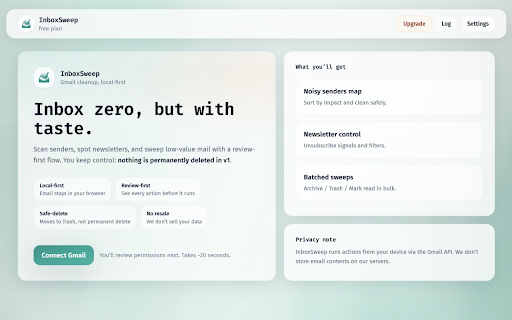
InboxSweep helps you reclaim your Gmail inbox without fear.

WHAT IT DOES

• Scans Gmail metadata locally to find noisy senders
• Groups newsletters, promotions, and old notifications
• Suggests safe cleanup actions with a clarity score
• Bulk archive, move to Trash (not permanent delete), mark as read
• Create Gmail filters to block future clutter
• Protect important senders and domains
• Dry-run preview before every bulk action — nothing runs until you confirm

PRIVACY

• Runs entirely in your browser
• No email content sent to InboxSweep servers
• No ads, no data resale, no AI reading your inbox
• Scan results and settings stay in chrome.storage.local on your device

HOW IT WORKS

1. Connect Gmail via Google OAuth (we explain every permission first)
2. Pick a cleanup goal (newsletters, storage, promos, etc.)
3. Review sender groups and safety scores
4. Preview exactly what will change in a dry-run
5. Confirm to archive, trash, mark read, or create filters

PRICING

Free to install with generous limits. Optional one-time upgrades (Personal $19 · Pro $39) via Lemon Squeezy license key — payments happen on Lemon Squeezy’s hosted checkout, not inside Gmail.

PERMISSIONS EXPLAINED

• Gmail access — scan sender metadata and apply cleanup actions you confirm
• Storage — save settings, protected senders, scan cache, and action logs locally
• Tabs — open unsubscribe links in a new tab when you choose

IMPORTANT

InboxSweep moves mail to Trash; it does not permanently delete messages. You can recover trashed mail in Gmail. Starred, important, and recent mail are protected by default.

Support: see the support URL on this listing.
Privacy: see the privacy policy URL on this listing.
Technical
- Version
- 0.1.0
- Manifest
- V3
- Size
- 340KiB
- Min Chrome
- 88
- Languages
- 1
- Featured
- No
Metadata
- ID
- omiamcmabnpgaciogpfhafaadicjblao
- Developer ID
- ued592cfca021fe846c8858acacb92e1a
- Developer Email
- [email protected]
- Created
- Jun 16, 2026
- Last Updated (Store)
- Jun 16, 2026
- Last Scraped
- Jun 17, 2026
- Website
- lusoft.dev
- Support URL
- https://www.lusoft.dev/en/inboxsweep
- Privacy Policy
- https://www.lusoft.dev/en/inboxsweep/privacy
Data sourced from the Chrome Web Store · last verified Jun 17, 2026.